







Question: Create a basic Database Subject-Advanced web development Software visual studio Language c# Start with a Console Application for simplicity.Use the Schema attached to create all
Create a basic Database
Subject-Advanced web development
Software visual studio
Language c#
Start with a Console Application for simplicity.Use the Schema attached to create all of the objects. Ensure that there are at least ten (10) constraints or attributes added to the set of models.
Create a Context Object that can be used to add data to the database
Use the Main Loop to five (5) Products, five (5) Customers, five (5) Employees and five (5) Orders. Also, ensure that there are at least two (2) records in the remaining tables.
Ensure that at least one (1) Migration exists.
Ensure that there are no errors in the migration when the database is updated.
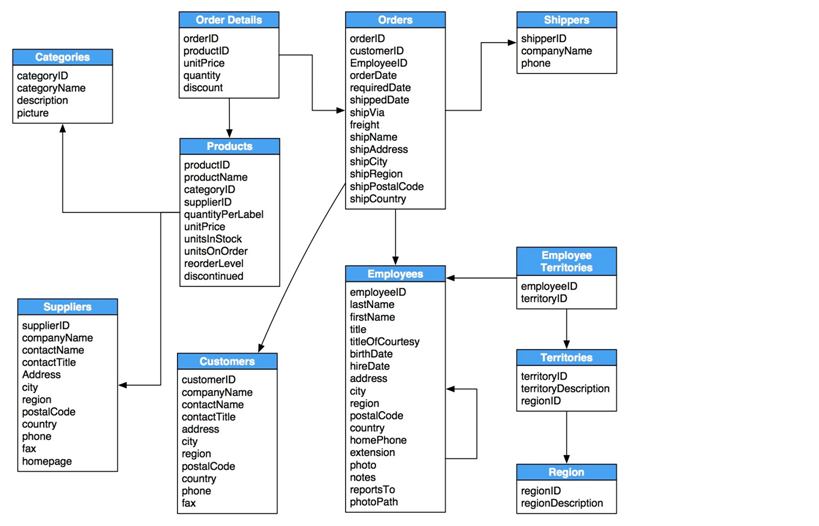
Order Details orderlD productID unitPrice quantity discount Shippers shipperID company Name phone Categories categoryID categoryName description picture Orders orderID customerID Employeeld order Date requiredDate shipped Date shipVia freight shipName shipAddress shipCity shipRegion shipPostalCode shipCountry Products productID productName categoryID supplierID quantityPerLabel unitPrice unitsInStock unitsOnOrder reorderLevel discontinued Employee Territories employeeld territoryID Suppliers supplier D company Name contactName contact Title Address city region postalCode country phone fax homepage Employees employeeld lastName firstName title titleOfCourtesy birthDate hire Date address city region postalCode country home Phone extension photo notes reports To photoPath Customers customerID company Name contactName contact Title address city region postalCode country phone fax Territories territoryID territoryDescription regioni Region regionID region Description Order Details orderlD productID unitPrice quantity discount Shippers shipperID company Name phone Categories categoryID categoryName description picture Orders orderID customerID Employeeld order Date requiredDate shipped Date shipVia freight shipName shipAddress shipCity shipRegion shipPostalCode shipCountry Products productID productName categoryID supplierID quantityPerLabel unitPrice unitsInStock unitsOnOrder reorderLevel discontinued Employee Territories employeeld territoryID Suppliers supplier D company Name contactName contact Title Address city region postalCode country phone fax homepage Employees employeeld lastName firstName title titleOfCourtesy birthDate hire Date address city region postalCode country home Phone extension photo notes reports To photoPath Customers customerID company Name contactName contact Title address city region postalCode country phone fax Territories territoryID territoryDescription regioni Region regionID region Description
Step by Step Solution
There are 3 Steps involved in it

Get step-by-step solutions from verified subject matter experts
 Study Help