







Question: Create a border Write a function called GenMatBorder that takes an array of numbers and produces an array called Out Mat, which replaces the top
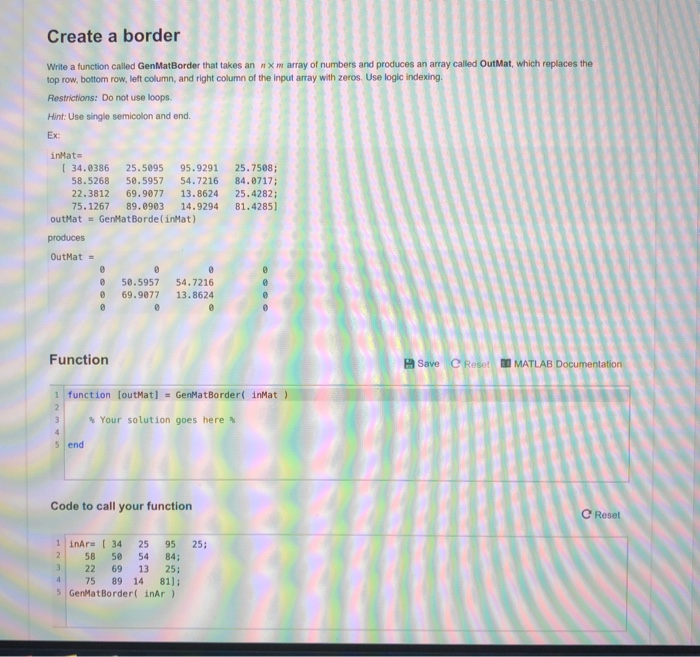
Create a border Write a function called GenMatBorder that takes an array of numbers and produces an array called Out Mat, which replaces the top row, bottom row, left column, and right column of the input array with zeros. Use logic indexing. Restrictions: Do not use loops. Hint: Use single semicolon and end. Ex: inMats [ 34.0386 25.5095 95.9291 25.7508; 58.5268 50.5957 54.7216 84.0717; 22.3812 69.9077 13.8624 25.4282; 75. 1267 89.0903 14.9294 81.4285] outMat - GenMat Borde (inMat) produces OutMat = 50.5957 69.9077 54.7216 13.8624 Function Save e Reset MATLAB Documentation 1 function CoutMat) = GenMatBorder( inMat ) Your solution goes here % Code to call your function e Reset 25; 1 inaru [ 34 25 95 2 58 50 54 84; 3 22 69 13 25; 4 75 89 14 81); 5 GenMat Border( inar)
Step by Step Solution
There are 3 Steps involved in it

Get step-by-step solutions from verified subject matter experts
 Study Help