







Question: Create a C# console application where you will declare the class ConvertLength (private fields, public constructors and methods, and public properties); instantiate the class (create
Create a C# console application where you will declare the class ConvertLength (private fields, public constructors and methods, and public properties); instantiate the class (create objects) in Main() and use the Proprieties and Methods of those objects you create in order to convert areas from Metric to US system. Save all the entered values into appropriate data type private fields (variables of the class) by using their public properties and/or the public overloaded constructors of a ConvertLength class, and then, use method(s) to calculate (convert) and present the information in the proper format on one line, using placeholders.
Use property set (for writing) and get (for reading) the 2 entered values, then use the appropriate methods for the presentation of the results on one line, using placeholders. Use following table is for testing your 2 conversion types.
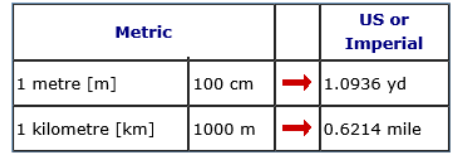
Create a menu (use do while with the switch) to present 2 different conversions options plus the option to quit. Use try and catch for each conversion, (for each case). Example: If the user enter option 1 for converting m to cm and to yd conversion, should enter a numerical value representing m and the application will display the result in cm and yd. If the user enter option 2 for converting km to m and to mile conversion, should enter a numerical value representing km value as an entry, for displaying the result in m and in miles.
\begin{tabular}{|l|l|l|l|} \hline \multicolumn{2}{|c|}{ Metric } & & \multicolumn{1}{c|}{USorImperial} \\ \hline 1 metre [m] & 100cm & & 1.0936yd \\ \hline 1 kilometre [km] & 1000m & & 0.6214 mile \\ \hline \end{tabular}
Step by Step Solution
There are 3 Steps involved in it

Get step-by-step solutions from verified subject matter experts
 Study Help