







Question: CREATE A C++ PROGRAM WITH PROTOTYPES AND FUNCTIONS. HW_2d - Student Grades (Pass a 2D array to functions) - Create a new project and name
CREATE A C++ PROGRAM WITH PROTOTYPES AND FUNCTIONS.
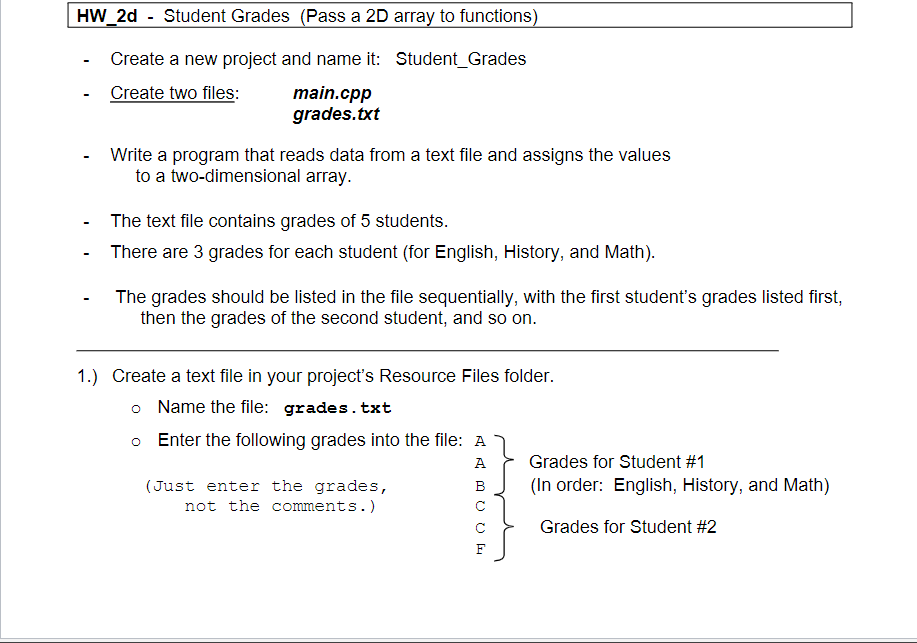
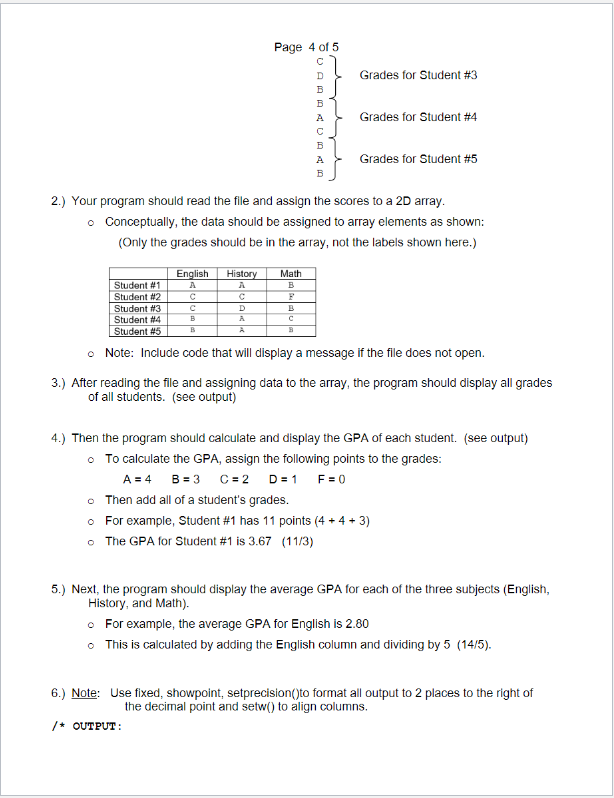
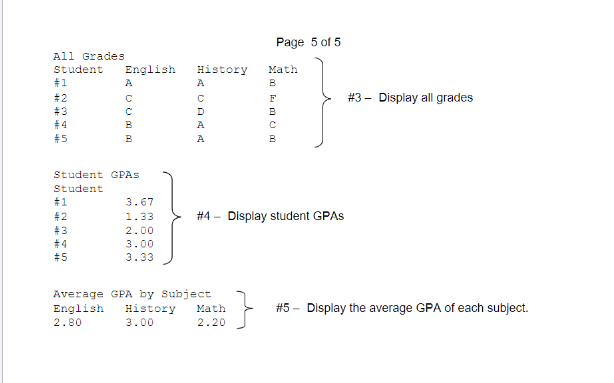
HW_2d - Student Grades (Pass a 2D array to functions) - Create a new project and name it: Student_Grades - Create two files: main.cpp grades.txt - Write a program that reads data from a text file and assigns the values to a two-dimensional array. - The text file contains grades of 5 students. - There are 3 grades for each student (for English, History, and Math). - The grades should be listed in the file sequentially, with the first student's grades listed first, then the grades of the second student, and so on. 1.) Create a text file in your project's Resource Files folder. - Name the file: grades.txt Grades for Student \#1 (In order: English, History, and Math) Grades for Student \#2 2.) Your program should read the file and assign the scores to a 2D array. - Conceptually, the data should be assigned to array elements as shown: (Only the grades should be in the array, not the labels shown here.) Note: Include code that will display a message if the file does not open. 3.) After reading the file and assigning data to the array, the program should display all grades of all students. (see output) 4.) Then the program should calculate and display the GPA of each student. (see output) - To calculate the GPA, assign the following points to the grades: A=4B=3C=2D=1F=0 - Then add all of a student's grades. For example, Student \#1 has 11 points (4+4+3) The GPA for Student \#1 is 3.67(11/3) 5.) Next, the program should display the average GPA for each of the three subjects (English, History, and Math). For example, the average GPA for English is 2.80 - This is calculated by adding the English column and dividing by 5 (14/5). 6.) Note: Use fixed, showpoint, setprecision()to format all output to 2 places to the right of the decimal point and setw() to align columns. / OUTPUT : Page 5 of 5 \#3- Display all grades StudentGPAsStudent$1$2$3$4#53.671.332.003.003.33 \#4 - Display student GPAs
Step by Step Solution
There are 3 Steps involved in it

Get step-by-step solutions from verified subject matter experts
 Study Help