







Question: Create a class called Invoice that a hardware store might use to represent an invoice for an item sold at the store. The Invoice class
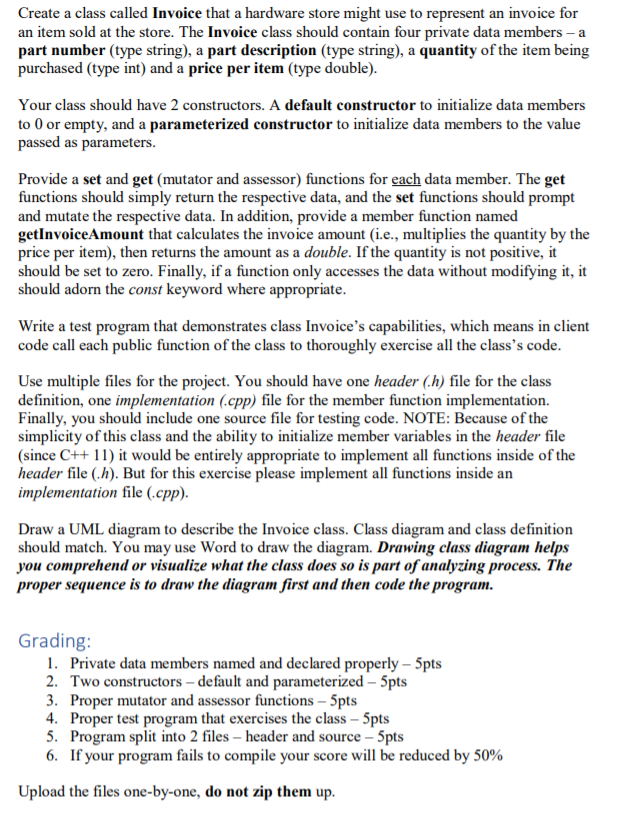
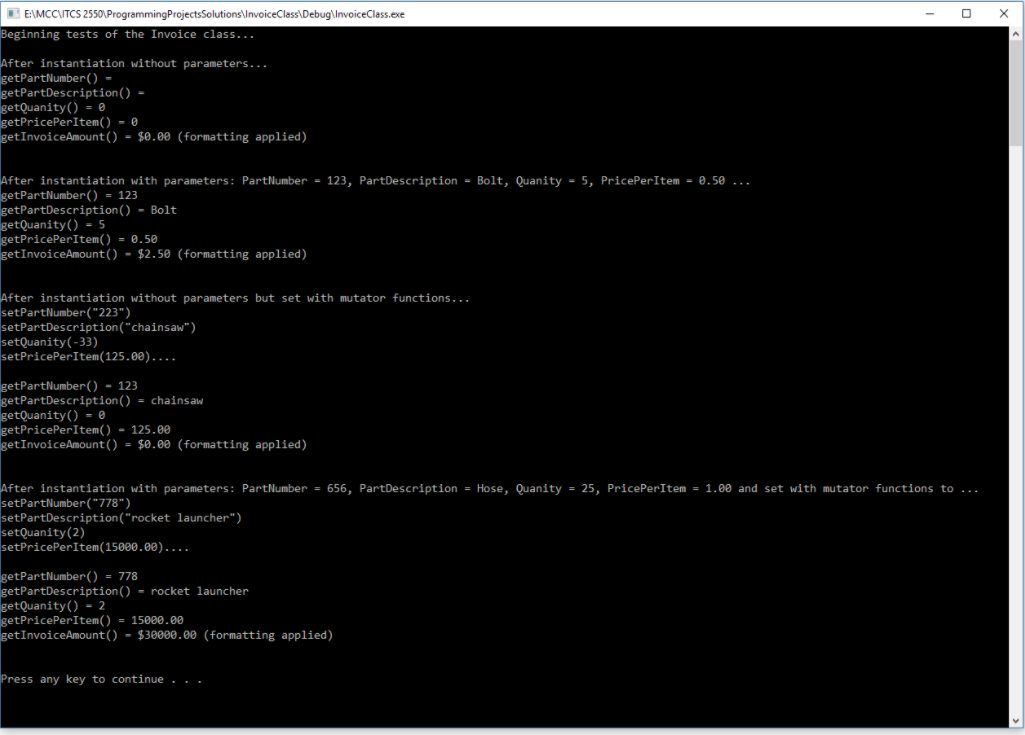
Create a class called Invoice that a hardware store might use to represent an invoice for an item sold at the store. The Invoice class should contain four private data members - a part number (type string), a part description (type string), a quantity of the item being purchased (type int) and a price per item (type double). Your class should have 2 constructors. A default constructor to initialize data members to 0 or empty, and a parameterized constructor to initialize data members to the value passed as parameters. Provide a set and get (mutator and assessor) functions for each data member. The get functions should simply return the respective data, and the set functions should prompt and mutate the respective data. In addition, provide a member function named getInvoiceAmount that calculates the invoice amount (i.e., multiplies the quantity by the price per item), then returns the amount as a double. If the quantity is not positive, it should be set to zero. Finally, if a function only accesses the data without modifying it, it should adorn the const keyword where appropriate. Write a test program that demonstrates class Invoice's capabilities, which means in client code call each public function of the class to thoroughly exercise all the class's code. Use multiple files for the project. You should have one header (h) file for the class definition, one implementation (.cpp) file for the member function implementation. Finally, you should include one source file for testing code. NOTE: Because of the simplicity of this class and the ability to initialize member variables in the header file (since C++11) it would be entirely appropriate to implement all functions inside of the header file (.h). But for this exercise please implement all functions inside an implementation file (.cpp). Draw a UML diagram to describe the Invoice class. Class diagram and class definition should match. You may use Word to draw the diagram. Drawing class diagram helps you comprehend or visualize what the class does so is part of analyzing process. The proper sequence is to draw the diagram first and then code the program. Grading: 1. Private data members named and declared properly - 5pts 2. Two constructors - default and parameterized 5pts 3. Proper mutator and assessor functions 5pts 4. Proper test program that exercises the class - 5pts 5. Program split into 2 files - header and source 5pts 6. If your program fails to compile your score will be reduced by 50% Upload the files one-by-one, do not zip them up. X E\MCCVTCS 2550\Programming Projects Solutions InvoiceClass\Debug\InvoiceClass.exe Beginning tests of the Invoice class... After instantiation without parameters... getPartNumber() = getPartDescription() - getQuanity() = @ getPricePerItem() - getInvoiceAmount() = $0.00 (formatting applied) After instantiation with parameters: Part Number = 123, PartDescription = Bolt, Quanity = 5, PricePerItem = 0.50 ... getPartNumber() = 123 getPartDescription() - Bolt getQuanity() - 5 getPricePerItem() - 0.50 getInvoiceAmount() - $2.50 (formatting applied) After instantiation without parameters but set with mutator functions... setPartNumber("223") setPartDescription("chainsaw") setQuanity(-33) setPricePerItem(125.00).... getPartNumber() - 123 getPartDescription() = chainsaw getQuanity() = 0 getPricePerItem() - 125.00 getInvoiceAmount() = $0.00 (formatting applied) After instantiation with parameters: Part Number = 656, PartDescription = Hose, Quanity = 25, PricePerItem = 1.00 and set with mutator functions to ... setPartNumber("778") setPartDescription("rocket launcher") setQuanity(2) setPricePerItem(15000.00).... getPartNumber() = 778 getPartDescription() - rocket launcher getQuanity() - 2 getPricePerItem() = 15000.00 getInvoiceAmount() - $30000.00 (formatting applied) Press any key to continue ... Create a class called Invoice that a hardware store might use to represent an invoice for an item sold at the store. The Invoice class should contain four private data members - a part number (type string), a part description (type string), a quantity of the item being purchased (type int) and a price per item (type double). Your class should have 2 constructors. A default constructor to initialize data members to 0 or empty, and a parameterized constructor to initialize data members to the value passed as parameters. Provide a set and get (mutator and assessor) functions for each data member. The get functions should simply return the respective data, and the set functions should prompt and mutate the respective data. In addition, provide a member function named getInvoiceAmount that calculates the invoice amount (i.e., multiplies the quantity by the price per item), then returns the amount as a double. If the quantity is not positive, it should be set to zero. Finally, if a function only accesses the data without modifying it, it should adorn the const keyword where appropriate. Write a test program that demonstrates class Invoice's capabilities, which means in client code call each public function of the class to thoroughly exercise all the class's code. Use multiple files for the project. You should have one header (h) file for the class definition, one implementation (.cpp) file for the member function implementation. Finally, you should include one source file for testing code. NOTE: Because of the simplicity of this class and the ability to initialize member variables in the header file (since C++11) it would be entirely appropriate to implement all functions inside of the header file (.h). But for this exercise please implement all functions inside an implementation file (.cpp). Draw a UML diagram to describe the Invoice class. Class diagram and class definition should match. You may use Word to draw the diagram. Drawing class diagram helps you comprehend or visualize what the class does so is part of analyzing process. The proper sequence is to draw the diagram first and then code the program. Grading: 1. Private data members named and declared properly - 5pts 2. Two constructors - default and parameterized 5pts 3. Proper mutator and assessor functions 5pts 4. Proper test program that exercises the class - 5pts 5. Program split into 2 files - header and source 5pts 6. If your program fails to compile your score will be reduced by 50% Upload the files one-by-one, do not zip them up. X E\MCCVTCS 2550\Programming Projects Solutions InvoiceClass\Debug\InvoiceClass.exe Beginning tests of the Invoice class... After instantiation without parameters... getPartNumber() = getPartDescription() - getQuanity() = @ getPricePerItem() - getInvoiceAmount() = $0.00 (formatting applied) After instantiation with parameters: Part Number = 123, PartDescription = Bolt, Quanity = 5, PricePerItem = 0.50 ... getPartNumber() = 123 getPartDescription() - Bolt getQuanity() - 5 getPricePerItem() - 0.50 getInvoiceAmount() - $2.50 (formatting applied) After instantiation without parameters but set with mutator functions... setPartNumber("223") setPartDescription("chainsaw") setQuanity(-33) setPricePerItem(125.00).... getPartNumber() - 123 getPartDescription() = chainsaw getQuanity() = 0 getPricePerItem() - 125.00 getInvoiceAmount() = $0.00 (formatting applied) After instantiation with parameters: Part Number = 656, PartDescription = Hose, Quanity = 25, PricePerItem = 1.00 and set with mutator functions to ... setPartNumber("778") setPartDescription("rocket launcher") setQuanity(2) setPricePerItem(15000.00).... getPartNumber() = 778 getPartDescription() - rocket launcher getQuanity() - 2 getPricePerItem() = 15000.00 getInvoiceAmount() - $30000.00 (formatting applied) Press any key to continue
Step by Step Solution
There are 3 Steps involved in it

Get step-by-step solutions from verified subject matter experts
 Study Help