







Question: Create a controlled animation that includes a spaceship and a planet Q2. Create an controlled animation that includes a spaceship and a planet. The location
Create a controlled animation that includes a spaceship and a planet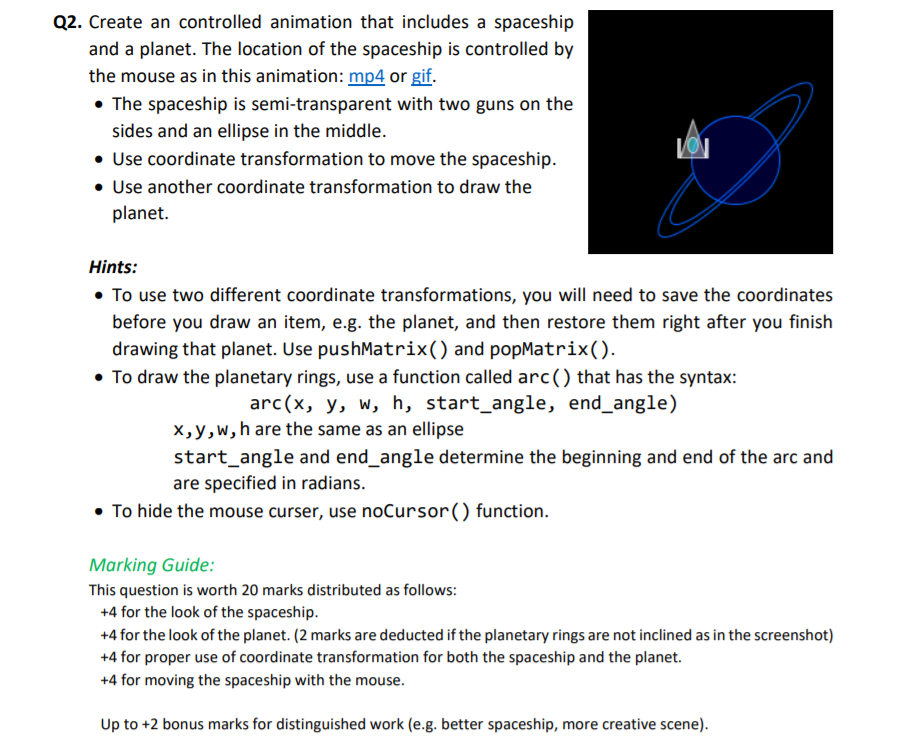
Q2. Create an controlled animation that includes a spaceship and a planet. The location of the spaceship is controlled by the mouse as in this animation: mp4 or gif. The spaceship is semi-transparent with two guns on the sides and an ellipse in the middle. . Use coordinate transformation to move the spaceship. Use another coordinate transformation to draw the planet. Hints: To use two different coordinate transformations, you will need to save the coordinates before you draw an item, e.g. the planet, and then restore them right after you finish drawing that planet. Use pushMatrix() and popMatrix). To draw the planetary rings, use a function called arc () that has the syntax arc(x, y, w, h, start_angle, end angle) x,y,w,h are the same as an ellipse start_angle and end_angle determine the beginning and end of the arc and are specified in radians To hide the mouse curser, use noCursor() function. Marking Guide: This question is worth 20 marks distributed as follows: +4 for the look of the spaceship +4 for the look of the planet. (2 marks are deducted if the planetary rings are not inclined as in the screenshot) +4 for proper use of coordinate transformation for both the spaceship and the planet. +4 for moving the spaceship with the mouse. Up to +2 bonus marks for distinguished work (e.g. better spaceship, more creative scene)
Step by Step Solution
There are 3 Steps involved in it

Get step-by-step solutions from verified subject matter experts
 Study Help