







Question: Create a database in MySQL using the attached mysqluniversity.sql file. Use the command: mysql - u username - p mysqluniversity.sql , where username may be
Create a database in MySQL using the attached mysqluniversity.sql file. Use the command: mysql u username p mysqluniversity.sql where username may be root or other user that you have configured in your MySQL installation.
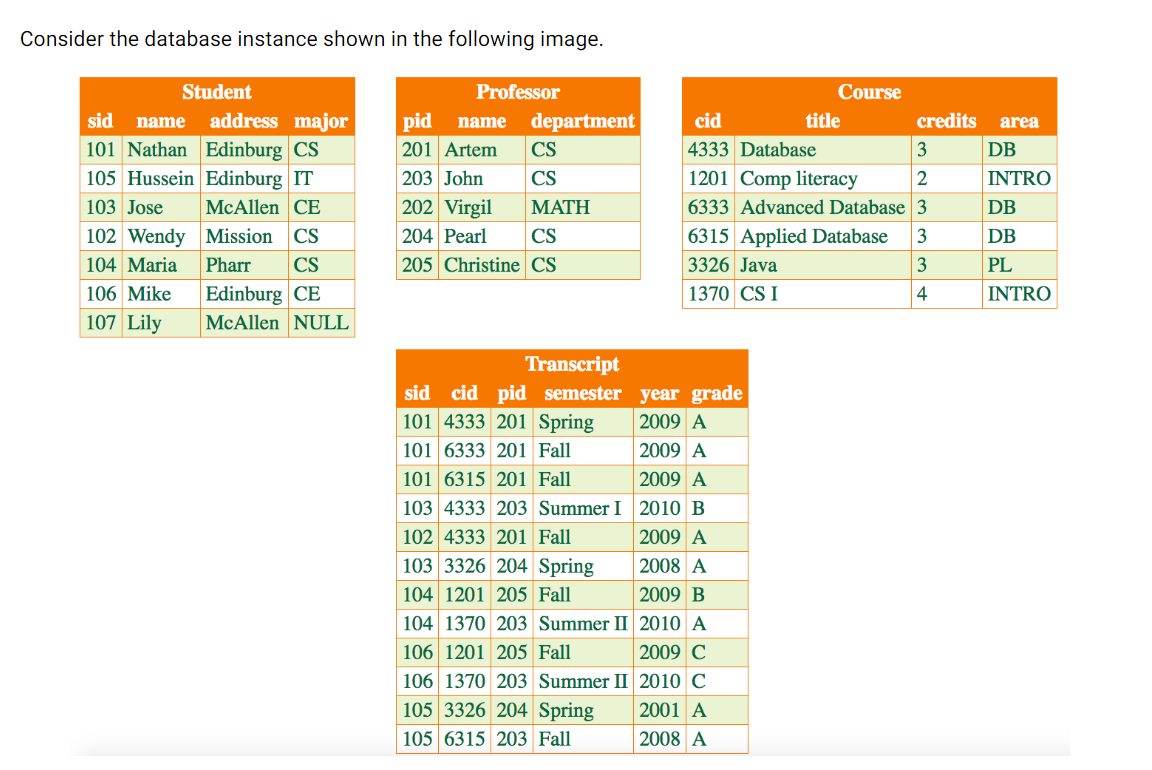
Write SQL DDL statements that implement the following queries. Test each statement to make sure it is producing the correct output.
Find all CS students who live in Edinburg.
Find all possible pairs combinations of students and professors.
Find all possible pairs combinations of CS and CE students.
Find identifiers of all courses taken by the student named Nathan.
Find titles of all courses taken by the student named Nathan.
Find course titles and professor names for courses taken by the student named Nathan.
Find names of students who took a course taught by Artem.
Find names of professors who taught a course.
Find all CS and all IT students
Find the total number of credits completed by student with id
Take a screenshot for each query. Provide ten screenshots.
Provide the Qsql file that contains all your source code. Here is the CREATE DATABASE University;
USE University;
CREATE TABLE Student
sid INT PRIMARY KEY,
name VARCHAR NOT NULL,
address VARCHAR NOT NULL,
major CHAR
;
CREATE TABLE Professor
pid INT PRIMARY KEY,
name VARCHAR NOT NULL,
department VARCHAR NOT NULL
;
CREATE TABLE Course
cid INT PRIMARY KEY,
title VARCHAR NOT NULL UNIQUE,
credits INT NOT NULL,
area VARCHAR NOT NULL
;
CREATE TABLE Transcript
sid INT,
cid INT,
pid INT,
semester VARCHAR
year YEAR,
grade CHAR NOT NULL,
PRIMARY KEY sid cid, semester, year
FOREIGN KEY sid REFERENCES Student sid
FOREIGN KEY cid REFERENCES Course cid
FOREIGN KEY pid REFERENCES Professor pid
;
INSERT INTO Student sid name, address, major VALUES 'Nathan', 'Edinburg', CS;
INSERT INTO Student sid name, address, major VALUES 'Hussein', 'Edinburg', IT;
INSERT INTO Student sid name, address, major VALUES 'Jose', 'McAllen', CE;
INSERT INTO Student sid name, address, major VALUES 'Wendy', 'Mission', CS;
INSERT INTO Student sid name, address, major VALUES 'Maria', 'Pharr', CS;
INSERT INTO Student sid name, address, major VALUES 'Mike', 'Edinburg', CE;
INSERT INTO Student sid name, address, major VALUES 'Lily', 'McAllen', NULL;
INSERT INTO Professor pid name, department VALUES 'Artem', CS;
INSERT INTO Professor pid name, department VALUES 'John', CS;
INSERT INTO Professor pid name, department VALUES 'Virgil', 'MATH';
INSERT INTO Professor pid name, department VALUES 'Pearl', CS;
INSERT INTO Professor pid name, department VALUES 'Christine', CS;
INSERT INTO Course cid title, credits, area VALUES 'Database', DB;
INSERT INTO Course cid title, credits, area VALUES 'Comp literacy', 'INTRO';
INSERT INTO Course cid title, credits, area VALUES 'Advanced Database', DB;
INSERT INTO Course cid title, credits, area VALUES 'Applied Database', DB;
INSERT INTO Course cid title, credits, area VALUES 'Java', PL;
INSERT INTO Course cid title, credits, area VALUES CS I 'INTRO';
INSERT INTO Transcript sid cid, pid, semester, year, grade VALUES 'Spring', A;
INSERT INTO Transcript sid cid, pid, semester, year, grade VALUES 'Fall', A;
INSERT INTO Transcript sid cid, pid, semester, year, grade VALUES 'Fall', A;
INSERT INTO Transcript sid cid, pid, semester, year, grade VALUES 'Summer IB;
INSERT INTO Transcript sid cid, pid, semester, year, grade VALUES 'Fall', A;
INSERT INTO Transcript sid cid, pid, semester, year, grade VALUES 'Spring', A;
INSERT INTO Transcript sid cid, pid, semester, year, grade VALUES 'Fall', B;
INSERT INTO Transcript sid cid, pid, semester, year, grade VALUES 'Summer IIA;
INSERT INTO Transcript sid cid, pid, semester, year, grade VALUES 'Fall', C;
INSERT INTO Transcript sid cid, pid, semester, year, grade VALUES 'Summer IIC;
INSERT INTO Transcript sid cid, pid, semester, year, grade VALUES 'Spring', A;
INSERT INTO Transcript sid cid, pid, semester, year, grade VALUES 'Fall', A;
Step by Step Solution
There are 3 Steps involved in it
1 Expert Approved Answer
Step: 1 Unlock

Question Has Been Solved by an Expert!
Get step-by-step solutions from verified subject matter experts
Step: 2 Unlock
Step: 3 Unlock
 Study Help