







Question: create a database with Access Access Assignment Make use of the help link within the application. It is typically at the top right and is
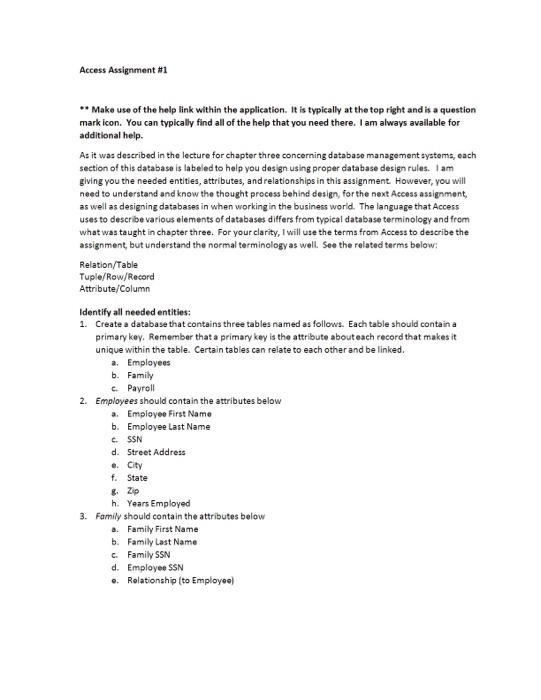
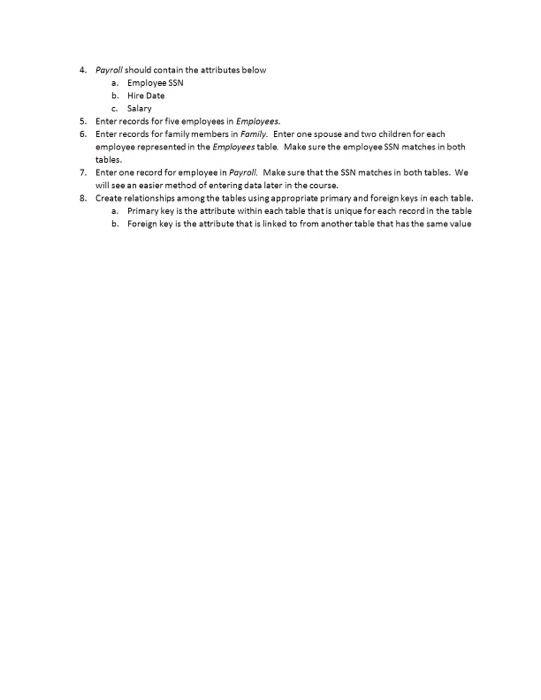
Access Assignment Make use of the help link within the application. It is typically at the top right and is a question mark icon. You can typically find all of the help that you need there I am always available for additional help As it was described in the lecture for chapter three concerning database management systems, each section of this database is labeled to help you design using proper database design rules. I am giving you the needed entities, attributes, andrelationships in this assignment However, you will need to understand and know the thought process behind design, forthe next Access assignment, as well as designing databases in when workingin the business world. The language thatAccess uses to describe various elements of databases differs from typical database terminology and from what was taught in chapter three. For your clarity, I will use the terms from Accessto describe the assignment but understand the normal terminology as well. See the related terms below: Relation/Table Tuple/Row/Record Attribute/Column Identify all needed entities: 1. Create a database that contains three tables named as follows. Eachtable should contain a primary key. Remember that a primary key is the attribute abouteach record that makes it unique within the table. Certain tables can relate to each other and be linked a. Employees b. Family c. Payroll 2. Employees should contain the attributes below a. Employee First Name b. Employee Last Name c. SSN d. Street Address e. City State g. Zip h. Years Employed 3. Family should contain the attributes below a. Family First Name b. Family Last Name c. Family SSN d. Employee SSN e. Relationship (to Employee)
Step by Step Solution
There are 3 Steps involved in it

Get step-by-step solutions from verified subject matter experts
 Study Help