







Question: . Create a FitnessTracker class Save the file as data fields FitnessTrackerFL.java, where FL are your initials (first and last names) . a String
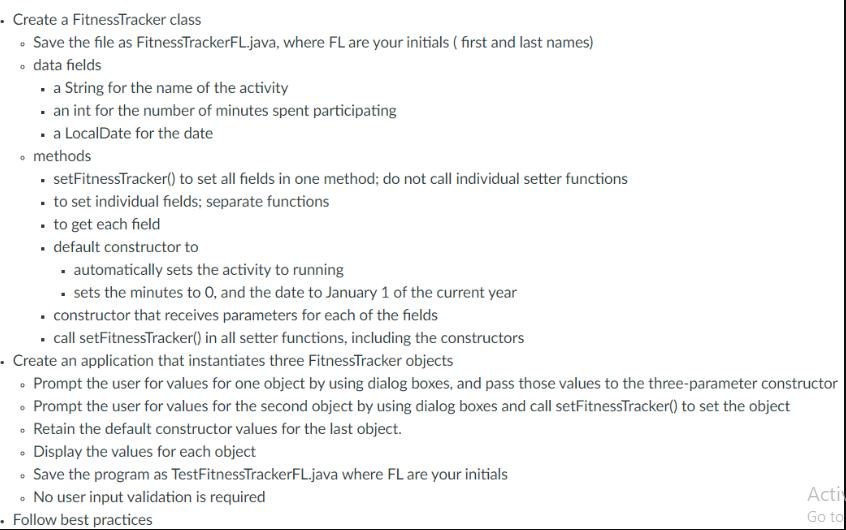
. Create a FitnessTracker class Save the file as data fields FitnessTrackerFL.java, where FL are your initials (first and last names) . a String for the name of the activity an int for the number of minutes spent participating . a LocalDate for the date methods . setFitnessTracker() to set all fields in one method; do not call individual setter functions . to set individual fields; separate functions . to get each field . default constructor to . automatically sets the activity to running . sets the minutes to O, and the date to January 1 of the current year . constructor that receives parameters for each of the fields . call setFitnessTracker() in all setter functions, including the constructors Create an application that instantiates three FitnessTracker objects Prompt the user for values for one object by using dialog boxes, and pass those values to the three-parameter constructor Prompt the user for values for the second object by using dialog boxes and call setFitnessTracker() to set the object Retain the default constructor values for the last object. Display the values for each object Save the program as TestFitnessTrackerFL.java where FL are your initials .No user input validation is required Follow best practices Acti Go to
Step by Step Solution
3.36 Rating (143 Votes )
There are 3 Steps involved in it
java import javatimeLocalDate public class FitnessTrackerFL private String activity private int minutes private LocalDate date public FitnessTrackerFL setFitnessTrackerRunning 0 LocalDatenow public Fi... View full answer

Get step-by-step solutions from verified subject matter experts
 Study Help