







Question: Create a flowchart, test cases and write a program that allows the user to enter a number and the program outputs if the number is
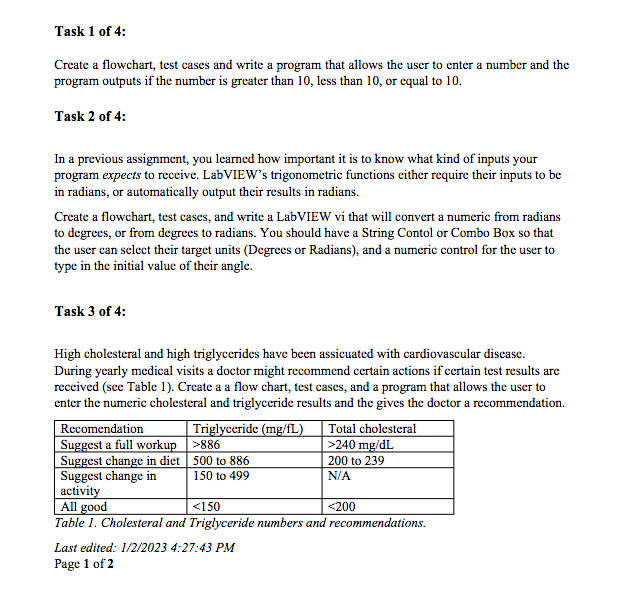

Create a flowchart, test cases and write a program that allows the user to enter a number and the program outputs if the number is greater than 10 , less than 10 , or equal to 10 . Task 2 of 4: In a previous assignment, you learned how important it is to know what kind of inputs your program expects to receive. LabVIEW's trigonometric functions either require their inputs to be in radians, or automatically output their results in radians. Create a flowchart, test cases, and write a LabVIEW vi that will convert a numeric from radians to degrees, or from degrees to radians. You should have a String Contol or Combo Box so that the user can select their target units (Degrees or Radians), and a numeric control for the user to type in the initial value of their angle. Task 3 of 4: High cholesteral and high triglycerides have been assicuated with cardiovascular disease. During yearly medical visits a doctor might recommend certain actions if certain test results are received (see Table 1). Create a a flow chart, test cases, and a program that allows the user to enter the numeric cholesteral and triglyceride results and the gives the doctor a recommendation. Table 1. Cholesteral and Triglyceride numbers and recommendations. Last edited: 1/2/2023 4:27:43 PM Page 1 of 2 Create a new version of your file for Task 4. Add two boolean indicators (Round LED). One should light up when both Triglyceride AND Cholesteral levels are in the "All good" range. The other should light up when either Triglyceride OR Cholesteral levels are in the "Suggest a full workup" range. Submit this edited file as a separate vi
Step by Step Solution
There are 3 Steps involved in it

Get step-by-step solutions from verified subject matter experts
 Study Help