







Question: Create a flowchart with the following shapes for the Java program. import java.util.Scanner; public class Exercise 0 8 _ 1 3 { public static void
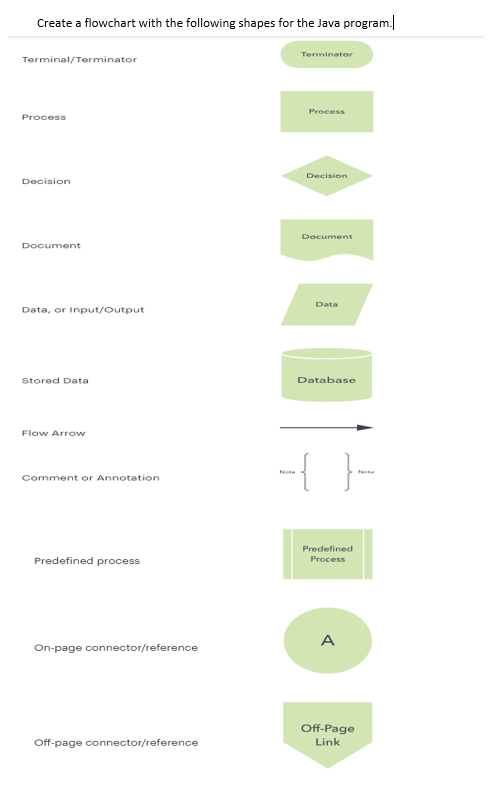
Create a flowchart with the following shapes for the Java program.
import java.util.Scanner;
public class Exercise
public static void mainString args
Prompt the user to enter the number of rows and columns
Scanner input new ScannerSystemin;
System.out.printEnter the number of rows and columns of the array: ;
int rows input.nextInt;
int columns input.nextInt;
Create a D array
double array new doublerowscolumns;
Prompt the user to enter the array elements
System.out.printlnEnter the array:";
for int i ; i rows; i
for int j ; j columns; j
arrayij input.nextDouble;
Find and display the location of the largest element
int location locateLargestarray;
System.out.printlnThe location of the largest element is at
location location;
public static int locateLargestdouble a
int location ; Initialize with the first element as a starting point
double maxElement a;
Iterate through the array to find the largest element
for int i ; i alength; i
for int j ; j ailength; j
if aij maxElement
maxElement aij;
location i; Update the row index
location j; Update the column index
return location;
Create a flowchart with the following shapes for the Java program.
TerminalTerminator
Process
Dacision
Decision
Dooument
Document
Data, or inputOutput
Data
stored Data
Database
Flow Arrow
Step by Step Solution
There are 3 Steps involved in it
1 Expert Approved Answer
Step: 1 Unlock

Question Has Been Solved by an Expert!
Get step-by-step solutions from verified subject matter experts
Step: 2 Unlock
Step: 3 Unlock
 Study Help