







Question: Create a Flutter app In this take home assignment, you will use all the concepts of Flutter that have been covered in previous lab assignments.
Create a Flutter app
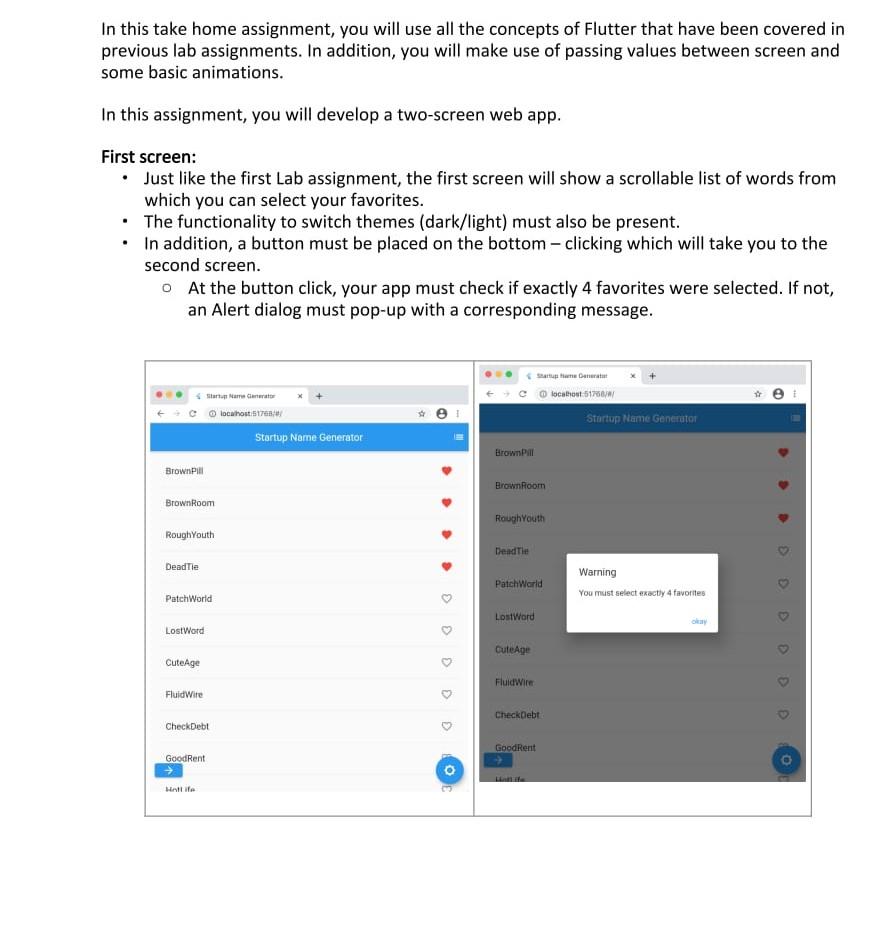
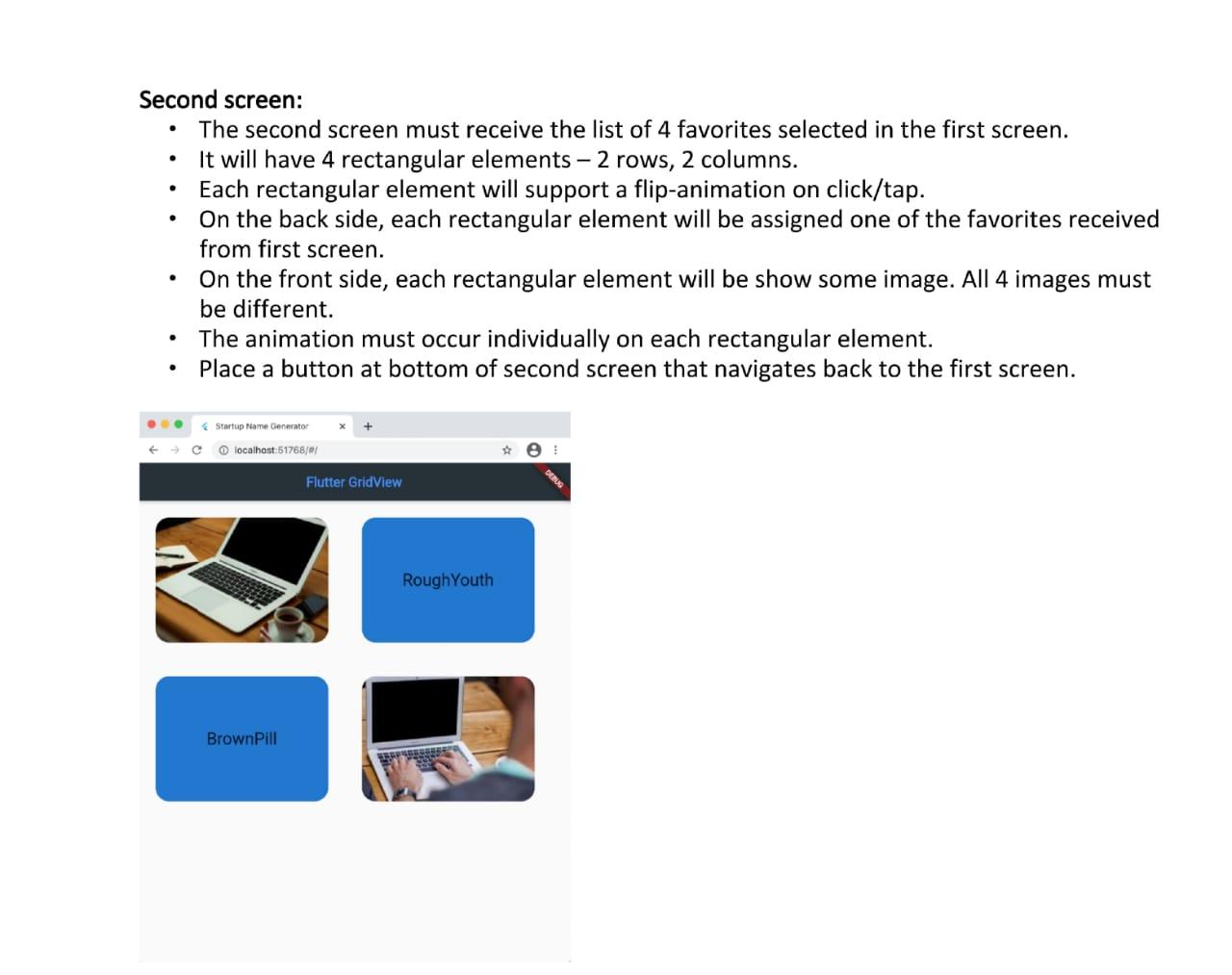
In this take home assignment, you will use all the concepts of Flutter that have been covered in previous lab assignments. In addition, you will make use of passing values between screen and some basic animations. In this assignment, you will develop a two-screen web app. First screen: Just like the first Lab assignment, the first screen will show a scrollable list of words from which you can select your favorites. The functionality to switch themes (dark/light) must also be present. In addition, a button must be placed on the bottom clicking which will take you to the second screen. o At the button click, your app must check if exactly 4 favorites were selected. If not, an Alert dialog must pop-up with a corresponding message. Star Care cocahonti Startup Nome Generator tocht 51760 Startup Name Generator Brown Brown Brown Room Brown Room RoughYouth RoughYouth Dead Tie Dead Tie PatchWorld Warning You must select exactly 4 favorites PatchWorld Lost Word aay Lost Word CuteAge CuteAge FluidWire Fluidite CheckDebt CheckDebt GoodRent Good Rent O O . . . Second screen: The second screen must receive the list of 4 favorites selected in the first screen. It will have 4 rectangular elements 2 rows, 2 columns. Each rectangular element will support a flip-animation on click/tap. On the back side, each rectangular element will be assigned one of the favorites received from first screen. On the front side, each rectangular element will be show some image. All 4 images must be different. The animation must occur individually on each rectangular element. Place a button at bottom of second screen that navigates back to the first screen. . Startup Name Generator localhost:51768/ Flutter GridView RoughYouth BrownPill In this take home assignment, you will use all the concepts of Flutter that have been covered in previous lab assignments. In addition, you will make use of passing values between screen and some basic animations. In this assignment, you will develop a two-screen web app. First screen: Just like the first Lab assignment, the first screen will show a scrollable list of words from which you can select your favorites. The functionality to switch themes (dark/light) must also be present. In addition, a button must be placed on the bottom clicking which will take you to the second screen. o At the button click, your app must check if exactly 4 favorites were selected. If not, an Alert dialog must pop-up with a corresponding message. Star Care cocahonti Startup Nome Generator tocht 51760 Startup Name Generator Brown Brown Brown Room Brown Room RoughYouth RoughYouth Dead Tie Dead Tie PatchWorld Warning You must select exactly 4 favorites PatchWorld Lost Word aay Lost Word CuteAge CuteAge FluidWire Fluidite CheckDebt CheckDebt GoodRent Good Rent O O . . . Second screen: The second screen must receive the list of 4 favorites selected in the first screen. It will have 4 rectangular elements 2 rows, 2 columns. Each rectangular element will support a flip-animation on click/tap. On the back side, each rectangular element will be assigned one of the favorites received from first screen. On the front side, each rectangular element will be show some image. All 4 images must be different. The animation must occur individually on each rectangular element. Place a button at bottom of second screen that navigates back to the first screen. . Startup Name Generator localhost:51768/ Flutter GridView RoughYouth BrownPill
Step by Step Solution
There are 3 Steps involved in it

Get step-by-step solutions from verified subject matter experts
 Study Help