







Question: Create a form named GradeTopDown that lets you to do the following: Enter a score (0100) and a name into two different text boxes and
Create a form named GradeTopDown that lets you to do the following:
- Enter a score (0–100) and a name into two different text boxes and compute the letter grade by clicking a button
- Use the scale 90, 80, 70 for A, B and C, respectively. The structure chart of the task to process the grade is as follows:
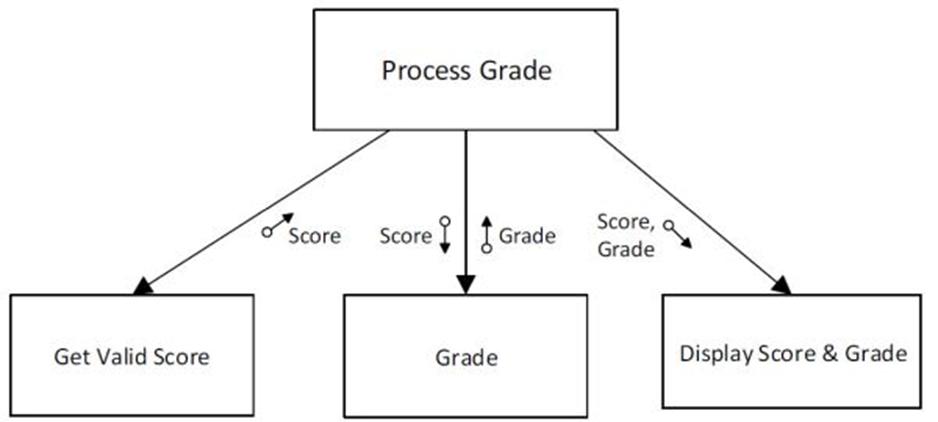
The Click event handler of the button must call three separate methods, corresponding to the three subtasks, described below:
- A method named ValidScore that gets the name and score from the TextBoxes, validates the score and passes the name and valid score to the Click event handler.
- A second method named Grade that computes the letter grade. Pass the score from the calling program to Grade. The method must return the letter grade without using a parameter.
- A third method that displays the name and letter grade. Pass the name and letter grade as parameters to this method.
Get Valid Score Score Process Grade Score Grade Grade Score, a Grade Display Score & Grade
Step by Step Solution
★★★★★
3.40 Rating (147 Votes )
There are 3 Steps involved in it
1 Expert Approved Answer
Step: 1 Unlock

Form Design To create a Form named GradeTopDown follow these steps Open Visual Studio and create a new Windows Forms Application In the Solution Explo... View full answer
Question Has Been Solved by an Expert!
Get step-by-step solutions from verified subject matter experts
Step: 2 Unlock
Step: 3 Unlock
 Study Help