







Question: In this exercise, you will use SPSS to get measures of central tendency for several different variables in the GSS2012 data set, which is available
In this exercise, you will use SPSS to get measures of central tendency for several different variables in the GSS2012 data set, which is available from the Web site for this text. In this data set, the cases are a representative sample (see Chapter 1) of the U.S. population.
• Find and click the SPSS icon on your desktop.
• Load the GSS2012 data set.
• From the menu bar across the top of the SPSS window, click Analyze, Descriptive Statistics, and Frequencies.
• Find these variables in the box on the left of the Frequencies window: closeblk, hrs1, partnrs5, and region. Consult Appendix G for information on what each variable measures and the coding scheme for the scores. Click the arrow to move the variable names into the box on the right.
• Click the Statistics button and, under “Central Tendency,” select Mean, Median, and Mode. Click Continue to return to the Frequencies window.
• Make sure the box next to the “Display frequency tables” option is not checked. We are interested only in the summary statistics, not in the tables.
• Click OK.
For each variable, select the most appropriate measure of central tendency (consult Tables 3.10 and 3.11) and write a summary sentence about the variable.
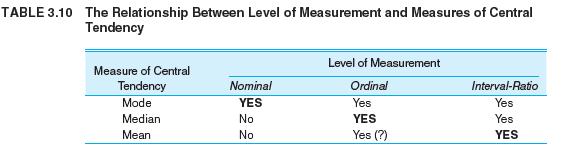
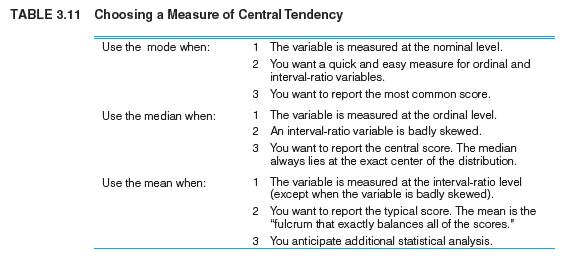
TABLE 3.10 The Relationship Between Level of Measurement and Measures of Central Tendency Level of Measurement Measure of Central Tendency Nominal Ordinal Interval-Ratio Mode YES Yes Yes Median No YES Yes Mean No Yes (?) YES
Step by Step Solution
3.37 Rating (156 Votes )
There are 3 Steps involved in it

Get step-by-step solutions from verified subject matter experts
 Study Help