







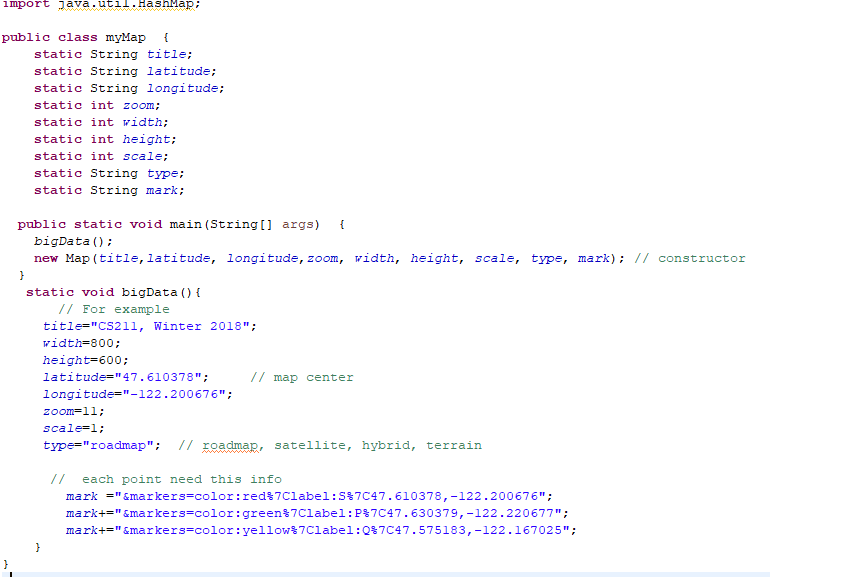
Question: Create a google map based user interactive system(write code on myMap class) 1. Apply query concept to retrieve results (the 3 point locations) 2. use
Create a google map based user interactive system(write code on myMap class) 1. Apply query concept to retrieve results (the 3 point locations) 2. use one(or more) of the data structures(HashMap HashSet) 3. use HashMap instead of if-else or switch-case statements (describe in detail at the beginning of the program) 4. set operation to retrieve more complex output (describe in detail at the beginning of the program)
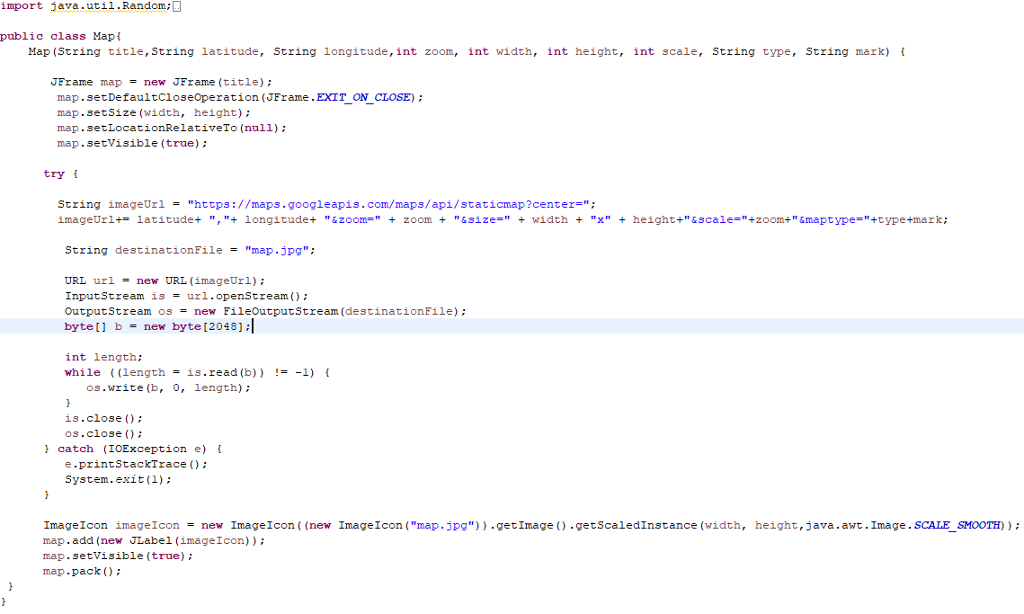
import java.util.Random public class Mapt Map (String title, String latitude, String longitude,int zoom, int width, int height, int scale, String type, String mark) f JFrame map = new JFrame (title); map.setDefaultcioseoperation (JFrame.EXIT_ON CLOSE) map.setSize (width, height) map.setLocationRelativeTo (null) map.setVisible (true) tryt String imageUrl "https://maps.googleapis.com/maps/api/staticmap ?center="; imageUr 1+-latitude+ ","4 longitude+ "&zoon " + zoom + "&size=" + width + "x" + height+"&scale="+zoom+ " &maptype="+type+mark; String destinationFile "map.jpg"; URL urlnew URL (imageUrl) InputStream is = url.openStream(); OutputStream os new FileOutputStream(destinationFile) ; byte [ ] b = new byte [2048]; int length: while ((length= is.read (b)) !--1) { os.write (b, 0, length) is.close () os.close ) catch (IOException e) e.printStackTrace): System.exit(1) Image Icon image Icon = new Image Icon ((new Image 1 con ("map .jpg")) .getImage().getScaledInstance (width, map.add (new JLabel (imageIcon) map. setVisible (true) map.pack ) height, java, awt. Image . SCALESMOOTH) import java.util.Random public class Mapt Map (String title, String latitude, String longitude,int zoom, int width, int height, int scale, String type, String mark) f JFrame map = new JFrame (title); map.setDefaultcioseoperation (JFrame.EXIT_ON CLOSE) map.setSize (width, height) map.setLocationRelativeTo (null) map.setVisible (true) tryt String imageUrl "https://maps.googleapis.com/maps/api/staticmap ?center="; imageUr 1+-latitude+ ","4 longitude+ "&zoon " + zoom + "&size=" + width + "x" + height+"&scale="+zoom+ " &maptype="+type+mark; String destinationFile "map.jpg"; URL urlnew URL (imageUrl) InputStream is = url.openStream(); OutputStream os new FileOutputStream(destinationFile) ; byte [ ] b = new byte [2048]; int length: while ((length= is.read (b)) !--1) { os.write (b, 0, length) is.close () os.close ) catch (IOException e) e.printStackTrace): System.exit(1) Image Icon image Icon = new Image Icon ((new Image 1 con ("map .jpg")) .getImage().getScaledInstance (width, map.add (new JLabel (imageIcon) map. setVisible (true) map.pack ) height, java, awt. Image . SCALESMOOTH)
Step by Step Solution
There are 3 Steps involved in it

Get step-by-step solutions from verified subject matter experts
 Study Help