







Question: Create a Graphical User Interface (GUI) using JavaFX for drawing a regular polygon as previously defined in the RegularPolygon class in the past exercise. The
Create a Graphical User Interface (GUI) using JavaFX for drawing a regular polygon as previously defined in the RegularPolygon class in the past exercise. The GUI must have the following features:
- It draws cartesian axes with the center as its origin (0,0).
- The axes will be updated accordingly by maintaining the position of the origin in the center of the GUI upon resizing the windows size.
- The user shall be able to enter the origin (x,y), number of sides, size, angle (theta), and color properties of the polygon.
- Pressing Draw button will update the displayed image on the GUI accordingly.
- Correct position (x,y) as entered in the GUI with different combination of n, angle and size.
- Correct size and various n as entered in the GUI.
- Correct angle representation as entered in the GUI. The GUI only accept theta in degrees.
- Correct color fill as entered in the GUI. The GUI must provide at least 5 different colors to choose.
Some examples are in images.
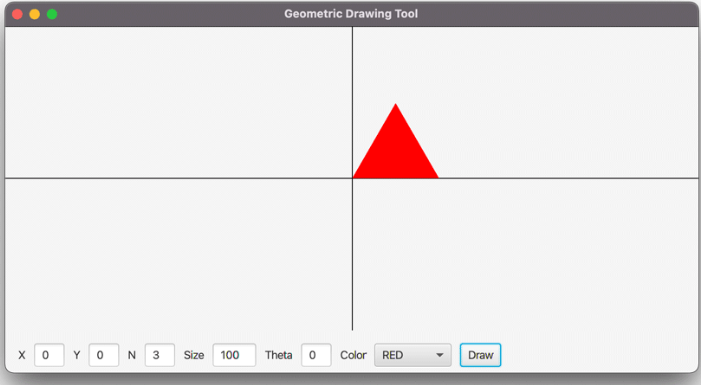
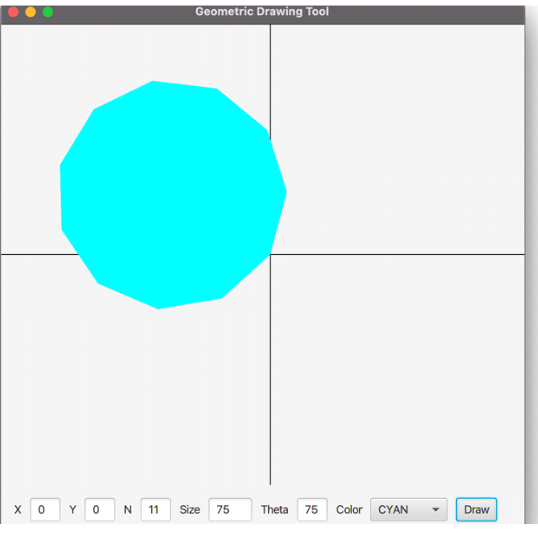
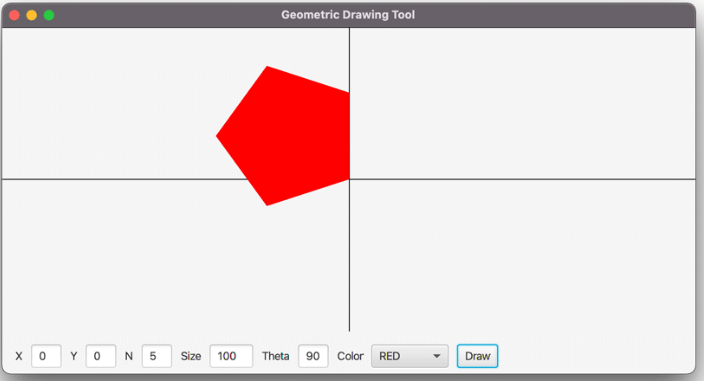
Geometric Drawing Tool Geometric Drawing Tool
Step by Step Solution
There are 3 Steps involved in it

Get step-by-step solutions from verified subject matter experts
 Study Help