





Question: Create a GUI form to contain a framePanel with a layout appropriate for four components. The application comprises: A menuBar containing three menus: File, Edit,
Create a GUI form to contain a framePanel with a layout appropriate for four components.
The application comprises: A menuBar containing three menus: File, Edit, Help
File menu contains four menuItems: New, Save As, separator, Exit
Add an icon to New menuItem.
Add an ActionListener to the Exit menuItem to close on click.
Edit menu contains five menuItems: Copy, Paste, separator, Find, Preferences
Find contains two menuItems that is sub-menus: Find, Replace
Add an icon to the Replace sub-menu Help menu contains one menuItem About
Add an ActionListener to About to display copyright information on a JWindow when clicked.
Add Mnemonics and accelerators where appropriate to all MenuBar items
Components are as follows :
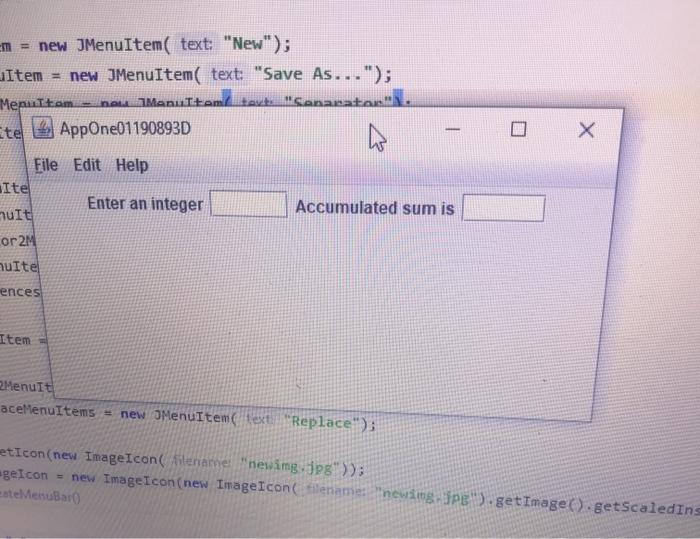
1.Jlabel: enter an integer
2.Jtextfield: for accepting user input
3.JLabel: accumulated sim is
4. Jtextfield: non-editable): for displaying the accumulated sim
The program shall accumulate the number entered into the input text field and display the sum in the output text field
the app should look like this ..
it should be able to accept inputs and display it when accumulated  Create a GUI form to contain a framePanel with a layout

m = new JenuItem( text: "New"); LiItem = new JMenuItem( text: "Save As..."); Menultam new menultam tev Cenacatanl. Ete 2 AppOne01190893D 0 X Accumulated sum is File Edit Help Ite Enter an integer It or 2M multe ences Item Menurt aceMenuItems = new JMenuItem ext"Replace"); etIcon(new ImageIcon Sitename "newimg.jpg")); egeIcon = new ImageIcon(new ImageIconfilename: "newing Spe).getImage().getScaledIn estMenuBar m = new JenuItem( text: "New"); LiItem = new JMenuItem( text: "Save As..."); Menultam new menultam tev Cenacatanl. Ete 2 AppOne01190893D 0 X Accumulated sum is File Edit Help Ite Enter an integer It or 2M multe ences Item Menurt aceMenuItems = new JMenuItem ext"Replace"); etIcon(new ImageIcon Sitename "newimg.jpg")); egeIcon = new ImageIcon(new ImageIconfilename: "newing Spe).getImage().getScaledIn estMenuBar

Step by Step Solution

There are 3 Steps involved in it

1 Expert Approved Answer
Step: 1 Unlock blur-text-image
Question Has Been Solved by an Expert!

Get step-by-step solutions from verified subject matter experts

Step: 2 Unlock
Step: 3 Unlock

Students Have Also Explored These Related Databases Questions!