







Question: Create a GUI in Java that makes the following: There should be at least a composite layout, and two customized JPanels. The minimum required elements
Create a GUI in Java that makes the following:
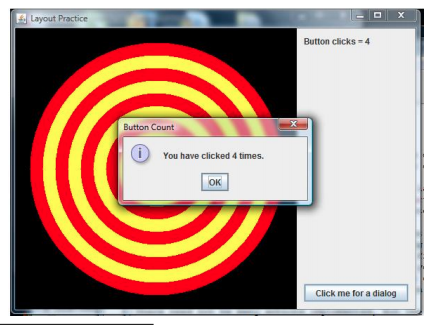
There should be at least a composite layout, and two customized JPanels. The minimum required elements of the GUI are:
(1) A large panel on which a custom image is painted. This doesnt have to be very complicated but should involve more than one shape and more than one color.
(2) A button that triggers a dialog4 to be displayed. The dialog should display a message informing the user of how many times the button was clicked.
(3) A label that displays how many times the button was clicked.
Comments:
Can you make use of a for-loop to create the circles? I tried the following but can't get it inside the panel with the button:
public void paint(Graphics g){
// Drawing a Rectangle
g.setColor(Color.BLACK);
g.fillRect(10, 10, 500, 5000);
// Drawing a Circles
double a_double = 10;
for(int a = 10; a > 0; a--){
g.setColor(Color.YELLOW);
g.fillOval(250-(a*25)/2, 250-(a*25)/2, a*25, a*25);
if (a_double/2 == a/2){
g.setColor(Color.RED);
g.fillOval(250-(a*25)/2, 250-(a*25)/2, a*25, a*25);
}
a_double = a_double -1;
}
}
Layout Practice Button clicks 4 Button Count You have clicked 4 times. OK Click me for a dialog Layout Practice Button clicks 4 Button Count You have clicked 4 times. OK Click me for a dialog
Step by Step Solution
There are 3 Steps involved in it

Get step-by-step solutions from verified subject matter experts
 Study Help