







Question: Create a Java GUI application that works like a shopping cart system for an online book store. You will be provided a file named BookPrice.txt.
Create a Java GUI application that works like a shopping cart system for an online book store.
You will be provided a file named BookPrice.txt. This file contains the names and prices of various books, formatted as follows:
I Did It Your Way, 11.95 The History of Scotland, 14.50 Learn Calculus in One Day, 29.95 Feel the Stress, 18.50 Great Poems, 12.95 Europe on a Shoestring, 10.95 The Life of Mozart, 14.50 Effective Java, 47.42 Head First Java, 24.50 Learn Java in One Day, 2.99 Java a Beginner's Guide, 14.75 Starting Out with Java, 138.16 Introduction to Java, 132.03 Java How to Program, 151.55 Java Software Solutions, 119.75 Java Foundations, 140.88 Android Boot Camp, 62.88 Core Java, 38.27 Java How to Program, 59.95
Each line in the file contains the name of a book, followed by a comma, followed by the books retail price. When your application begins execution, it should read the contents of the file and store the titles in a ListView.
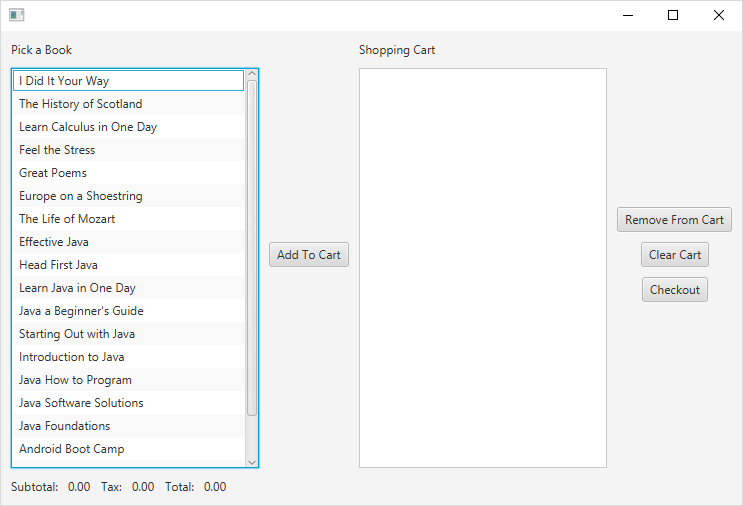
The user should be able to select a book from the list and add it to the Shopping Cart.
The Shopping Cart is another ListView.
The application should have buttons or menu items that allow the user to Add Selected Items, Remove Selected Items, and Check Out.
When the Check Out button is selected, the application should calculate and display the subtotal of all books in the shopping cart, the sales tax of 7%, and the total. It should also create a receipt file, which should be a text file that includes the books purchased, the quantities of each book purchased, their prices, and total price both before and after taxes. Here is an example of what the receipt file could look like:
(File Name would be Receipt-02-41-2018.14.52.56.txt)
Receipt: 02-41-2018 14:52:56
Title Price
----------------------------------- ---------
The Life of Mozart $ 14.50
Java How to Program $151.55
Feel the Stress $ 18.50
Core Java $ 38.27
Sub Total $222.82
Tax $ 15.60
---------
Grand Total $238.42
To exit the application, click the x in the upper right corner.
Setup
Create the Project
Click File hover over New -> Java Project and click
Enter FINAL as the Project name and click Finish
To Enable Java FX in Eclipse you must remove and re-add the JRE System Library.
Right click on the FINAL package and select Properties
In the list on the left select Java Build Path
In the middle Window Select JRE System Library
Click Remove
Click Add Library
Ensure JRE System Library is selected
Click Next
Click Finish
Click Apply and Close
Create the Package
Right click on FINAL hover over New -> Package and click
Enter shoppingCart as the Name and click Finish
Create the Class
Right click on shoppingCart hover over New -> Class and click
Enter ShoppingCart as the Name
Select the public static void main check box and click Finish
Copy the attached ShoppingCart,java and BookPrices.txt files to your shoppingCart package.
You should see this.
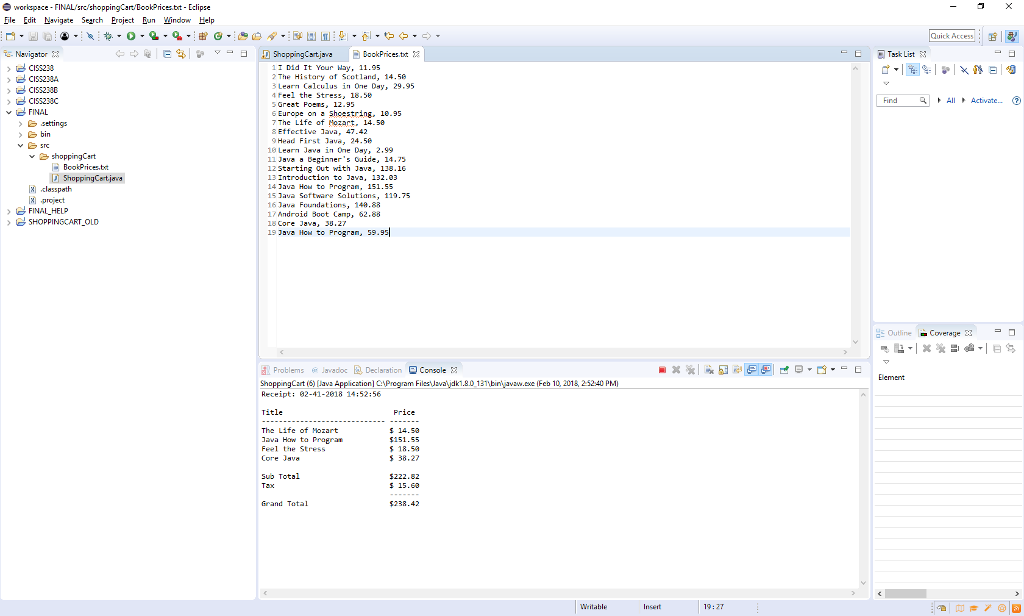
Here is an outline:
package shoppingCart;
/* Add your required multi-line comment here
*
*/
//imports
import javafx.application.Application;
import javafx.stage.Stage;
import javafx.scene.Scene;
import javafx.scene.layout.VBox;
import javafx.scene.layout.HBox;
import javafx.geometry.Pos;
import javafx.geometry.Insets;
import javafx.scene.control.Label;
import javafx.scene.control.Button;
import javafx.scene.control.ListView;
import javafx.scene.control.SelectionMode;
import javafx.collections.ObservableList;
import javafx.collections.FXCollections;
import java.util.ArrayList;
import java.util.Calendar;
import java.util.Collections;
import java.util.Scanner;
import java.io.File;
import java.io.FileNotFoundException;
import java.io.IOException;
import java.io.PrintWriter;
//for the date
import java.text.SimpleDateFormat;
public class ShoppingCart extends Application
{
/* ArrayList to hold info from the BookProces.txt file, cart information
* and other required variables
*/
public static void main(String[] args)
{
// Launch the application.
launch(args);
}
// start method entry point of the application
@Override
public void start(Stage primaryStage)
{
// Build the inventory ArrayLists
// Convert the inventoryTtitles ArrayList to an ObservableList.
// Build the Book ListView
// Build the Shopping Cart ListView
// Create the output label for the cart subtotal.
// Create the output label for the tax.
// Create the output label for the cart total.
// Add To Cart Button
Button addToCartButton = new Button("Add To Cart");
addToCartButton.setOnAction(e ->
{
// Get the selected index.
// Add the item to the cart.
if (index != -1)
{
// Update the cart ArrayLists
// Update the cartListView
// Update the subtotal
}
});
// Remove From Cart Button
Button removeFromCartButton = new Button("Remove From Cart");
removeFromCartButton.setOnAction(e ->
{
// Get the selected index.
// Add the item to the cart.
if (index != -1)
{
// Update the subtotal
// Remove the selected item from the cart ArrayLists
// Update the cartListView
}
});
// Clear Cart Button
Button clearCartButton = new Button("Clear Cart");
clearCartButton.setOnAction(e ->
{
// Update the subtotal
// Clear the cart ArrayLists
// Update the cartListView
});
// Checkout Button
Button checkoutButton = new Button("Checkout");
checkoutButton.setOnAction(e ->
{
final double TAX_RATE = 0.07;
// Calculate the tax
// Calculate the total
//setup dates
String timeStamp = new SimpleDateFormat("MM-DD-YYYY HH:mm:ss").format(Calendar.getInstance().getTime());
String fntimeStamp = new SimpleDateFormat("MM-DD-YYYY.HH.mm.ss").format(Calendar.getInstance().getTime());
//create and open receipt file
String filename = "Receipt-"+fntimeStamp+".txt";
try {
//open file
PrintWriter receiptFile = new PrintWriter("src/shoppingCart/"+filename);
//create the receipt
//close the file
receiptFile.close();
} catch (FileNotFoundException e1) {
e1.printStackTrace();
System.out.println("file open error");
}
});
// Build the VBox to hold the Add button
// Build the VBox to hold the cart buttons
// Build the top part of the GUI
// Build the bottom part of the GUI
// Put everything into a VBox
// Add the main VBox to a scene.
// Set the scene to the stage aand display it.
}
private void readBookFile() throws IOException
{
String input; // To hold a line from the file
// Open the file.
File file = new File("src/shoppingCart/BookPrices.txt");
Scanner inFile = new Scanner(file);
// Read the file.
while (inFile.hasNext())
{
// Read a line.
// Tokenize the line.
// Add the book info to the ArrayLists.
}
// Close the file.
inFile.close();
}
}
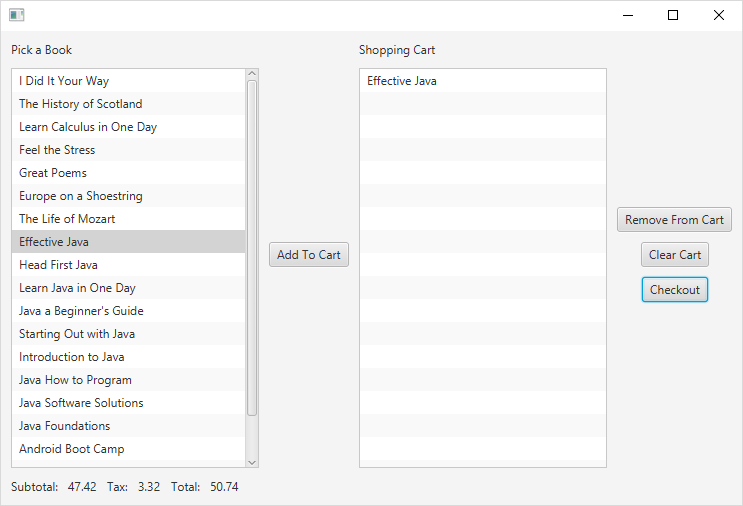
The Receipt file for this one book would be
Receipt: 02-41-2018 15:10:04
Title Price
--------------------------------- -------
Effective Java $ 47.42
Sub Total $ 47.42
Tax $ 3.32
---------
Grand Total $ 50.74
work pece-FINAL/src/shoppingCart/BookPrices.tt-Eclipse Fle Edit Navigete Search Eroject Eun Window Help . Quick Access E! Navigstor 1 Did It Your Way, 11.95 The Histary af Scotland, 14.56 3 Learm Colculus in One Dsy 29.95 4 Feel the Stress, 18.58 Find AII Activate. FINAL Europe on ? Shoestring, 18.35 7 The Life of ozart. 14.58 8 Etfective lava, 47-42 bin Head First lava, 24.50 18 Learn Java in One Dsy, 2.99 11 Java a Beginner's Ouide, 14.75 12 Starting out with Jv 118.16 13 Introduction ta 132.03 4Jav How to Progran, 151.55 5 ava Software Salutions, 110.75 6av Foundations, 14a.88 17 Android Boot Canp, 62.88 15 Core Javs, 30.27 19 Java How to Progran, 59.95 ?ShoppingCart lasspath ?.project FINAL HELP ?: Outline -Coverage 23-, d, problems levadoc Declaration Console Element ShoppingCart6) Java Application Program Files Javatjdk1.3nav.ee(Feb 10, 2018 25240 PM Receipt: 02-41-2018 14:52:56 Title Price The Life of Mozart ava Haw ta Pragran Feel the Stress Core Jav? 5 18.5A 5 38.27 sub Total 5222.82 $ 15.63 Grand Total $238.42 19:27 work pece-FINAL/src/shoppingCart/BookPrices.tt-Eclipse Fle Edit Navigete Search Eroject Eun Window Help . Quick Access E! Navigstor 1 Did It Your Way, 11.95 The Histary af Scotland, 14.56 3 Learm Colculus in One Dsy 29.95 4 Feel the Stress, 18.58 Find AII Activate. FINAL Europe on ? Shoestring, 18.35 7 The Life of ozart. 14.58 8 Etfective lava, 47-42 bin Head First lava, 24.50 18 Learn Java in One Dsy, 2.99 11 Java a Beginner's Ouide, 14.75 12 Starting out with Jv 118.16 13 Introduction ta 132.03 4Jav How to Progran, 151.55 5 ava Software Salutions, 110.75 6av Foundations, 14a.88 17 Android Boot Canp, 62.88 15 Core Javs, 30.27 19 Java How to Progran, 59.95 ?ShoppingCart lasspath ?.project FINAL HELP ?: Outline -Coverage 23-, d, problems levadoc Declaration Console Element ShoppingCart6) Java Application Program Files Javatjdk1.3nav.ee(Feb 10, 2018 25240 PM Receipt: 02-41-2018 14:52:56 Title Price The Life of Mozart ava Haw ta Pragran Feel the Stress Core Jav? 5 18.5A 5 38.27 sub Total 5222.82 $ 15.63 Grand Total $238.42 19:27
Step by Step Solution
There are 3 Steps involved in it

Get step-by-step solutions from verified subject matter experts
 Study Help