







Question: Create a Java program using the pseudocode below, there is NO use of a Scanner or System.out.println. The code should ONLY use JOptionPane. The code
Create a Java program using the pseudocode below, there is NO use of a Scanner or System.out.println. The code should ONLY use JOptionPane. The code should start with
import javax.swing.JOptionPane;
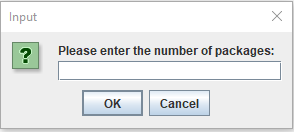
All inputs should be displayed in dialog boxes like this (refer to the dialog box above). All outputs should be displayed in dialog boxes as well. Nothing should be displayed in Run I/O!
Here is what the code below should be formatted to using the above instructions, the pseudocode may be hard to convert to Java, so just use this list below. But make sure to follow the instructions!
- The Consumer Name
- The desired number of picture(s) (one or two)
- The first photog has a flat rate of $100 per hour and the second photog has a flat rate of $60 per hour.
- The number of hours the photog(s) are needed.
- The number of hours for the venue cannot be greater than 10
- The mileage to and back from the venue
- The mileage cannot be greater than 40 miles.
- Each mile will cost the customer 54 cents ($.54)
Create the program to gather the consumer s name, if a second photog is needed, the number of hours a photog is needed, and the mileage to and from the venue. While gathering this information, if the user enters at least one invalid value, the program must display one error message telling the user they made a mistake and that they should rerun the program in order to try again. The program must then end at this point. Though, if all valid values are entered, the program should calculate the total cost of providing the photography service for the venue and then print a good formatted report that shows the consumers name, the number of photogs needed, number of hours the photog(s) are needed, the mileage, and the total for the photography service cost.
MAKE SURE TO FOLLOW THE INSTRUCTIONS ABOVE!
- PROMPT consumerName
- READ consumerName
- PROMPT numberOfPhoto
- If numberOfPhoto > 10
- ELSE error message
- READ numberOfPhoto > 10
- PROMPT numberOfHours
- READ numberOfHours
- Initialize photo1Cost = 100
- Initialize photo2Cost =40
- SET totalCost = (numberOfHours * photo1Cost)
- If numberOfPhotograph = 2
- SET totalCosst = (numberOfHours * photo2Cost)
- PROMT Mileage
- If Mileage >= 60
- ELSE error message
- READ Mileage >= 60
- Calculate totalCost
- totalCost= totalCost + (Mileage * 0.54)
- PRINT The total cost of sevice is , totalCost
END
Input ? Please enter the number of packages: OK Cancel
Step by Step Solution
There are 3 Steps involved in it

Get step-by-step solutions from verified subject matter experts
 Study Help