







Question: Create a JavaFX Application with a central graphics pane and buttons below it. The graphics pane should have a black background. You will need
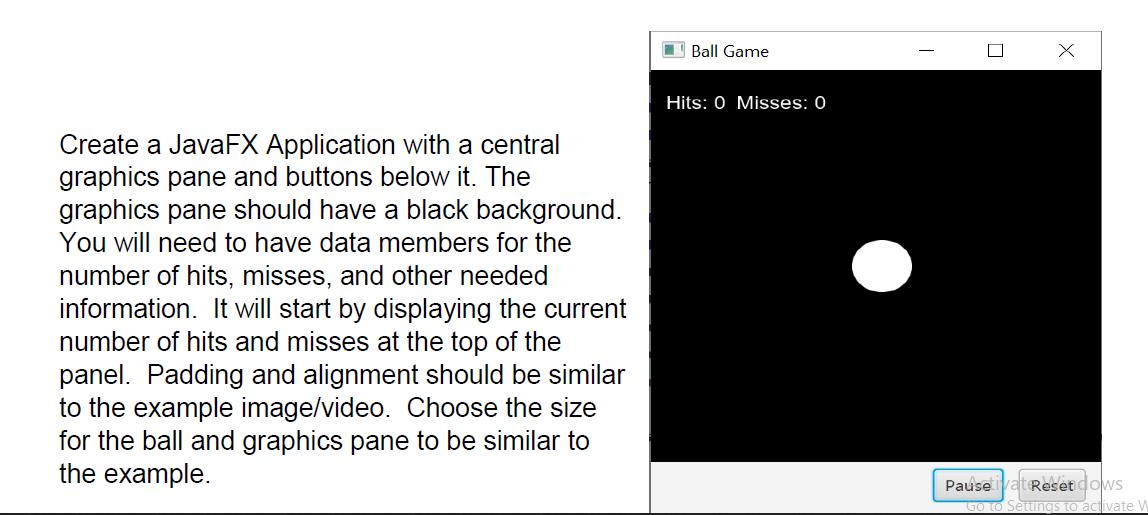
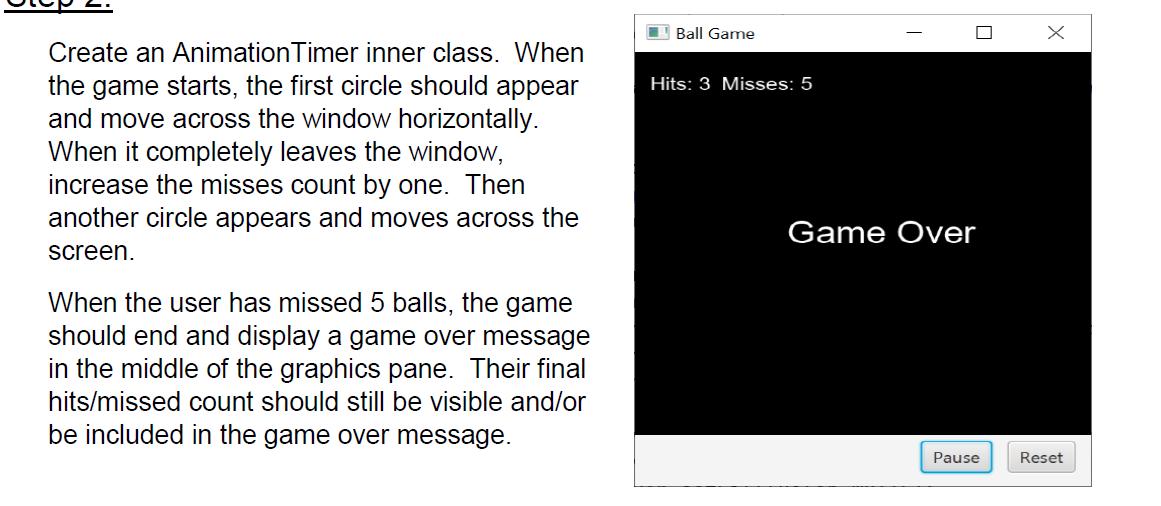
Create a JavaFX Application with a central graphics pane and buttons below it. The graphics pane should have a black background. You will need to have data members for the number of hits, misses, and other needed information. It will start by displaying the current number of hits and misses at the top of the panel. Padding and alignment should be similar to the example image/video. Choose the size for the ball and graphics pane to be similar to the example. Ball Game Hits: 0 Misses: 0 I U X Pause Reset dows Go to Settings to activate W Create an Animation Timer inner class. When the game starts, the first circle should appear and move across the window horizontally. When it completely leaves the window, increase the misses count by one. Then another circle appears and moves across the screen. When the user has missed 5 balls, the game should end and display a game over message in the middle of the graphics pane. Their final hits/missed count should still be visible and/or be included in the game over message. Ball Game Hits: 3 Misses: 5 Game Over Pause X Reset Step 3: Create event handlers to make the buttons function. The reset button should completely reset the game as if the application was just started. It should do this if the game is running, paused, or ended. The pause button should pause the game in progress and if clicked again, the game should continue. When the game is paused the animation should stop and clicking on the ball should have no effect. The pause button should also have no effect if the game has ended. Step 4: Setup an event handler for when the mouse is clicked. If the user clicks on a circle, they have scored a hit and the circle should disappear. When the user scores a hit, the next circle's speed should be slightly higher. If the user misses, do nothing. The misses count only increases when the circle leaves the scene. When the game is paused or has ended, clicking does nothing. Hints: Do not place all of your code directly into the start method and event handler/animation methods. Create at least two useful helper methods for code that needs to be called from multiple locations. One example, many of the same things need to happen when the application is started and when the reset button is clicked.
Step by Step Solution
3.51 Rating (148 Votes )
There are 3 Steps involved in it
Java import javafxanimationAnimationTimer import javafxapplicationApplication import javafxgeometryInsets import javafxsceneScene import javafxscenecontrolButton import javafxscenelayoutBorderPane imp... View full answer

Get step-by-step solutions from verified subject matter experts
 Study Help