







Question: Create a JavaScript code that can access Cesium - an browser based 3D globe - while offline. Within that code, also make sure the application
Create a JavaScript code that can access Cesium - an browser based 3D globe - while offline. Within that code, also make sure the application runs with high resolution tiles so that there is minimal lag and pixilation when zooming in.
Then continue to test the code by highlighting the state of Wyoming. The code for highlighting the state of Wyoming is provided in the attached picture as a source of guidance for when running the application offline
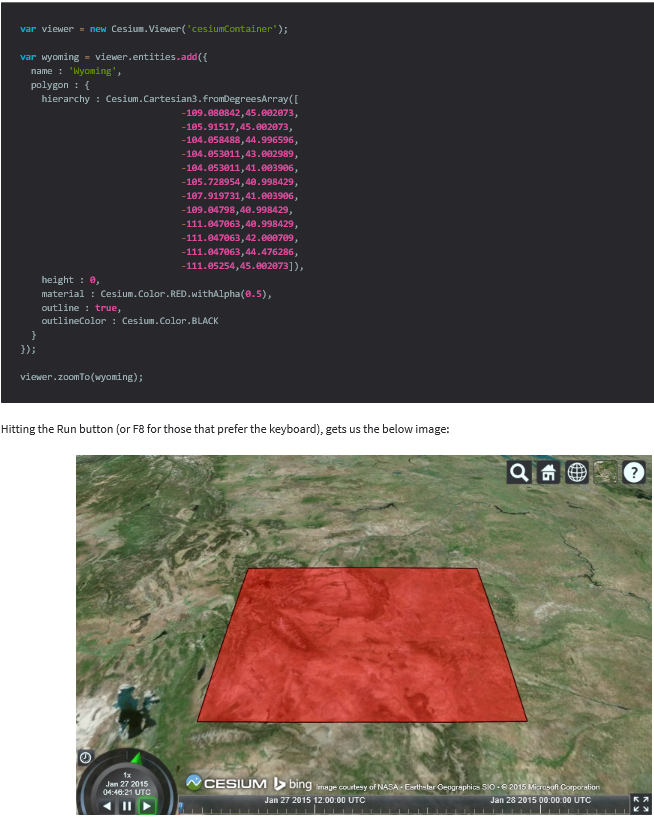
var viewer new Cesium. Viewer cesiumContainer"); var Wyoming viewer.entities.add({ name 'Wyoming', polygon hierarchy Cesium.Cartesian3.fromDegreesArray(C 109.080842, 45.002073 -105.91517,45.002073, 104.058488, 44.996596, 104.053011, 43.002989 104.053011, 41.003906 105.728954, 40.998429 107.919731, 41.003906 -109.04798,40.998429, -111.047063,40.998429, 111.047063, 42.000709 111.047063, 44.476286 111.05254, 45.0020731), height 0, material Cesium.Color.RED.withAlpha(0.5), outline true outline Color Cesium. Color BLACK viewer.zoomTo(wyoming); Hitting the Run button (or F8 for those that preferthe keyboard), gets us the below image: 1x Jan 27 2015 ing courtesy of NASA Earth ter 04:48:21 UTC Jan 27 2015 12.00:00 UTC SO-820 1 Mi Corporation Jan 28 2015 00.00.00 UTC
Step by Step Solution
There are 3 Steps involved in it

Get step-by-step solutions from verified subject matter experts
 Study Help