







Question: Create a Mad Libs Use JavaScript to create a Mad Libs. See minimum requirements below. Create a folder named madlibs and save it within your
Create a Mad Libs
Use JavaScript to create a Mad Libs. See minimum requirements below.
Create a folder named madlibs and save it within your course folder. Keep all files related to this assessment within your madlibs folder.
- HTML File
- Create an HTML file that utilizes a minimum of 6 form input elements to collect end-user data (noun, adjective, etc.). Use at least 2 different input types, such as a text or selection (Links to an external site.)Links to an external site.. Form resource: w3schools.com
- Use proper HTML Elements on your page and ensure that the page passes validation.
- HTML file does not contain any embedded JavaScript
- External JavaScript File:
- Create all necessary variables
- Create a function that takes the user input and displays a completed Mad Libs story on the HTML page within a paragraph element.
- Create a function that takes the user input and displays a different, completed Mad Libs story on the HTML page within a heading element.
- Use an Event Listener that is compatible with all major browsers
- Comment generously; every variable, every function
Not sure what a mad libs is? See example https://i2.wp.com/theinquisitivemom.com/wp-content/uploads/2016/03/Make-Your-Own-Mad-Libs-2.jpg
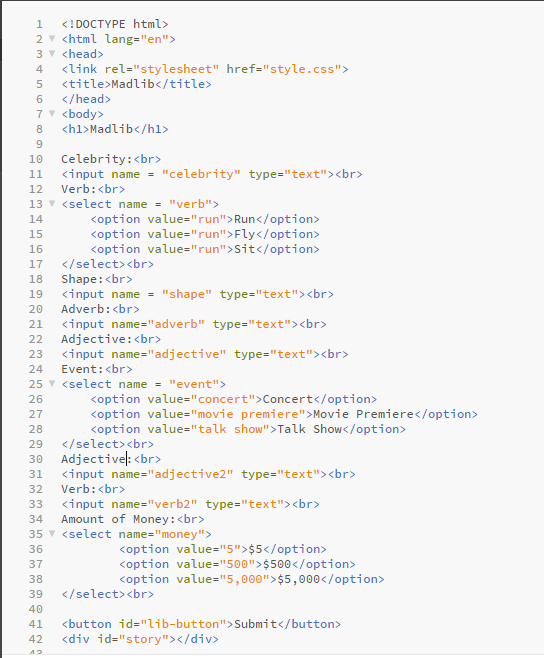
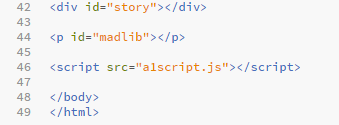
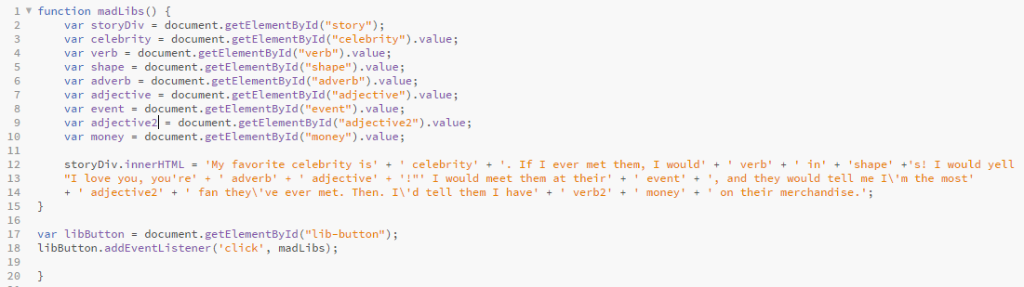
This is what I have so far, but I'm not sure how to output it:
2 4 Madlib 6 7 8
22 Adjective: 23 24 Event: 25 30 Adjective: 31 input name-"adjective2" type-"text" 32 Verb: 33 36 Koption value-"run" Run Koption value-"run">Fly Koption value-"run">Sit Koption value-"concert" Concert Koption value-"movie premiere" >Movie Premiere Koption value-"talk show">Talk Show Koption value-5"> $5 Koption value-"500"> $500 Koption value-"5,000"> $5,000 38 39 40 41 42
Step by Step Solution
There are 3 Steps involved in it

Get step-by-step solutions from verified subject matter experts
 Study Help