







Question: Create a new ASP.NET Core MVC web application called CarOptions, then complete the following task: A. [1 POINT] Set the default layout for all
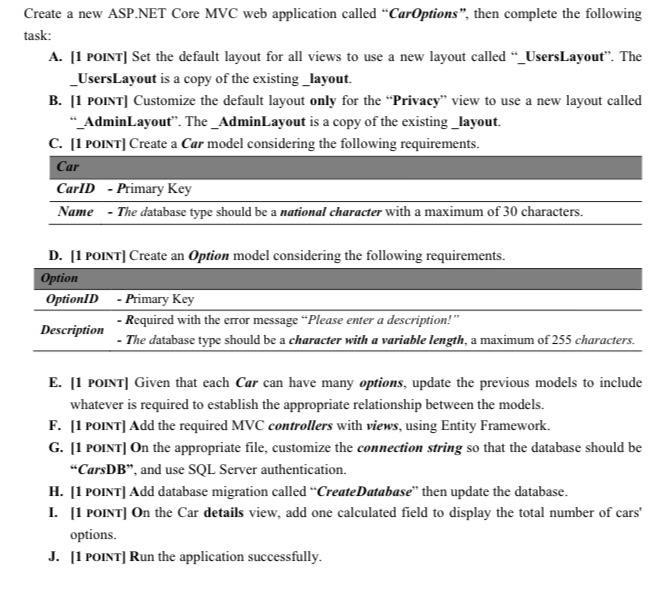
Create a new ASP.NET Core MVC web application called "CarOptions", then complete the following task: A. [1 POINT] Set the default layout for all views to use a new layout called "_UsersLayout". The _UsersLayout is a copy of the existing layout. B. [1 POINT] Customize the default layout only for the "Privacy" view to use a new layout called " AdminLayout". The_AdminLayout is a copy of the existing _layout. C. [1 POINT] Create a Car model considering the following requirements. Car CarlD - Primary Key Name - The database type should be a national character with a maximum of 30 characters. D. [1 POINT] Create an Option model considering the following requirements. Option OptionID - Primary Key - Required with the error message "Please enter a description!" Description - The database type should be a character with a variable length, a maximum of 255 characters. E. [1 POINT] Given that each Car can have many options, update the previous models to include whatever is required to establish the appropriate relationship between the models. F. [1 POINT] Add the required MVC controllers with views, using Entity Framework. G. [1 POINT] On the appropriate file, customize the connection string so that the database should be "CarsDB", and use SQL Server authentication. H. [1 POINT] Add database migration called "CreateDatabase" then update the database. I. [1 POINT] On the Car details view, add one calculated field to display the total number of cars' options. J. [1 POINT] Run the application successfully.
Step by Step Solution
3.51 Rating (154 Votes )
There are 3 Steps involved in it
FOR LAYOUT Create a new project and then select ASPNET core web applicat... View full answer

Get step-by-step solutions from verified subject matter experts
 Study Help