







Question: Create a new function file called modify matrix.m. Then copy and paste the contents of the create matrix.m file into this new file, and change
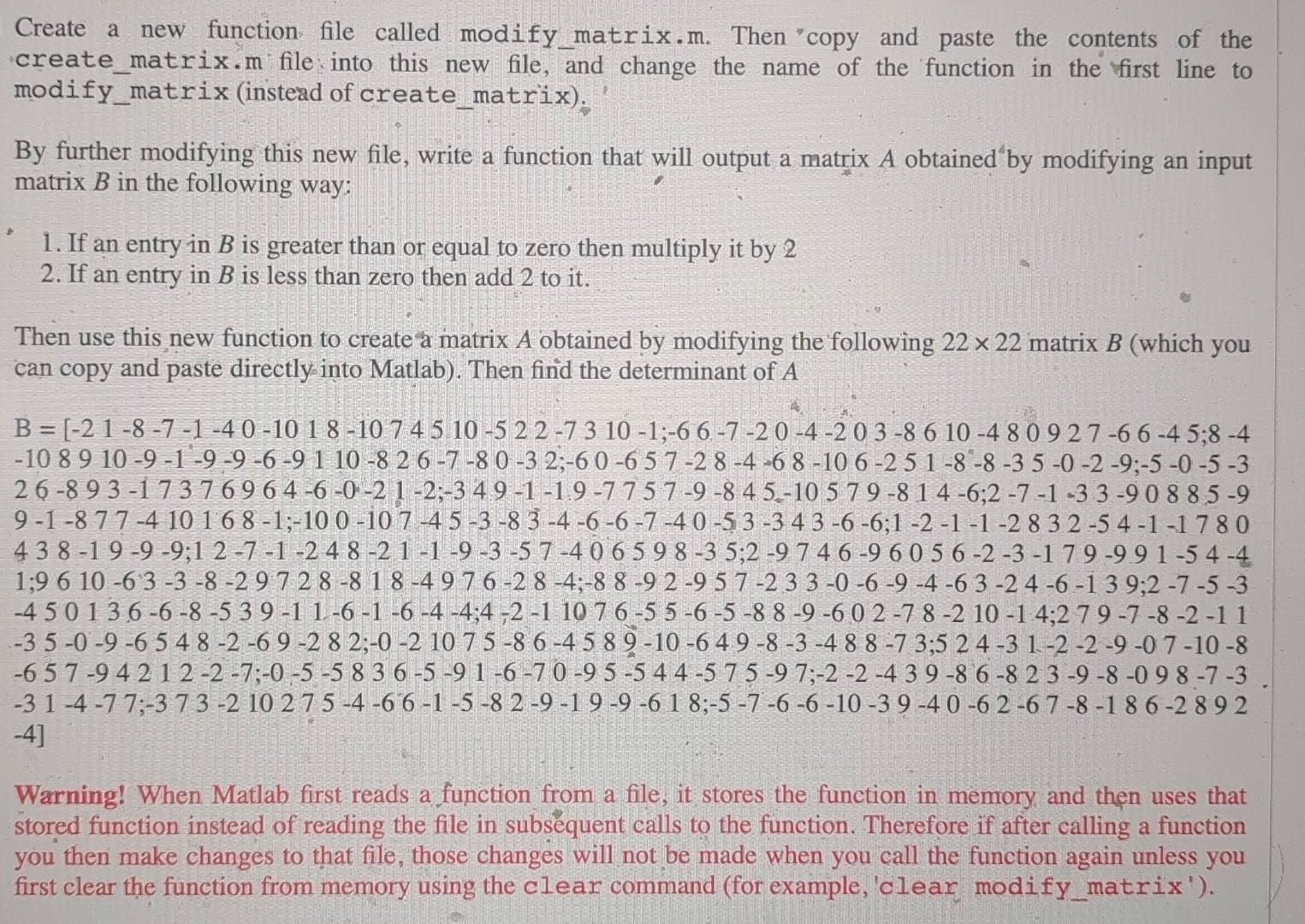
Create a new function file called modify matrix.m. Then "copy and paste the contents of the create matrix.m file into this new file, and change the name of the function in the first line to modify matrix (instead of create matrix). By further modifying this new file, write a function that will output a matrix A obtained by modifying an input matrix B in the following way: 1. If an entry in B is greater than or equal to zero then multiply it by 2 2. If an entry in B is less than zero then add 2 to it. Then use this new function to create a matrix A obtained by modifying the following 2222 matrix B (which you can copy and paste directly into Matlab). Then find the determinant of A 4] Warning! When Matlab first reads a function from a file, it stores the function in memory and then uses that stored function instead of reading the file in subsequent calls to the function. Therefore if after calling a function you then make changes to that file, those changes will not be made when you call the function again unless you first clear the function from memory using the clear command (for example, clear modify_matrix')
Step by Step Solution
There are 3 Steps involved in it

Get step-by-step solutions from verified subject matter experts
 Study Help