







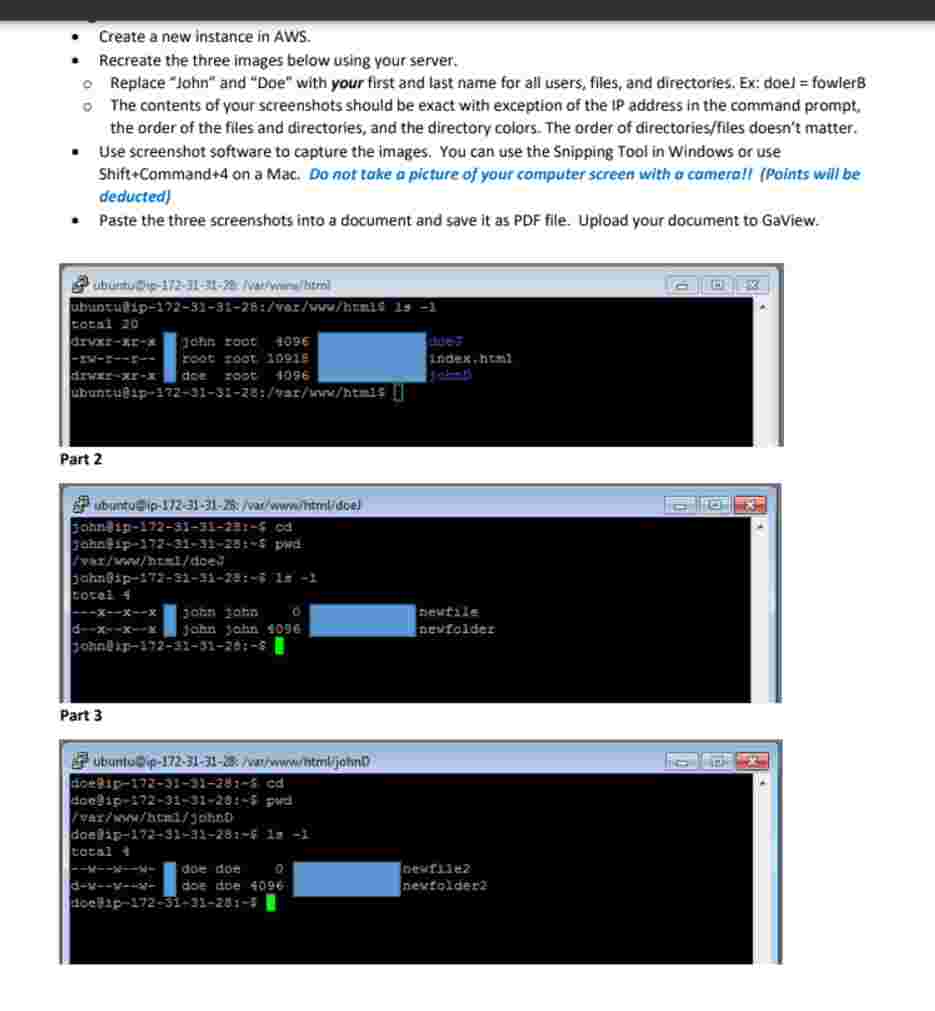
Question: - Create a new instance in AWS. - Recreate the three images below using your server.Replace John and Doe with your first and last name
Create a new instance in AWS.
Recreate the three images below using your server.Replace "John" and "Doe" with your first and last name for all users, files, and directories. Ex: doel fowler'The contents of your screenshots should be exact with exception of the IP address in the command prompt, the order of the filies and directories, and the directory colors. The order of directoriesfiles doesn't matter.
Use screenshot software to capture the lmages. You can use the Snipping Tool in Windows or use ShiftCommand on a Mac. Do not take a picture of your computer screen with a camerall Points will be deducted
Paste the three screenshots into a document and save it as PDF file. Upload your document to GaView.
Part
Part
Step by Step Solution
There are 3 Steps involved in it
1 Expert Approved Answer
Step: 1 Unlock

Question Has Been Solved by an Expert!
Get step-by-step solutions from verified subject matter experts
Step: 2 Unlock
Step: 3 Unlock
 Study Help