



Question: Create a new object of type Scanner that reads from the keyboard Create a new movie object Prompt the user to enter the title of
Create a new object of type Scanner that reads from the keyboard
Create a new movie object
Prompt the user to enter the title of a movie
Read in the line that the user types
Set the title in the movie object
Prompt the user to enter the movies rating
Read in the line that the user types
Set the rating in the movie object
Prompt the user to enter the number of tickets sold at a (unnamed) theater
Read in the integer that the user types
Set the number of tickets sold in the movie object
Print out the information using the movies toString method
Add to your driver class a loop that reads input for multiple movies. Your code does not need to save each movie as you enter the next one.
Ask the user if they want to continue, and continue the loop if the user types the correct response.
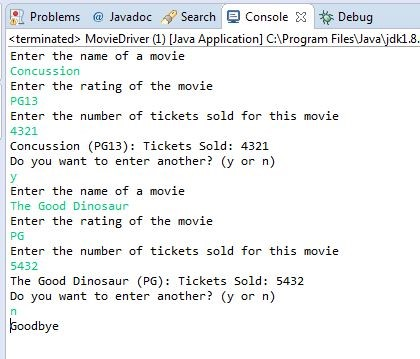
Run the new driver to ensure that it reads and prints multiple movies.Your Eclipse console should look something like this:
Problems Javadoc Search ConsoleDebug
Step by Step Solution
There are 3 Steps involved in it

Get step-by-step solutions from verified subject matter experts