







Question: Create a new record to represent your new data type (this will be in its own .java file): Tip: You can delete any file content
Create a new record to represent your new data type (this will be in its own .java file):
Tip: You can delete any file content VS Code initially creates then start typing record and select the second option, with the box icon next to it to have it create an appropriate skeleton for you to add to
- Declare the properties inside the () at the top
- Define a customized toString() method that displays the data in the object as specified in your chosen option. The implementation details of this vary depending on the option you choose. Remember that you can create a String value one piece at a time and use += to append to it.
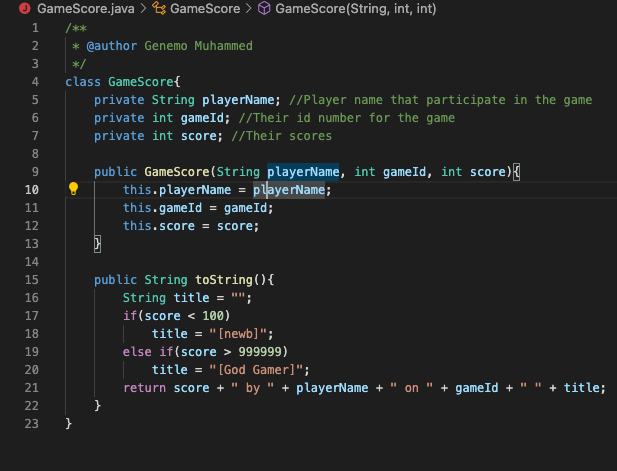
23 GameScore.java > GameScore > GameScore (String, int, int) 1 /** 4 56988 7 10 11 12 13 14 15 16 EZZ267222222 * @author Genemo Muhammed */ class GameScore{ private String playerName; //Player name that participate in the game private int gameId; //Their id number for the game private int score; //Their scores public GameScore (String playerName, int gameId, int score){ this.playerName = playerName; this.gameId = gameId; this.score = score; 17 18 19 20 21 23 } public String toString() { String title = ""; } if(score < 100) | title = "[newb]"; else if(score > 999999) title = "[God Gamer]"; return score + " by " + playerName + on " + gameId + " " + title;
Step by Step Solution
There are 3 Steps involved in it
Heres the corrected GameScorejava file with the toString method implemented GameScore represents the ... View full answer

Get step-by-step solutions from verified subject matter experts
 Study Help