







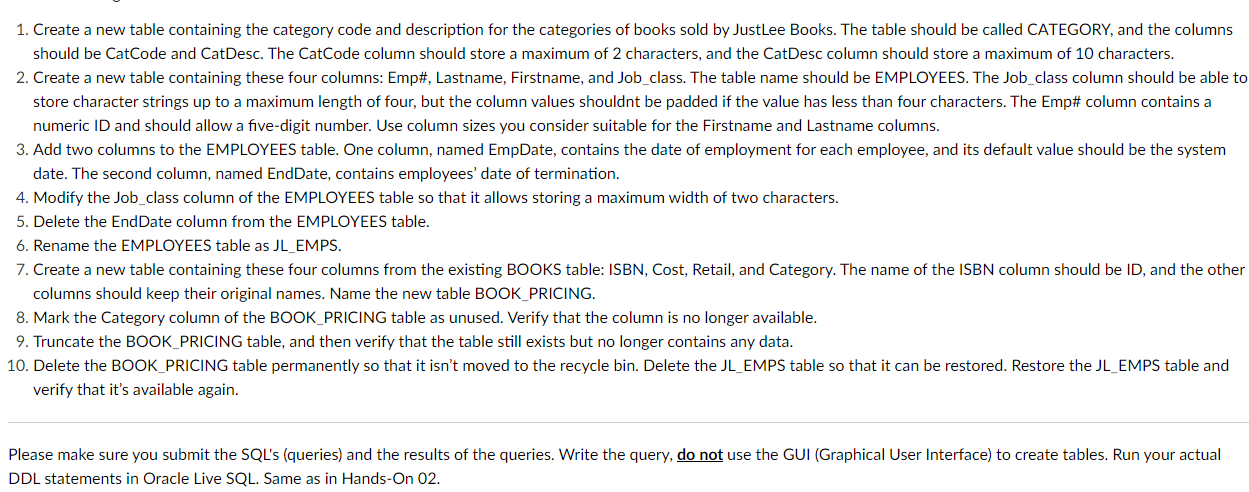
Question: Create a new table containing the category code and description for the categories of books sold by JustLee Books. The table should be called CATEGORY,
Create a new table containing the category code and description for the categories of books sold by JustLee Books. The table should be called CATEGORY, and the columns
should be CatCode and CatDesc. The CatCode column should store a maximum of characters, and the CatDesc column should store a maximum of characters.
Create a new table containing these four columns: Emp# Lastname, Firstname, and Jobclass. The table name should be EMPLOYEES. The Jobclass column should be able to
store character strings up to a maximum length of four, but the column values shouldnt be padded if the value has less than four characters. The Emp# column contains a
numeric ID and should allow a fivedigit number. Use column sizes you consider suitable for the Firstname and Lastname columns.
Add two columns to the EMPLOYEES table. One column, named EmpDate, contains the date of employment for each employee, and its default value should be the system
date. The second column, named EndDate, contains employees' date of termination.
Modify the Jobclass column of the EMPLOYEES table so that it allows storing a maximum width of two characters.
Delete the EndDate column from the EMPLOYEES table.
Rename the EMPLOYEES table as JLEMPS.
Create a new table containing these four columns from the existing BOOKS table: ISBN, Cost, Retail, and Category. The name of the ISBN column should be ID and the other
columns should keep their original names. Name the new table BOOKPRICING.
Mark the Category column of the BOOKPRICING table as unused. Verify that the column is no longer available.
Truncate the BOOKPRICING table, and then verify that the table still exists but no longer contains any data.
Delete the BOOKPRICING table permanently so that it isn't moved to the recycle bin. Delete the JLEMPS table so that it can be restored. Restore the JLEMPS table and
verify that it's available again.
Please make sure you submit the SQLs queries and the results of the queries. Write the query, do not use the GUI Graphical User Interface to create tables. Run your actual
DDL statements in Oracle Live SQL Same as in HandsOn
Step by Step Solution
There are 3 Steps involved in it
1 Expert Approved Answer
Step: 1 Unlock

Question Has Been Solved by an Expert!
Get step-by-step solutions from verified subject matter experts
Step: 2 Unlock
Step: 3 Unlock
 Study Help