







Question: Create a new Windows Destop ( . NET ) application Go out to the project Gutenberg website ( Free eBooks | Project Gutenberg ) and
Create a new Windows Destop NET application
Go out to the project Gutenberg website Free eBooks Project Gutenberg and download two books that interest you.
Build your Windows form. Include two prompts to prompt the user to choose a file. Make sure to include one prompt for each file.
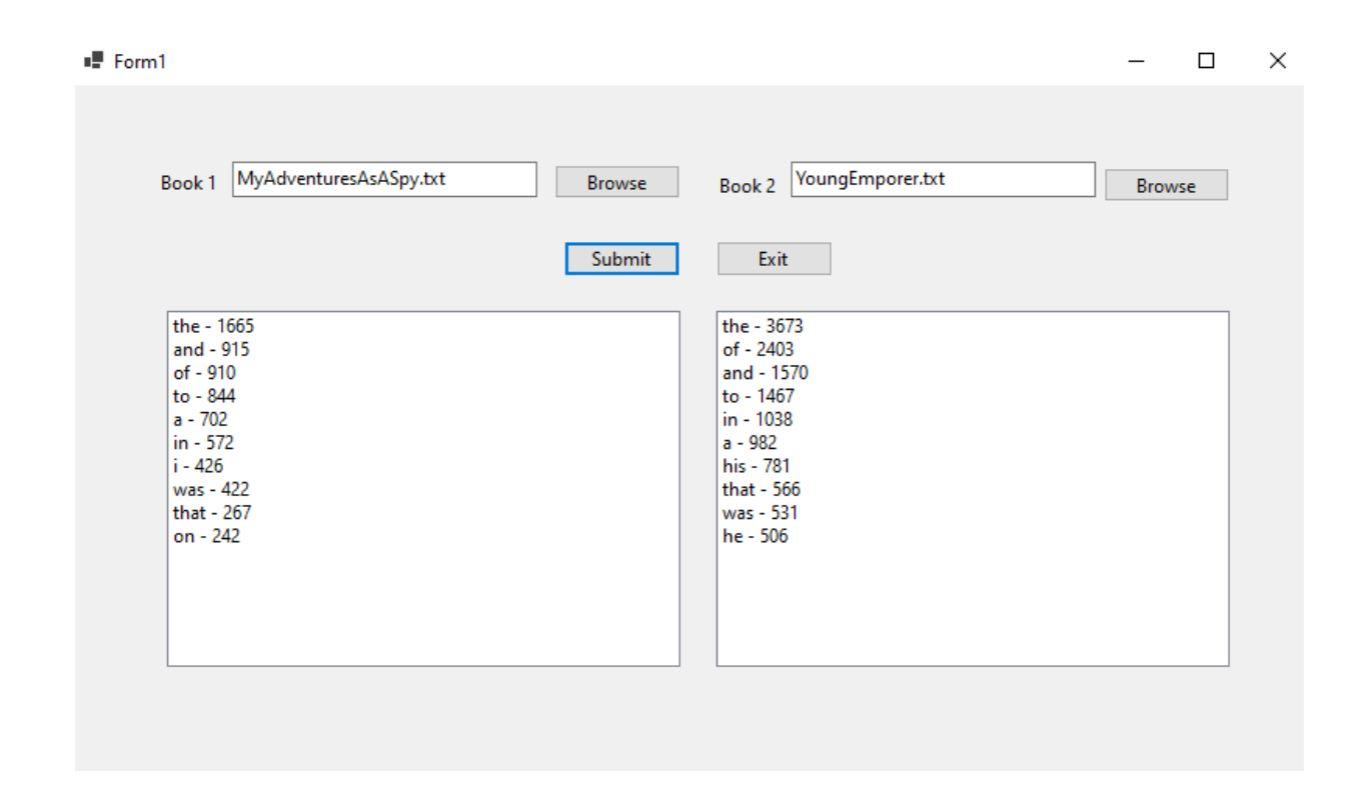
Add a button to the form. Make sure to use proper naming conventions for all objects on the form. This button should process each file asynchronously and display each file contents in a separate list box view. The list should display the most used words in each book. An example can be found below.
Step by Step Solution
There are 3 Steps involved in it
1 Expert Approved Answer
Step: 1 Unlock

Question Has Been Solved by an Expert!
Get step-by-step solutions from verified subject matter experts
Step: 2 Unlock
Step: 3 Unlock
 Study Help