







Question: Create a new worksheet Original Loan Amortization Table. Use the Loan Amount, Original Interest Rate and Loan Term to build a mortgage amortization table (from
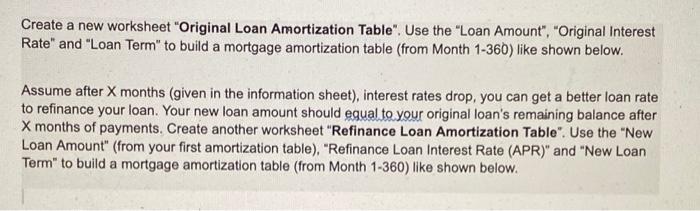
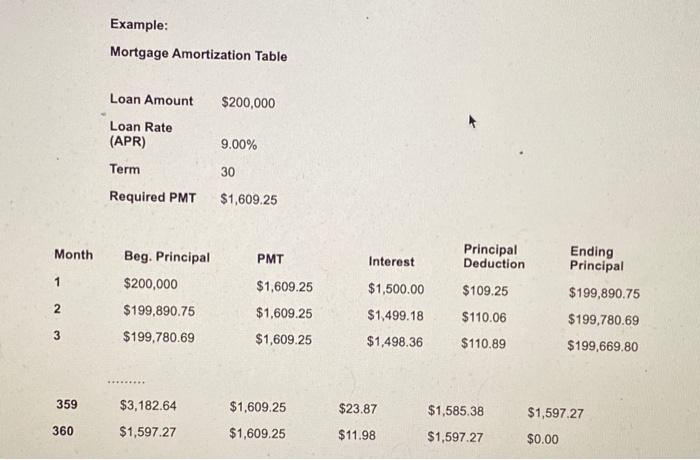
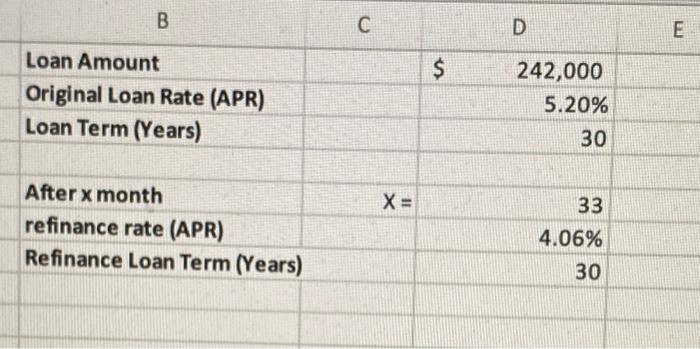
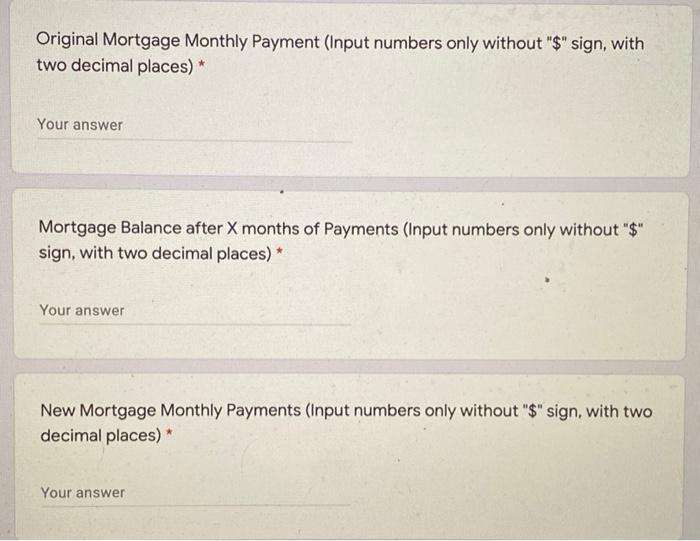
Create a new worksheet "Original Loan Amortization Table". Use the "Loan Amount", "Original Interest Rate" and "Loan Term" to build a mortgage amortization table (from Month 1-366) like shown below. Assume after X months (given in the information sheet), interest rates drop, you can get a better loan rate to refinance your loan. Your new loan amount should equal to your original loan's remaining balance after X months of payments. Create another worksheet "Refinance Loan Amortization Table". Use the "New Loan Amount" (from your first amortization table), "Refinance Loan Interest Rate (APR)" and "New Loan Term" to build a mortgage amortization table (from Month 1-360) like shown below. Example: Mortgage Amortization Table Loan Amount $200,000 Loan Rate (APR) 9.00% Term 30 Required PMT $1,609.25 Month PMT Interest Principal Deduction 1 Ending Principal $199,890.75 Beg. Principal $200,000 $199,890.75 $199,780.69 $1,500.00 $109.25 $1,609.25 $1,609.25 $1,499.18 $110.06 $199,780.69 $1,609.25 $1,498.36 $110.89 $199,669.80 359 $3,182.64 $23.87 $1,585.38 $1,597.27 $1,609.25 $1,609.25 360 $1,597.27 $11.98 $1,597.27 $0.00 B D E $ Loan Amount Original Loan Rate (APR) Loan Term (Years) 242,000 5.20% 30 X= 33 After x month refinance rate (APR) Refinance Loan Term (Years) 4.06% 30 Original Mortgage Monthly Payment (Input numbers only without "$" sign, with two decimal places)* Your answer Mortgage Balance after X months of Payments (Input numbers only without "$" sign, with two decimal places) * Your answer New Mortgage Monthly Payments (Input numbers only without "$" sign, with two decimal places) * Your
Step by Step Solution
There are 3 Steps involved in it

Get step-by-step solutions from verified subject matter experts
 Study Help