



Question: Create a PLC program for a ride vehicle for them park on RSLogix 500 or similar program RIDE VEHICLE Objective: To use the knowledge of
Create a PLC program for a ride vehicle for them park on RSLogix 500 or similar program
RIDE VEHICLE
Objective:
To use the knowledge of Timers and Counters towards the development and implementation of a program that simulates a park ride.
General Operation:
A ride has pulled into the station and the riders are ready to disembark as soon as the seat restraints go up. Guests exit the vehicle, as new riders enter the vehicle and start to fill up the rows of seats. A counter is activated to count the number of riders per row, and a counter to count the number of rows. Once all seats are filled, the seat restraints come down to get ready for launch. Once the operator has verified that all conditions are met for launch, the launch operator presses the LAUNCH button to launch the vehicle.
System Operation:
After the PLC detects a rising edge from the Photosensor, the LAUNCHED light should turn OFF.
5 seconds later the seat restraints should come up automatically. riders may then exit the vehicle.
When the Photosensor is ON and 3 pulses from the TURNSTILE output have been counted, the first row should be filled and the ROW 1 light should turn ON.
When the Photosensor is ON and 6 pulses from the TURNSTILE output have been counted, the second row should be filled and the ROW 2 light should turn ON.
When the Photosensor is ON and 9 pulses from the TURNSTILE output have been counted, the third row should be filled and the ROW 3 light should turn ON.
After all the rows are filled, and the operator presses the DN pushbutton, the seat restraints should come down.
If the Photosensor is ON and the operator presses the UP pushbutton, the seat restraints should come up.
After both, the seat restraints are down and the operator presses the LAUNCH pushbutton, the ride vehicle should launch.
Vehicle launches and the operator is ready for the next ride.
NOTE: When the program is downloaded, the LAUNCHED light may not be ON. This is normal. In addition, the seat restraints may go up 5 seconds after you download the program. This is normal too.
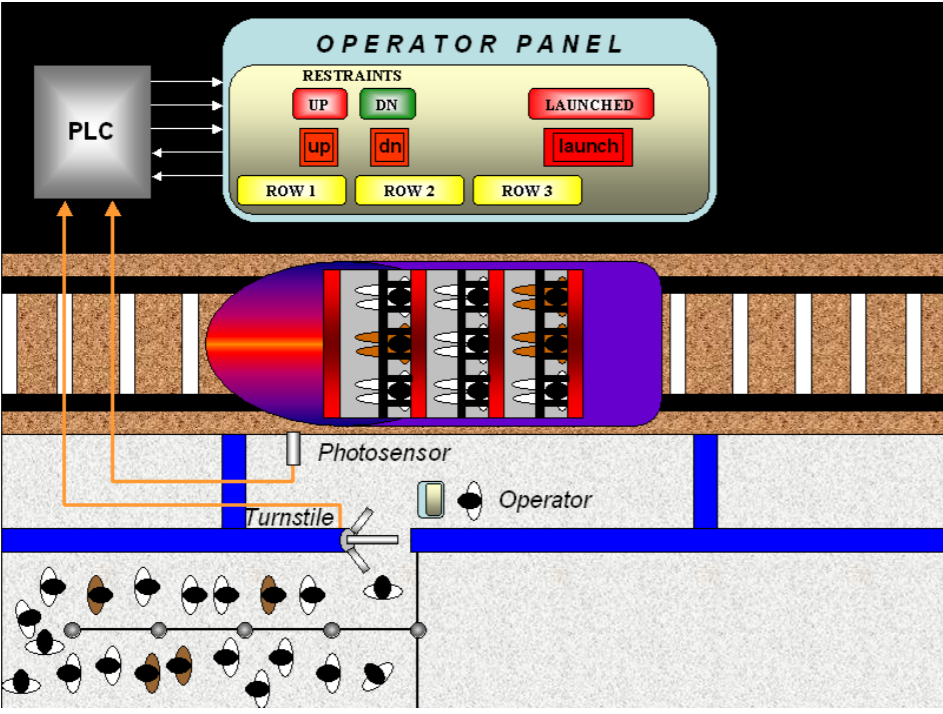
OPERATOR PANEL RESTRAINTS UP UP DN DN LAUNCHED PLC dn ROW1 ROW 2 ROW 3 Photosensor Operator Turnstile
Step by Step Solution
There are 3 Steps involved in it

Get step-by-step solutions from verified subject matter experts