







Question: Create a PL/SQL block that uses data in the company database to do the following tasks: 1) Retrieve information about an employee and print it
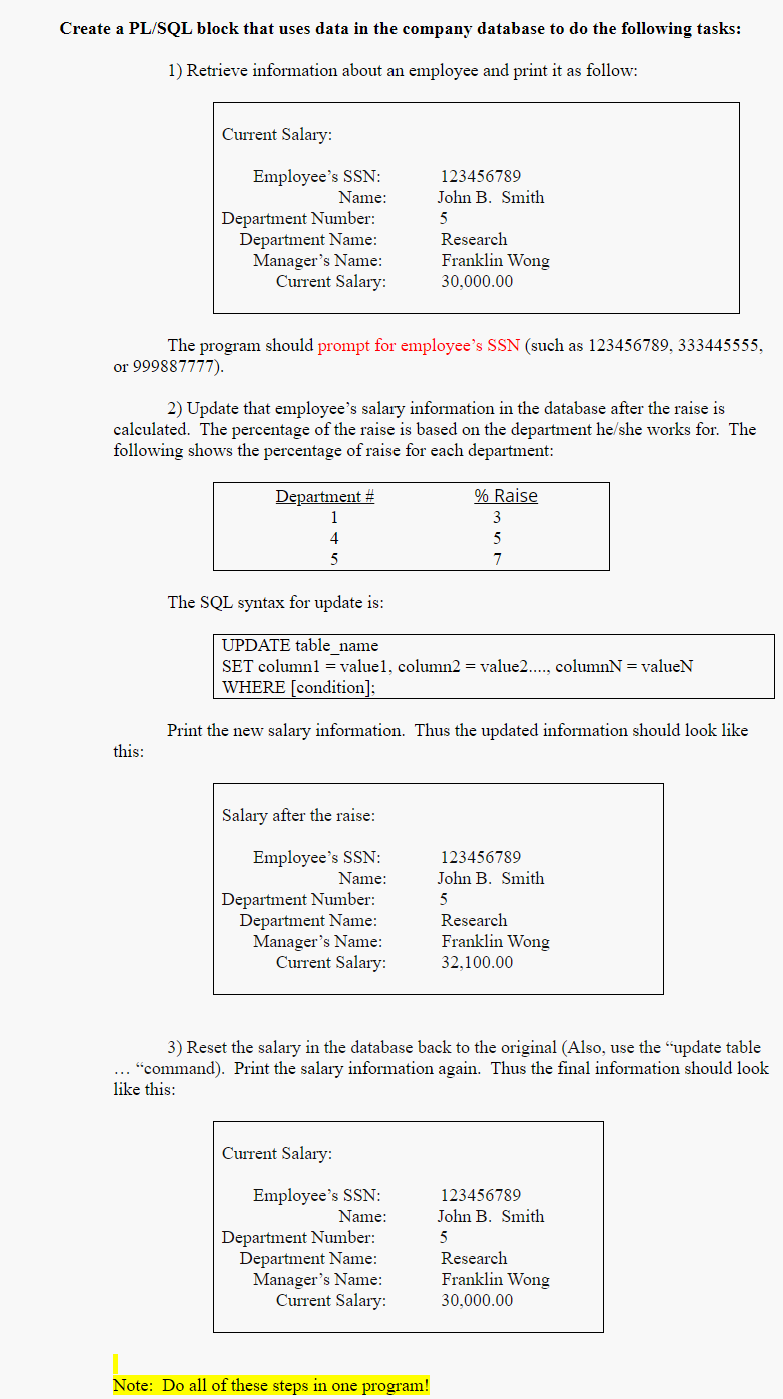
Create a PL/SQL block that uses data in the company database to do the following tasks: 1) Retrieve information about an employee and print it as follow: Current Salary: Employee's SSN: Name: Department Number: Department Name: Manager's Name: Current Salary: 123456789 John B. Smith 5 Research Franklin Wong 30,000.00 The program should prompt for employee's SSN (such as 123456789, 333445555, or 999887777). 2) Update that employee's salary information in the database after the raise is calculated. The percentage of the raise is based on the department he/she works for. The following shows the percentage of raise for each department: Department # 1 % Raise 3 5 7 4 5 The SQL syntax for update is: UPDATE table_name SET columnl = valuel, column2 = value2...., columnN = valueN WHERE (condition]: Print the new salary information. Thus the updated information should look like this: Salary after the raise: Employee's SSN: Name: Department Number: Department Name: Manager's Name: Current Salary: 123456789 John B. Smith 5 Research Franklin Wong 32.100.00 3) Reset the salary in the database back to the original (Also, use the "update table "command). Print the salary information again. Thus the final information should look like this: Current Salary: Employee's SSN: Name: Department Number: Department Name: Manager's Name: Current Salary: 123456789 John B. Smith 5 Research Franklin Wong 30,000.00 Note: Do all of these steps in one program! Create a PL/SQL block that uses data in the company database to do the following tasks: 1) Retrieve information about an employee and print it as follow: Current Salary: Employee's SSN: Name: Department Number: Department Name: Manager's Name: Current Salary: 123456789 John B. Smith 5 Research Franklin Wong 30,000.00 The program should prompt for employee's SSN (such as 123456789, 333445555, or 999887777). 2) Update that employee's salary information in the database after the raise is calculated. The percentage of the raise is based on the department he/she works for. The following shows the percentage of raise for each department: Department # 1 % Raise 3 5 7 4 5 The SQL syntax for update is: UPDATE table_name SET columnl = valuel, column2 = value2...., columnN = valueN WHERE (condition]: Print the new salary information. Thus the updated information should look like this: Salary after the raise: Employee's SSN: Name: Department Number: Department Name: Manager's Name: Current Salary: 123456789 John B. Smith 5 Research Franklin Wong 32.100.00 3) Reset the salary in the database back to the original (Also, use the "update table "command). Print the salary information again. Thus the final information should look like this: Current Salary: Employee's SSN: Name: Department Number: Department Name: Manager's Name: Current Salary: 123456789 John B. Smith 5 Research Franklin Wong 30,000.00 Note: Do all of these steps in one program
Step by Step Solution
There are 3 Steps involved in it

Get step-by-step solutions from verified subject matter experts
 Study Help