







Question: Create a program in AVR microcontrolling in C and upload it into your Arduino Mega 2560 board to implement a simple credit card management system.
Create a program in AVR microcontrolling in C and upload it into your Arduino Mega 2560 board to implement a simple credit card management system. The Arduino Mega 2560 should interact with the user via the Serial Monitor. This Question is based on AVR programming in C and should compile on Ardunio IDE.
The use of high level ArduinoFunctions (seehttp://arduino.cc/en/Reference/HomePage, under Functions) is not permitted.Significant marks will be deducted if any of the functions is used. Native C functionsare however permitted.
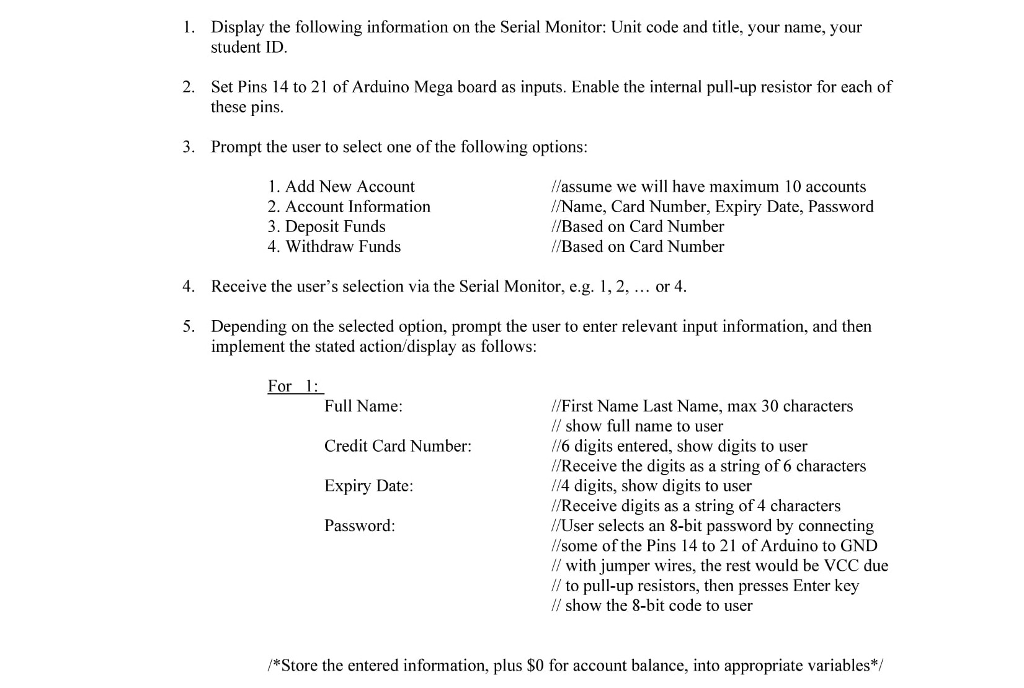
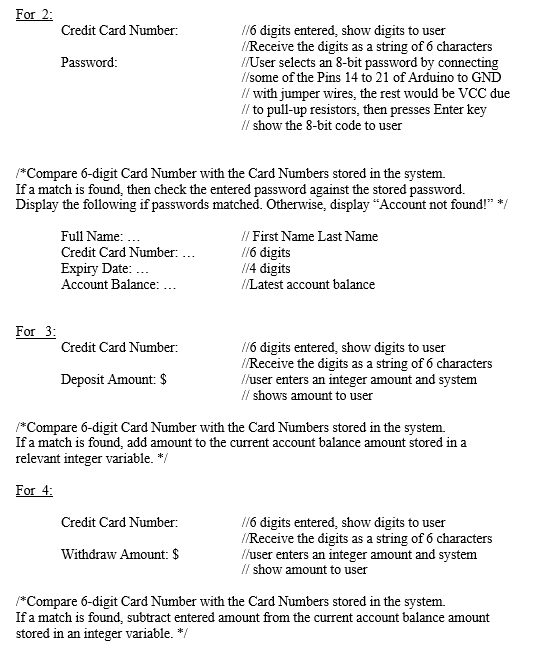
.BELOW IS A SAMPLE CODE AS A GUIDE OF WHAT IS EXPECTED.
/* Fahrenheit to Celsius Converter */ int degF; float degC; char degS[20]; static FILE uart00 = {0}; void setup(void) { USART0_init(); //initialise USART0 parameters fdev_setup_stream (&uart00, TX, RX, _FDEV_SETUP_RW); //Associate RX and TX functions with stdin/stdout stdin= stdout = &uart00 ; //the uart is defined as the standard inputa/output device } void loop(void) { printf("------------------------------- "); //display messages printf("Fahrenheit to Celsius Converter "); //display messages printf("------------------------------- "); //display messages printf("Fahrenheit: "); //display messages scanf("%d",F); //get Fahrenheit degree printf("%d ",degF); //show the obtained Fahrenheit degree degC = ((degF)-32) / 1.8; //calculate Celsius degree dtostrf(degC,6,2,degS); //convert float to string, width 6 precision 2 printf("Celsius: %s ",degS); //display Celsius degree } void USART0_init(void) { UCSR0A = B00000000; //single transmission speed, multiprocessor disabled UCSR0B = B00011000; //enable Rx & Tx UCSR0C = B00000110; //asynchronous, no parity, 1 stop, 8 bits UBRR0 = 103; //load the value for 9600 bps baud rate into whole UBRR register } static int RX(FILE *stream) { //do nothing until data is received and is ready to be read from UDR0; wait for USART RX Complete flag while ((UCSR0A & (1 1. Display the following information on the Serial Monitor: Unit code and title, your name, your student ID 2. Set Pins 14 to 21 of Arduino Mega board as inputs. Enable the internal pull-up resistor for each of these pins 3. Prompt the user to select one of the following options 1. Add New Account 2. Account Information 3. Deposit Funds 4. Withdraw Funds /assume we will have maximum 10 accounts //Name, Card Number, Expiry Date, Password //Based on Card Number /Based on Card Number 4. Receive the user's selection via the Serial Monitor, e.g. 1,2, or 4 5. Depending on the selected option, prompt the user to enter relevant input information, and then implement the stated action/display as follows For1: Full Name: Credit Card Number: Expiry Date Password //First Name Last Name, max 30 characters / show full name to user //6 digits entered, show digits to user //Receive the digits as a string of 6 characters //4 digits, show digits to user //Receive digits as a string of 4 characters /User //some of the Pins 14 to 21 of Arduino to GND // with jumper wires, the rest would be VCC due // to pull-up resistors, then presses Enter key show the 8-bit code to user selects an 8-bit password by connecting /*Store the entered information, plus $0 for account balance, into appropriate variables*
Step by Step Solution
There are 3 Steps involved in it

Get step-by-step solutions from verified subject matter experts
 Study Help