







Question: Create a program that allows you to view and edit the sales amounts for each month of the current year. The program will use a
Create a program that allows you to view and edit the sales amounts for each month of the current year.
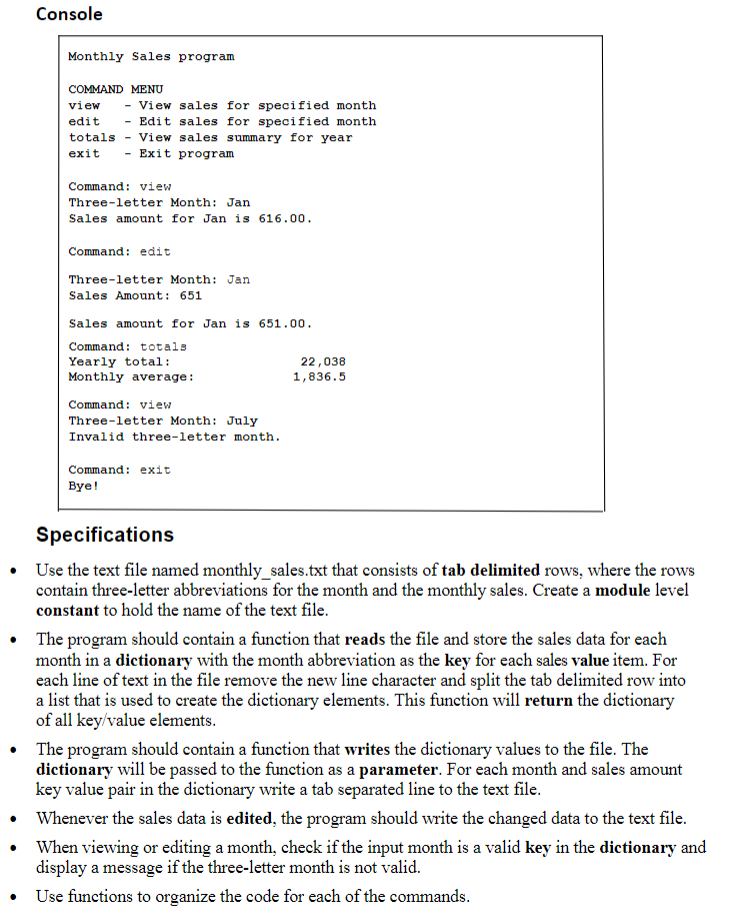
The program will use a dictionary to store the data instead of a list. Follow the formatting shown in the
sample output
Montly sales txt
Jul
Dec
May
Mar
Apr
Oct
Aug
Jun
Feb
Nov
Jan
Sep
Console
Monthly Sales program
COMMAND MENU
view View sales for specified month
edit Edit sales for specified month
totals View sales summary for year
exit Exit program
Command: view
Threeletter Month: Jan
Sales amount for Jan is
Command: edit
Threeletter Month: Jan
Sales Amount:
Sales amount for Jan is
Command: totals
Yearly total:
Monthly average:
Command: view
Threeletter Month: July
Invalid threeletter month.
Command: exit
Bye!
Specifications
Use the text file named monthlysales.txt that consists of tab delimited rows, where the rows
contain threeletter abbreviations for the month and the monthly sales. Create a module level
constant to hold the name of the text file.
The program should contain a function that reads the file and store the sales data for each
month in a dictionary with the month abbreviation as the key for each sales value item. For
each line of text in the file remove the new line character and split the tab delimited row into
a list that is used to create the dictionary elements. This function will return the dictionary
of all keyvalue elements.
The program should contain a function that writes the dictionary values to the file. The
dictionary will be passed to the function as a parameter. For each month and sales amount
key value pair in the dictionary write a tab separated line to the text file.
Whenever the sales data is edited, the program should write the changed data to the text file.
When viewing or editing a month, check if the input month is a valid key in the dictionary and
display a message if the threeletter month is not valid.
Use functions to organize the code for each of the commands. monthlysales.txt
begintabularll
Jul &
Dec &
May &
Mar &
Apr &
Oct &
Aug &
Jun &
Feb &
Nov &
Jan &
Sep &
endtabular
Step by Step Solution
There are 3 Steps involved in it
1 Expert Approved Answer
Step: 1 Unlock

Question Has Been Solved by an Expert!
Get step-by-step solutions from verified subject matter experts
Step: 2 Unlock
Step: 3 Unlock
 Study Help