







Question: Create a program that behaves EXACTLY as the one given (including output formatting). Day of the week with validation.exe I Day of the Week with
Create a program that behaves EXACTLY as the one given (including output formatting). Day of the week with validation.exe
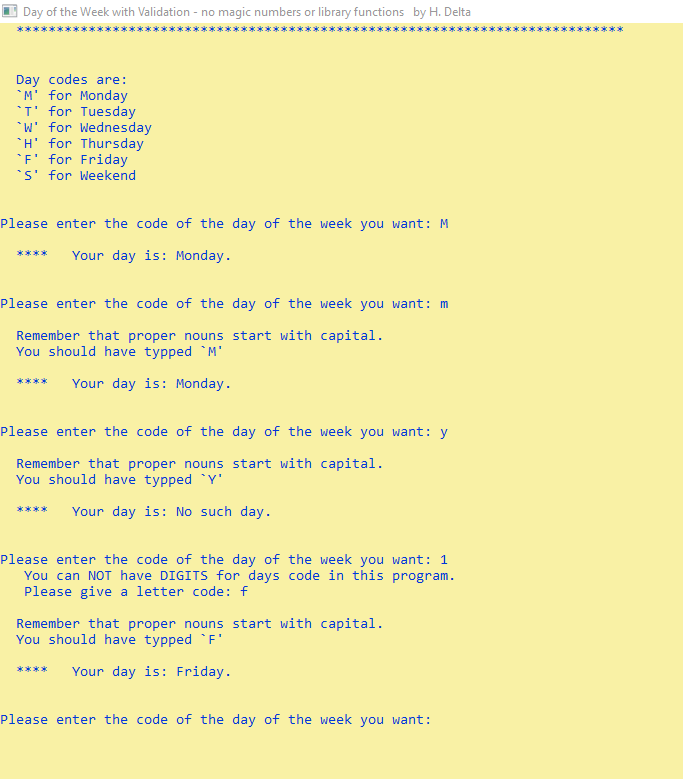
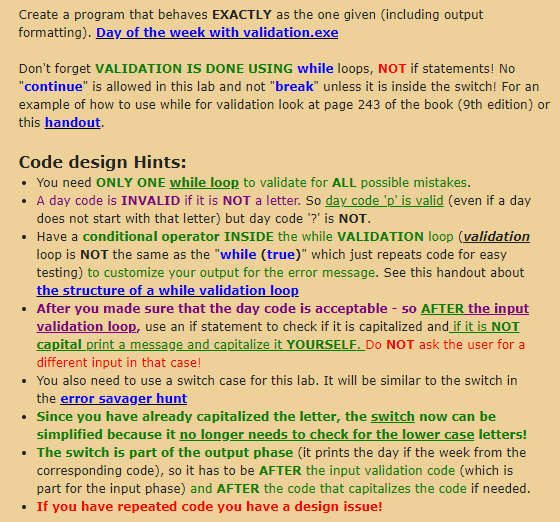
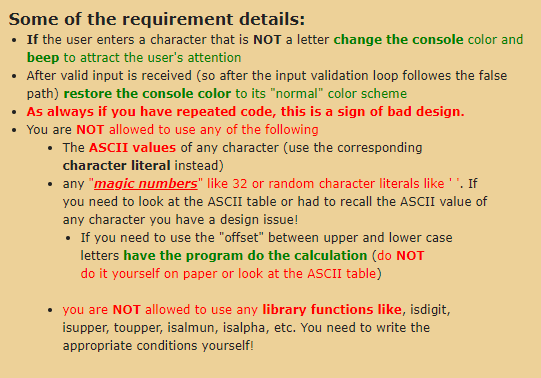
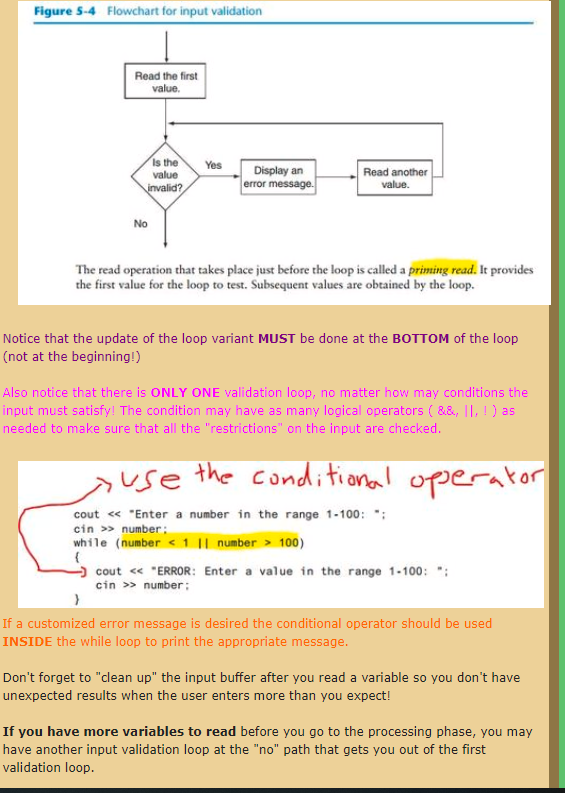
I Day of the Week with Validation - no magic numbers or library functions by H. Delta * ********* ********* ***************** ********* *** ****** *** ****** Day codes are: M' for Monday T' for Tuesday W' for Wednesday H' for Thursday 'F' for Friday 'S' for Weekend Please enter the code of the day of the week you want: M **** Your day is: Monday. Please enter the code of the day of the week you want: m Remember that proper nouns start with capital. You should have typped 'M'. **** Your day is: Monday. Please enter the code of the day of the week you want: y Remember that proper nouns start with capital. You should have typped 'Y' **** Your day is: No such day. Please enter the code of the day of the week you want: 1 You can NOT have DIGITS for days code in this program. Please give a letter code: f Remember that proper nouns start with capital. You should have typped 'F' **** Your day is: Friday. Please enter the code of the day of the week you want : Create a program that behaves EXACTLY as the one given (including output formatting). Day of the week with validation.exe Don't forget VALIDATION IS DONE USING while loops, NOT if statements! No "continue" is allowed in this lab and not "break" unless it is inside the switch! For an example of how to use while for validation look at page 243 of the book (9th edition) or this handout Code design Hints: You need ONLY ONE while loop to validate for ALL possible mistakes. A day code is INVALID if it is NOT a letter. So day code_p' is valid (even if a day does not start with that letter) but day code '?' is NOT. Have a conditional operator INSIDE the while VALIDATION loop (validation loop is NOT the same as the "while (true)" which just repeats code for easy testing) to customize your output for the error message. See this handout about the structure of a while validation loop After you made sure that the day code is acceptable - So AFTER the input validation loop, use an if statement to check if it is capitalized and if it is NOT capital print a message and capitalize it YOURSELF. DO NOT ask the user for a different input in that case! You also need to use a switch case for this lab. It will be similar to the switch in the error savager hunt Since you have already capitalized the letter, the switch now can be simplified because it no longer needs to check for the lower case letters! The switch is part of the output phase (it prints the day if the week from the corresponding code), so it has to be AFTER the input validation code (which is part for the input phase) and AFTER the code that capitalizes the code if needed. If you have repeated code you have a design issue! Some of the requirement details: If the user enters a character that is NOT a letter change the console color and beep to attract the user's attention After valid input is received (so after the input validation loop followes the false path) restore the console color to its "normal" color scheme As always if you have repeated code, this is a sign of bad design. You are NOT allowed to use any of the following The ASCII values of any character (use the corresponding character literal instead) any "magic numbers" like 32 or random character literals like'. If you need to look at the ASCII table or had to recall the ASCII value of any character you have a design issue! If you need to use the "offset" between upper and lower case letters have the program do the calculation (do NOT do it yourself on paper or look at the ASCII table) you are NOT allowed to use any library functions like, isdigit, isupper, toupper, isalmun, isalpha, etc. You need to write the appropriate conditions yourself! Figure 5.4 Flowchart for input validation Read the first value. Yes Is the value invalid? Display an error message. Read another value. No The read operation that takes place just before the loop is called a printing read. It provides the first value for the loop to test. Subsequent values are obtained by the loop. Notice that the update of the loop variant MUST be done at the BOTTOM of the loop (not at the beginning!) Also notice that there is ONLY ONE validation loop, no matter how may conditions the input must satisfy! The condition may have as many logical operators (&&, , ) as needed to make sure that all the "restrictions" on the input are checked ause the conditional operator cout > number: while (number 100) -) cout > number: If a customized error message is desired the conditional operator should be used INSIDE the while loop to print the appropriate message. Don't forget to clean up" the input buffer after you read a variable so you don't have unexpected results when the user enters more than you expect! If you have more variables to read before you go to the processing phase, you may have another input validation loop at the "no" path that gets you out of the first validation loop
Step by Step Solution
There are 3 Steps involved in it

Get step-by-step solutions from verified subject matter experts
 Study Help