







Question: Create a program that creates a pushdown automata from an input file, then from another file gathers input strings and determines if they are in
Create a program that creates a pushdown automata from an input file, then from another file gathers input strings and determines if they are in the language.
sample input:
0011 e 0000011
sample output:
4 5 0 3 0 1 e e $ 1 1 0 e 0 1 2 e e e 2 2 1 0 e 2 3 e $ e
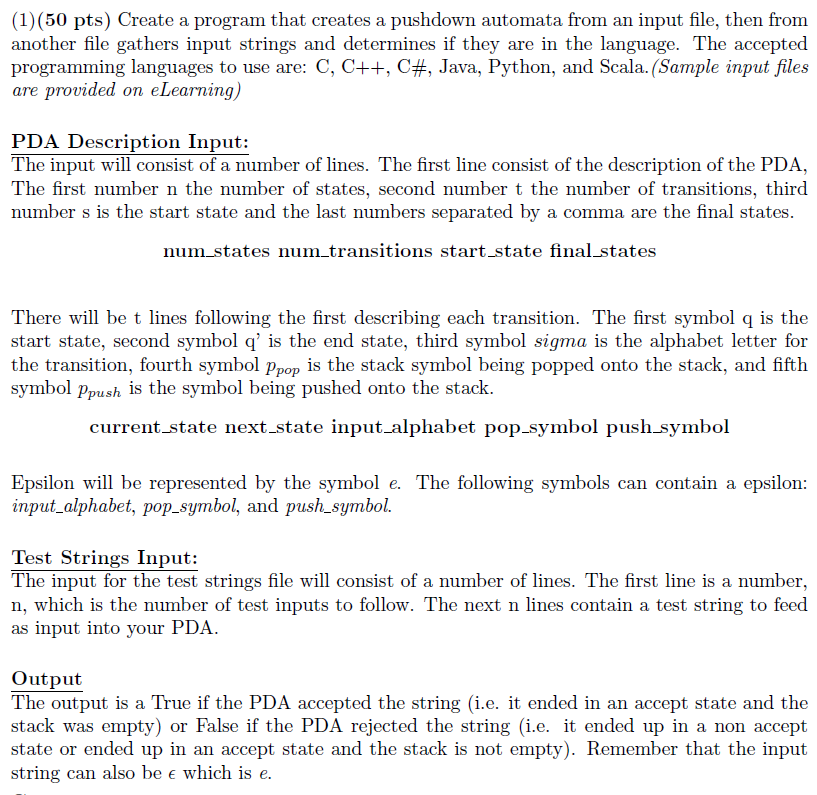
(1) (50 pts) Create a program that creates a pushdown automata from an input file, then from another file gathers input strings and determines if they are in the language. The accepted programming languages to use are: C, C++, C#, Java, Python, and Scala. (Sample input files are provided on eLearning) PDA Description Input: The input will consist of a number of lines. The first line consist of the description of the PDA, The first number n the number of states, second number t the number of transitions, third number s is the start state and the last numbers separated by a comma are the final states num states num transitions start_state final states There will be t lines following the first describing each transition. The first symbol q is the start state, second symbol q' is the end state, third symbol sigma is the alphabet letter for the transition, fourth symbol ppop is the stack symbol being popped onto the stack, and fifth symbol Ppush is the symbol being pushed onto the stack current_state next state input alphabet pop symbol push symbol Epsilon will be represented by the symbol e. The following symbols can contain a epsilon: input alphabet, pop_symbol, and push_symbol. Test Strings Input: The input for the test strings file will consist of a number of lines. The first line is a number, n, which is the number of test inputs to follow. The next n lines contain a test string to feed as input into your PDA Output The output is a True if the PDA accepted the string (i.e. it ended in an accept state and the stack was empty) or False if the PDA rejected the string (i.e. it ended up in a non accept state or ended up in an accept state and the stack is not empty). Remember that the input string can also be e which is e (1) (50 pts) Create a program that creates a pushdown automata from an input file, then from another file gathers input strings and determines if they are in the language. The accepted programming languages to use are: C, C++, C#, Java, Python, and Scala. (Sample input files are provided on eLearning) PDA Description Input: The input will consist of a number of lines. The first line consist of the description of the PDA, The first number n the number of states, second number t the number of transitions, third number s is the start state and the last numbers separated by a comma are the final states num states num transitions start_state final states There will be t lines following the first describing each transition. The first symbol q is the start state, second symbol q' is the end state, third symbol sigma is the alphabet letter for the transition, fourth symbol ppop is the stack symbol being popped onto the stack, and fifth symbol Ppush is the symbol being pushed onto the stack current_state next state input alphabet pop symbol push symbol Epsilon will be represented by the symbol e. The following symbols can contain a epsilon: input alphabet, pop_symbol, and push_symbol. Test Strings Input: The input for the test strings file will consist of a number of lines. The first line is a number, n, which is the number of test inputs to follow. The next n lines contain a test string to feed as input into your PDA Output The output is a True if the PDA accepted the string (i.e. it ended in an accept state and the stack was empty) or False if the PDA rejected the string (i.e. it ended up in a non accept state or ended up in an accept state and the stack is not empty). Remember that the input string can also be e which is e
Step by Step Solution
There are 3 Steps involved in it

Get step-by-step solutions from verified subject matter experts
 Study Help