







Question: Create a programming solution that reads a student record file into parallel arrays. As part of our in-class assignment, we were directed to create these
Create a programming solution that reads a student record file into parallel arrays. As part of our in-class assignment, we were directed to create these solutions with different options performing different methods. I have no idea how to create the code, but I did get it started. If anyone could supply me with any portion of the options, I will be more than grateful. For my sake, please make it easy for me to understand which portion of the code you are working on if it is not the entire code. Again, I truly appreciate all the help!
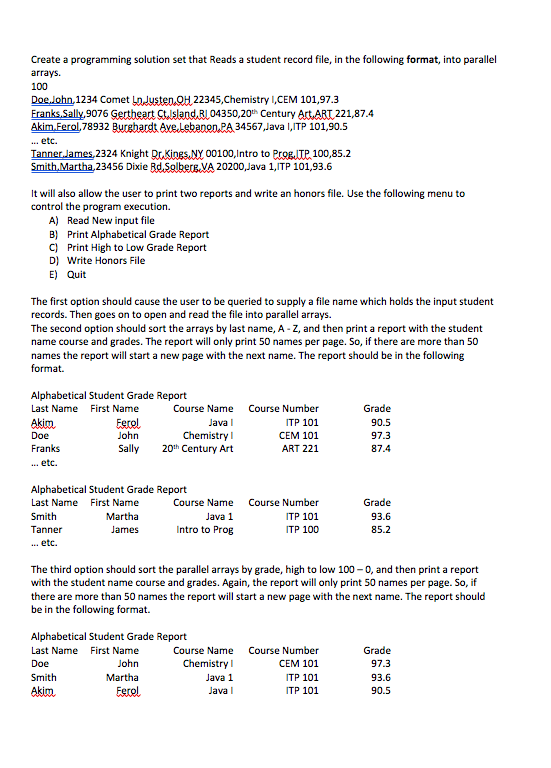
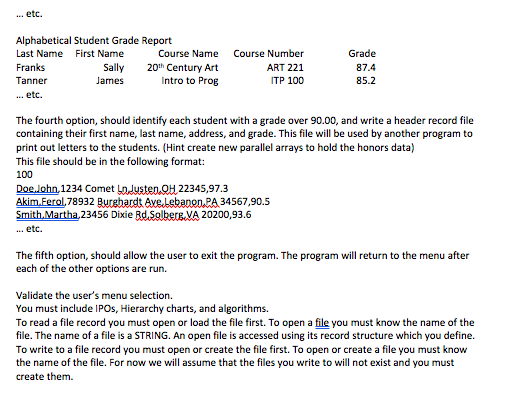
This was the beginning portion we created to help guide us on the rest of the assignment from class
START
SRTING[] lastName = NULL
SRTING[] firstName = NULL
SRTING[] streetAddress = NULL
SRTING[] cityAddress = NULL
SRTING[] stateAddress = NULL
SRTING[] className = NULL
SRTING[] classCode = NULL
REAL[] grade = NULL
INT numberOfRecords = 0
STRING filename =
FILE currentFile = NULL
RECORD headerRecord FORMAT INT
RECORD studentRecord FORMAT STRING, STRING, STRING, STRING, STRING, STRING, STRING, REAL
code
//get file name from user .
currentFile = OPEN filename
READ headerRecord FROM currentFile INTO numberOfRecords // get the header record that contains the number of student records in the file.
//create arrays of size numberOfRecords
lastName = CREATE STRING[ numberOfRecords ]
.
FOR?
READ studentRecord FROM currentFile INTO lastName[ ? ], firstName[ ? ], streetAddress .
to write a record to a file you need to open a file by its file name.
FILE newFile OPEN newFileName
Then you need to write records into the file
WRITE headerRecord INTO newFile USING recordsToStore // recordsToStore needs to contain the number of the records you want to write to the file. This is the first record written to a header record file. It tells the reader of the file how many data records there are in the file.
Now using a counter loop write each data record into the file. The data record should have a declaration statement
RECORD dataRecord FORMAT STRING, STRING, etc. The format should reflect the data type structure of the record.
Create a programming solution set that Reads a student record file, in the following format, into parallel 100 Doe lohn, 1234 Comet to Justen H 22345,Chemistry I,CEM 101,97.3 EranksSally, 9076 Gerteart tlsand RL04350,20th Century Art ART 221,87.4 Akim.Eerol,78932 Burebardt Ave.lebanen PA 34567,Java I,ITP 101,90.5 etc Tanner Jlames,2324 Knight DrSinES,NY 00100,Intro to PrBITP 100,85.2 Smith Martha,23456 Dixie Rd SolberB.VA 20200,Java 1,ITP 101,93.6 It will also allow the user to print two reports and write an honors file. Use the following menu to control the program execution. A) Read New input file B) Print Alphabetical Grade Report C) Print High to Low Grade Report D Write Honors File E) Quit The first option should cause the user to be queried to supply a file name which holds the input student records. Then goes on to open and read the file into parallel arrays. The second option should sort the arrays by last name, A - Z, and then print a report with the student name course and grades. The report will only print 50 names per page. So, if there are more than 50 names the report will start a new page with the next name. The report should be in the following Alphabetical Student Grade Report Last Name First Name Course Number ITP 101 CEM 101 ART 221 Grade 90.5 97.3 87.4 Course Name Java I Doe Chemistry Sally 20th Century Art etc. Alphabetical Student Grade Report Last Name First Name Smith Tanner Course Name Java 1 Intro to Prog Course Number ITP 101 ITP 100 Grade 93.6 85.2 etc. The third option should sort the parallel arrays by grade, high to low 100-0, and then print a report with the student name course and grades. Again, the report will only print 50 names per page. So, if there are more than 50 names the report will start a new page with the next name. The report should be in the following format. Alphabetical Student Grade Report Last Name First Name Doe Smith Course Number CEM 101 ITP 101 ITP 101 Course Name Chemistry Java 1 Java I 97.3 93.6 90.5 Martha Create a programming solution set that Reads a student record file, in the following format, into parallel 100 Doe lohn, 1234 Comet to Justen H 22345,Chemistry I,CEM 101,97.3 EranksSally, 9076 Gerteart tlsand RL04350,20th Century Art ART 221,87.4 Akim.Eerol,78932 Burebardt Ave.lebanen PA 34567,Java I,ITP 101,90.5 etc Tanner Jlames,2324 Knight DrSinES,NY 00100,Intro to PrBITP 100,85.2 Smith Martha,23456 Dixie Rd SolberB.VA 20200,Java 1,ITP 101,93.6 It will also allow the user to print two reports and write an honors file. Use the following menu to control the program execution. A) Read New input file B) Print Alphabetical Grade Report C) Print High to Low Grade Report D Write Honors File E) Quit The first option should cause the user to be queried to supply a file name which holds the input student records. Then goes on to open and read the file into parallel arrays. The second option should sort the arrays by last name, A - Z, and then print a report with the student name course and grades. The report will only print 50 names per page. So, if there are more than 50 names the report will start a new page with the next name. The report should be in the following Alphabetical Student Grade Report Last Name First Name Course Number ITP 101 CEM 101 ART 221 Grade 90.5 97.3 87.4 Course Name Java I Doe Chemistry Sally 20th Century Art etc. Alphabetical Student Grade Report Last Name First Name Smith Tanner Course Name Java 1 Intro to Prog Course Number ITP 101 ITP 100 Grade 93.6 85.2 etc. The third option should sort the parallel arrays by grade, high to low 100-0, and then print a report with the student name course and grades. Again, the report will only print 50 names per page. So, if there are more than 50 names the report will start a new page with the next name. The report should be in the following format. Alphabetical Student Grade Report Last Name First Name Doe Smith Course Number CEM 101 ITP 101 ITP 101 Course Name Chemistry Java 1 Java I 97.3 93.6 90.5 Martha
Step by Step Solution
There are 3 Steps involved in it

Get step-by-step solutions from verified subject matter experts
 Study Help