







Question: Create a Python 3 Script that converts decimal numbers to binary numbers (instructions above) and binary numbers to decimal. Please include a docstring! Thanks! Develop
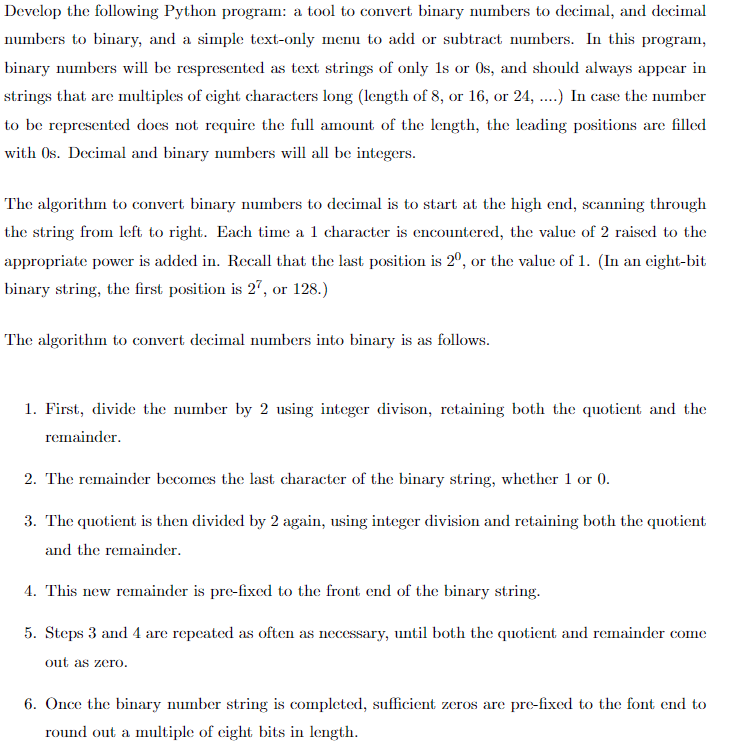
Create a Python 3 Script that converts decimal numbers to binary numbers (instructions above) and binary numbers to decimal.
Please include a docstring! Thanks!
Develop the following Python program: a tool to convert binary numbers to decimal, and decimal numbers to binary, and a simple text-only menu to add or subtract numbers. In this program binary numbers will be respresented as text strings of only ls or Os, and should always appecar in strings that are multiples of cight characters long (length of 8, or 16, or 24, ....) In case the number to be represented does not require the full amount of the length, the leading positions are filled with 0s. Decimal and binary numbers will all be integers. The algorithm to convert binary numbers to decimal is to start at the high end, scanning through the string from left to right. Each time a 1 character is encountered, the value of 2 raised to the appropriate power is added in Recall that the last positionis 2, or the value of1. (In an cight-bit binary string, the first position is 27, or 128.) The algorithm to convert decimal numbers into binary is as follows. 1. First, divide the nuber by 2 using integer divison, retaining both the quotient and the rcinainder 2. The remainder becomes the last character of the binary string, whether 1 or 0 3. The quotient is then divided by 2 again, using integer division and retaining both the quotient and the remainder . This new remainder is pre-fixed to the front end of the binary string 5. Steps 3 and 4 are repcated as often as necessary, until both the quotient and remainder come out as zero 6. Once the binary number string is completed, sufficient zeros are pre-fixed to the font end to round out a multiple of cight bits in length
Step by Step Solution
There are 3 Steps involved in it

Get step-by-step solutions from verified subject matter experts
 Study Help