







Question: Create a Python Loan Calculator according to the steps below: Start by getting the Listing 10.11 LoanCalculator.py program running: from tkinter import * # Import
Create a Python Loan Calculator according to the steps below:
Start by getting the Listing 10.11 LoanCalculator.py program running:
from tkinter import * # Import tkinter class LoanCalculator: def __init__(self): window = Tk() # Create a window window.title("Loan Calculator") # Set title Label(window, text = "Annual Interest Rate").grid(row = 1, column = 1, sticky = W) Label(window, text = "Number of Years").grid(row = 2, column = 1, sticky = W) Label(window, text = "Loan Amount").grid(row = 3, column = 1, sticky = W) Label(window, text = "Monthly Payment").grid(row = 4, column = 1, sticky = W) Label(window, text = "Total Payment").grid(row = 5, column = 1, sticky = W) self.annualInterestRateVar = FILL_CODE_OR_CLICK_ANSWER Entry(window, textvariable = self.annualInterestRateVar, justify = RIGHT).grid(row = 1, column = 2) self.numberOfYearsVar = StringVar() Entry(window, FILL_CODE_OR_CLICK_ANSWER, justify = RIGHT).grid(row = 2, column = 2) self.loanAmountVar = StringVar() Entry(window, textvariable = self.loanAmountVar, justify = RIGHT).grid(row = 3, column = 2) self.monthlyPaymentVar = StringVar() lblMonthlyPayment = Label(window, textvariable = self.monthlyPaymentVar).grid(row = 4, column = 2, sticky = E) self.totalPaymentVar = StringVar() lblTotalPayment = Label(window, textvariable = self.totalPaymentVar).grid(row = 5, column = 2, sticky = E) btComputePayment = Button(window, text = "Compute Payment", command = FILL_CODE_OR_CLICK_ANSWER).grid( row = 6, column = 2, sticky = E) window.mainloop() # Create an event loop def computePayment(self): monthlyPayment = self.getMonthlyPayment( float(self.loanAmountVar.get()), float(self.annualInterestRateVar.get()) / 1200, int(FILL_CODE_OR_CLICK_ANSWER)) self.monthlyPaymentVar.set(format(monthlyPayment, '10.2f')) totalPayment = float(self.monthlyPaymentVar.get()) * 12 \ * int(self.numberOfYearsVar.get()) self.totalPaymentVar.set(format(totalPayment, '10.2f')) def getMonthlyPayment(self, loanAmount, monthlyInterestRate, numberOfYears): monthlyPayment = loanAmount * monthlyInterestRate / (1 - 1 / (1 + monthlyInterestRate) ** (numberOfYears * 12)) return monthlyPayment; LoanCalculator() # Create GUI
The execution window looks as follows:
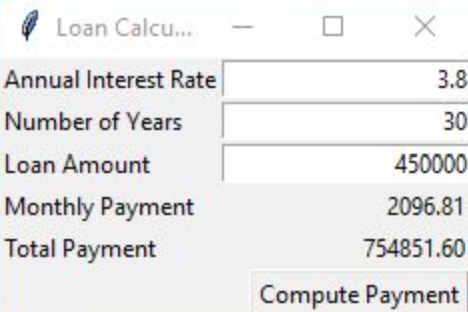
Modify the program to provide another input for a revised monthly payment, and output for a revised loan amount. The Compute Loan Amount button will compute a new Loan amount using the adjusted monthly payment, but using the same interest rate and number of years:
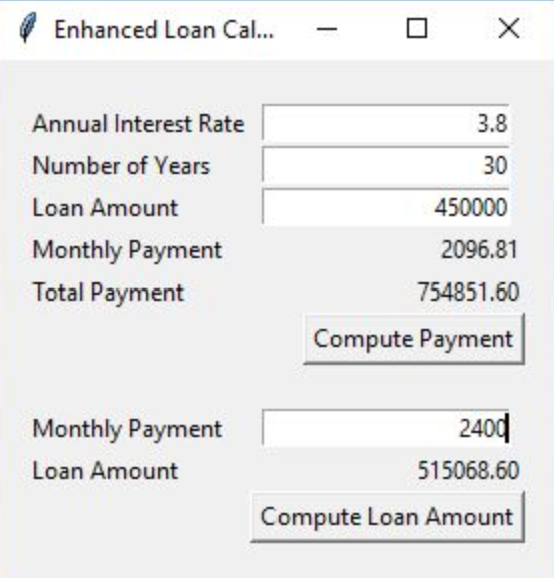
Also add spacing around the outside of the form and between the Compute Payment button and the Monthly Payment Entry box. You accomplish this by adding grid rows and columns containing spaces.
The following two methods should help:
def computeLoan(self): loanAmount2 = self.getLoanAmount(float(self.monthlyPaymentVar2.get()), float(self.annualInterestRateVar.get()) / 1200, int(self.numberOfYearsVar.get())) self.loanAmountVar2.set(format(loanAmount2, '10.2f')) def getLoanAmount(self, monthlyPayment, monthlyInterestRate, numberOfYears): loanAmount = monthlyPayment * (1 - 1 / (1 + monthlyInterestRate) ** (numberOfYears * 12)) / monthlyInterestRate return loanAmount;
- X 3.8 30 Loan Calcu.. Annual Interest Rate Number of Years Loan Amount Monthly Payment Total Payment 450000 2096.81 754851.60 Compute Payment Enhanced Loan Cal. - a X 3.8 30 Annual Interest Rate Number of Years Loan Amount Monthly Payment Total Payment 450000 2096.81 754851.60 Compute Payment Monthly Payment Loan Amount 2400 515068.60 Compute Loan Amount - X 3.8 30 Loan Calcu.. Annual Interest Rate Number of Years Loan Amount Monthly Payment Total Payment 450000 2096.81 754851.60 Compute Payment Enhanced Loan Cal. - a X 3.8 30 Annual Interest Rate Number of Years Loan Amount Monthly Payment Total Payment 450000 2096.81 754851.60 Compute Payment Monthly Payment Loan Amount 2400 515068.60 Compute Loan Amount
Step by Step Solution
There are 3 Steps involved in it

Get step-by-step solutions from verified subject matter experts
 Study Help