







Question: Create a script The script must create all necessary tables and data according to the prior submissions. Script must run without error The script must
Create a script
The script must create all necessary tables and data according to the prior submissions.
Script must run without error
The script must first check if the database already exist before creating the new database.
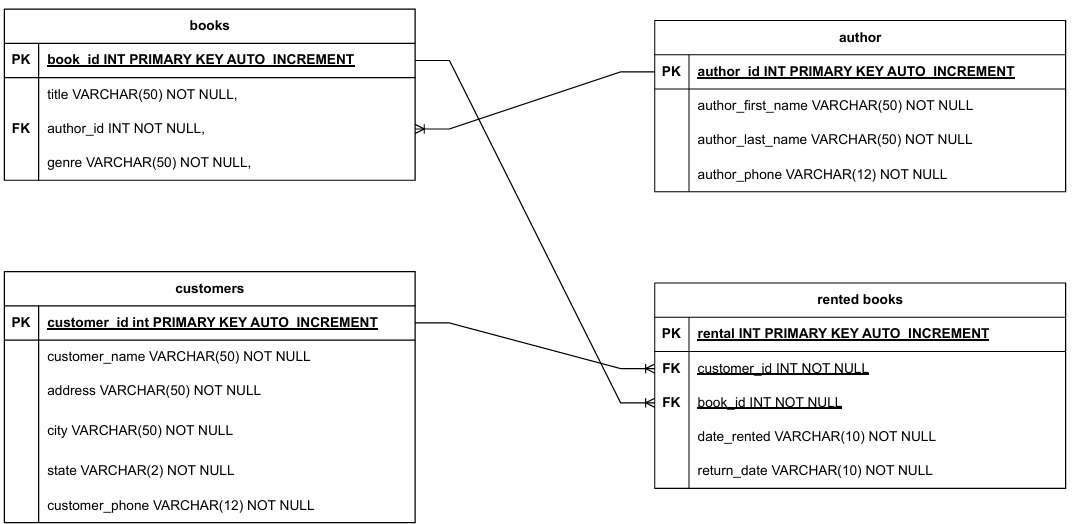
The script must create the tables with their constraints according to the ERD.
The script must include constraints for Primary and Foreign Keys.
All sample data must be inserted into their appropriate tables
The sample data included in your Normalization submission must be utilized in your script.
Script must include SELECT statements across multiple tables
You must include at least SELECT statements that demonstrate the use of your tables.
Each SELECT statement will represent a professionally formatted report that contains meaningful and useful data.
You must include statements that restricts rows andor groups.
You must include statements that demonstrate functions.
You must include statements using a JOIN that connects at least two tables.
Script must include DROP TABLE statements and a DROP DATABASE statement
The script will include commented out DROP TABLE statements to remove each table in the correct order.
The script will include a commented out DROP DATABASE statement to remove the database after all tables have been dropped successfully.
Place your drop statements at the bottom of your script. The statements will be executed in the order provided to drop your tables and database.
All tables and the database should drop without error in the order provided.
Things to Check:
Does your script run without error?
Does your SELECT statements return the results you are expecting?
Are the SELECT statements varied in use spanning a variety of tables?
Does your script allow to drop all the tables and the database in the correct order?
Step by Step Solution
There are 3 Steps involved in it
1 Expert Approved Answer
Step: 1 Unlock

Question Has Been Solved by an Expert!
Get step-by-step solutions from verified subject matter experts
Step: 2 Unlock
Step: 3 Unlock
 Study Help