







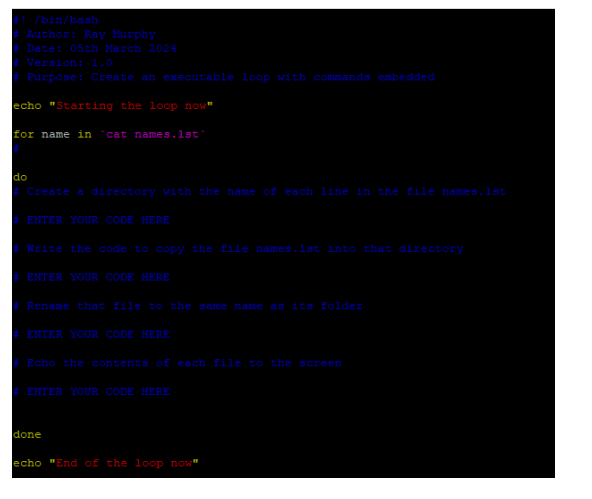
Question: Create a script with the following content ( as laid out in Fig 1 ) / bin / bash Auchors Bay Muxphy Date: 0 5
Create a script with the following content as laid out in Fig binbash
Auchors Bay Muxphy
Date: th Maxeh
Verstion:
Purpose: Create an executable loop with comands embedded
echo "starting the loop now"
for name in "cat names.lst
do
Create a directory whth the name of each line in the file nanes.ist
ENHER YOUR CODE HBRE
ENTER YOUR CODE HERE
Rename that file to the sane name as its folder
BNHE YOUR CODE HBRE
Echo the contents of each file to the soreen
BNHER YOUR CODE HSES
done
echo "End of the loop now"
Save the file as mybashscript.sh
Edit the author and date information to include your own name
Proceed to replace the items typed as follows with code to fulfil the four instructions written in blue above that capitalised line:
a # ENTER YOUR CODE HERE
Use gedit or kate as your text editor
Save the script again
Change the permissions on the file so that you can execute the script that you have created
Note: The characters on the line beginning "for cat" are backtick characters rather than an apostrophe. You will see them to the let of the key on your keyboard.
Step by Step Solution
There are 3 Steps involved in it
1 Expert Approved Answer
Step: 1 Unlock

Question Has Been Solved by an Expert!
Get step-by-step solutions from verified subject matter experts
Step: 2 Unlock
Step: 3 Unlock
 Study Help