







Question: Create a simple Android interface that takes a password and provides feedback as to its strength ( using the provided Classes + Tests ). Your
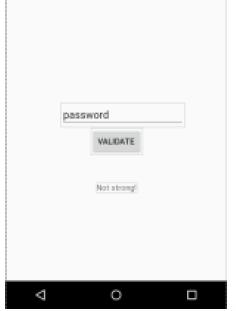
Create a simple Android interface that takes a password and provides feedback as to its strength (using the provided Classes + Tests ). Your interface needs an input text field, button, and output text and it required to indicate on the form whether the password is strong enough.
Your output should be something like this:
Classes + Tests:
PasswordValidator.java:
import java.util.regex.Pattern;
public class PasswordValidator {
public static int validatePasswordStage1(String password) { if (password == null || password.isEmpty()) { return 0; } int countMatchingRules = 0;
// check if string is not password if (!password.equalsIgnoreCase("PASSWORD")) { countMatchingRules++; }
// Check if string is at-least 8 character long if (password.length() >= 8) { countMatchingRules++; }
return countMatchingRules; }
public static int validatePasswordStage2(String password) { int countMatchingRules = 0;
// Using the first stage to get first 2 matching rules countMatchingRules += validatePasswordStage1(password);
// check if string contains at-least one special character from !, @, #, // $, &, * if (password.indexOf('!') != -1 || password.indexOf('@') != -1 || password.indexOf('#') != -1 || password.indexOf('&') != -1 || password.indexOf('*') != -1) { countMatchingRules++; }
// Check if string is at-least one digit if (Pattern.compile("[0-9]").matcher(password).find()) { System.out.println("Digit for " + password); countMatchingRules++; } // Check if string has both upper and lower case characters if (Pattern.compile("[a-z]").matcher(password).find() && Pattern.compile("[A-Z]").matcher(password).find() ) { System.out.println("Upper lower for " + password); countMatchingRules++; } return countMatchingRules; } }
PasswordValidatorTest.java:
import static org.junit.Assert.*;
import org.junit.Test;
public class PasswordValidatorTest {
@Test public void testValidatePasswordStage1() { // Rules: // - it is not password (case insensitive) // - it is at least 8 characters long
assertEquals(PasswordValidator.validatePasswordStage1("PASSWOrD"), 1); assertEquals(PasswordValidator.validatePasswordStage1("ABCD"), 1); assertEquals(PasswordValidator.validatePasswordStage1("ABCDEFGH"), 2); assertEquals(PasswordValidator.validatePasswordStage1("ABCDEFGHIJ"), 2); }
@Test public void testValidatePasswordStage2() { // Rules: // 1 - it is not password (case insensitive) // 2 - it is at least 8 characters long // 3 - atleast one special character out of !, @, #, $, &, * // 4 - atleast one digit // 5 - atleast one upper and lower case character
// rule 1, 5 matching assertEquals(PasswordValidator.validatePasswordStage2("Abcd"), 2);
// rule 1, 5, 4 matching assertEquals(PasswordValidator.validatePasswordStage2("Abcd34"), 3);
// rule 1, 5, 4, 2 matching assertEquals(PasswordValidator.validatePasswordStage2("Abcd34er"), 4);
// rule 1, 4, 2 matching assertEquals(PasswordValidator.validatePasswordStage2("abcd34er"), 3);
// rule 1, 5, 4, 2 matching assertEquals(PasswordValidator.validatePasswordStage2("abcd@34er"), 4); // rule 1, 2, 3, 4, 5 matching assertEquals(PasswordValidator.validatePasswordStage2("Abcd@34er"), 5); }
}
Please explin by steps how to connect the button with text field to view the stngrth of the password in Android Studio
password Not thang
Step by Step Solution
There are 3 Steps involved in it

Get step-by-step solutions from verified subject matter experts
 Study Help