







Question: Create a simple Flask application! Make any Flask web application. This is for your understanding of Flask/Jinja, so any applications that can show you understand
Create a simple Flask application!
Make any Flask web application. This is for your understanding of Flask/Jinja, so any applications that can show you understand Flask/Jinja is OK. You can even reuse some of the examples from the Flask directory.
1. Name your Flask app as FlaskApp.py, create a templates directory.
2. Screen capture your web browser that shows your FlaskApp application output. Name it Flask.png or Flask.jpg, depending on your le format. 3. Copy your FlaskApp.py, templates directory, and screen capture in the Flask directory. Dont include any unnecessary les. Include only your source les or a screen capture le
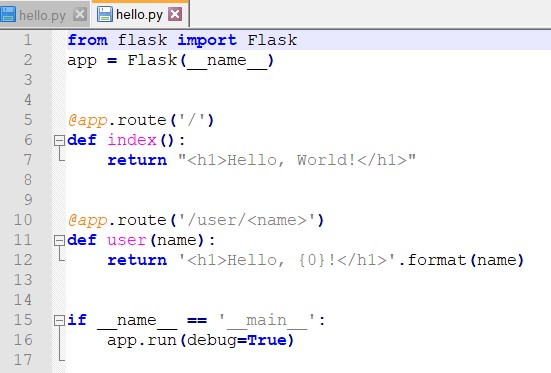
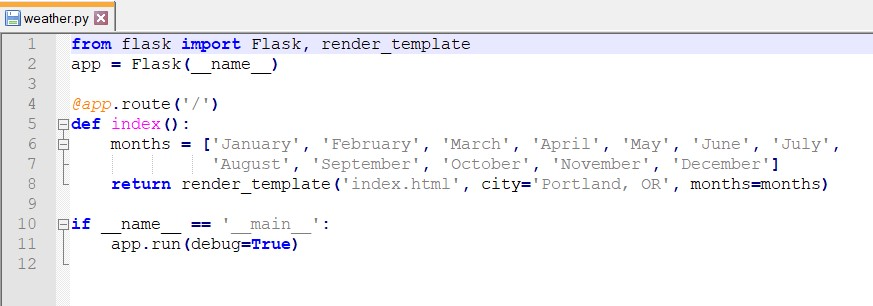
Here are some examples!
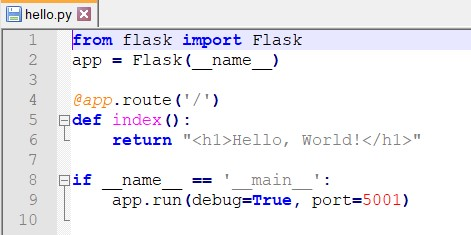
Bhello.py X from flask import Flask app = Flask (_name__) 6 @app.route('/') Fidef index(): return "
Hello, World!
" pif name == ' main ': app.run (debug=True, port=5001) hello.py x hello.py X from flask import Flask app = Flask (_name) @app.route('/') Fidef index(): return "
Hello, World!
" @app.route('/user/Hello, {0}!
'. format (name) Fif : name == 'main app.run (debug=True) 17 weather.py X from flask import Flask, render template app = Flask (_name__) Eco OWN @app.route('/') Fdef index(): months = ['January', 'February', 'March', 'April', 'May', 'June', 'July', 'August', 'September', 'October', 'November', 'December'] return render_template ('index.html', city='Portland, OR, months=months) Fif ': name == ' main app.run (debug=True) 12
Step by Step Solution
There are 3 Steps involved in it

Get step-by-step solutions from verified subject matter experts
 Study Help