







Question: Create a simple transaction log (using the format shown in Table 10.14) to represent the actions of the transactions in Problems 6a and 6b. (This
"Create a simple transaction log (using the format shown in Table 10.14) to represent the actions of the transactions in Problems 6a and 6b." (This is the question I need answered, this is so confusing to me).
_______________________________________________
Here are 6a and 6b answers:
(6a)
BEGIN TRANSACTION;
UPDATE CUSTOMER SET CUS_BALANCE = CUS_BALANCE + 118.8, CUS_DATELSTPUR = '2014-05-11' WHERE CUS_CODE = 10010;
INSERT INTO INVOICE (INV_NUMBER, CUS_CODE, INV_DATE, INV_TOTAL, INV_TERMS, INV_STATUS) VALUES (10983, 10010, '2014-05-11', 118.8, '30', 'OPEN');
INSERT INTO LINE (INV_NUMBER, LINE_NUMBER, P_CODE, LINE_UNITS, LINE_PRICE) VALUES (10983, 1, '11QER/31', 1, 110);
UPDATE PRODUCT SET P_QTYOH = P_QTYOH - 1 WHERE P_CODE = '11QER/31';
COMMIT;
_____________________________________________
(6b)
BEGIN TRANACTION;
UPDATE CUSTOMER SET CUS_BALANCE = CUS_BALANCE - 118.8, CUS_DATELSTPMT = '2014-06-03' WHERE CUS_CODE = 10010;
UPDATE INVOICE SET INV_TERMS = 'CASH', INV_STATUS = 'PAID' WHERE INV_NUMBER = 10983;
INSERT INTO PAYMENTS (PMT_ID, PMT_DATE, CUS_CODE, PMT_AMT, PMT_TYPE, PMT_DETAILS) VALUES (3428, '2014-06-03', 10010, 118.8, 'CASH','');
COMMIT;
______________________________________________
And here is table 10.14 (Please HELP!!)
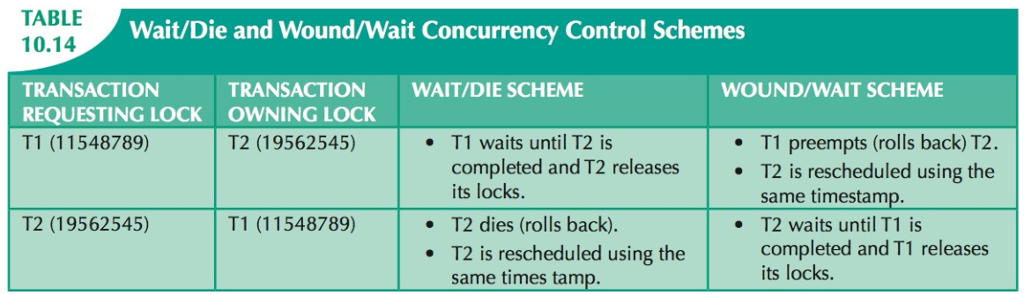
TABLE 10.14 Wait/Die and Wound/Wait Concurrency Control Schemes TRANSACTION REQUESTING LOCK OWNING LOCK T1 (11548789) TRANSACTION WAIT/DIE SCHEME WOUND/WAIT SCHEME TI waits until T2 is T1 preempts (rolls back) T2. same timestamp. completed and T1 releases T2 (19562545) completed and T2 releasesT2 is rescheduled using the its locks. T2 dies (rolls back). T2 is rescheduled using the same times tamp T2 (19562545) T1 (11548789) T2 waits until T1 is its locks
Step by Step Solution
There are 3 Steps involved in it

Get step-by-step solutions from verified subject matter experts
 Study Help