







Question: Create a simple web-app that we created using client-side HTML form, come up with our very own (custom-built) JS calculator. One possible look and feel
Create a simple "web-app" that we created using client-side HTML form, come up with our very own (custom-built) JS calculator.
One possible "look and feel" is shown below in attached screen-shot (CSS or style is not important. Functionality using JavaScript is major part of the current focus)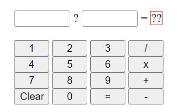
When first loaded, both input (type=number) fields are empty and when user clicks any of the numeric buttons, the "Operand 1" should be populated.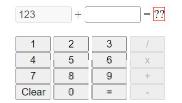 [Above is one possible visual after pressing "1","2","3" & "+" buttons in sequence. Notice the "operation" buttons are disabled on pressing any one of them (+ in this case).]
When the user presses any operation (ie /, x, +, -) the "focus" should shift to "Operand 2" and the numeric buttons should now start populating that second input box.
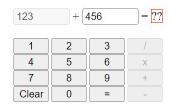
[Above is one possible visual after further pressing "4","5","6" in sequence]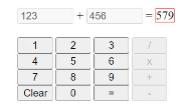
[Above is one possible visual after pressing the "=" button]
The "clear" button should reset everything (ie remove all entries from Operand 1 & 2 as well as enable all "operation" buttons and bring the "focus" back to first input box.)
1 4 7 250 2 3 1 6 X 8 9 Clear 0 =
Step by Step Solution
There are 3 Steps involved in it
DOCTYPE html html head title Simple Calculator title style body fontfamily Arial sansserif margin 0 padding 0 display flex justifycontent center alignitems center height 100vh backgroundcolor f7f7f7 c... View full answer

Get step-by-step solutions from verified subject matter experts
 Study Help