







Question: Create a split form from the Managers table. Save the form with the name SplitManagers and close it . 2 . Open the ManagerEntry form
Create a split form from the Managers table. Save the form with the name SplitManagers and close it
Open the ManagerEntry form in Design View and change the Record Source for the form to the SortedManagers query. Change the tab order so that the SignonBonus field is in the third position in the Detail section. Save and close the ManagerEntry form.
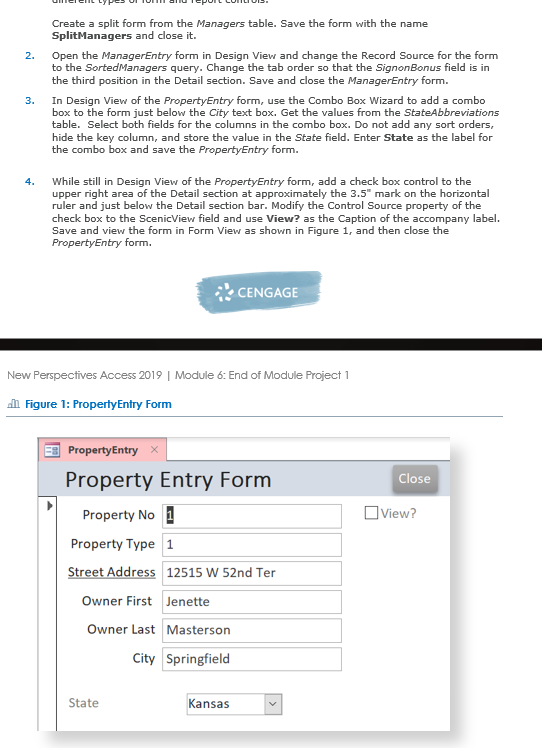
In Design View of the PropertyEntry form, use the Combo Box Wizard to add a combo box to the form just below the City text box. Get the values from the StateAbbreviations table. Select both fields for the columns in the combo box. Do not add any sort orders, hide the key column, and store the value in the State field. Enter State as the label for the combo box and save the PropertyEntry form.
While still in Design View of the PropertyEntry form, add a check box control to the upper right area of the Detail section at approximately the mark on the horizontal ruler and just below the Detail section bar. Modify the Control Source property of the check box to the ScenicView field and use View? as the Caption of the accompany label. Save and view the form in Form View as shown in Figure and then close the PropertyEntry form.
Step by Step Solution
There are 3 Steps involved in it
1 Expert Approved Answer
Step: 1 Unlock

Question Has Been Solved by an Expert!
Get step-by-step solutions from verified subject matter experts
Step: 2 Unlock
Step: 3 Unlock
 Study Help