







Question: Create a spreadsheet in Excel or write a MATLAB file that will calculate the following. Given a wave height, a water depth, and a wave
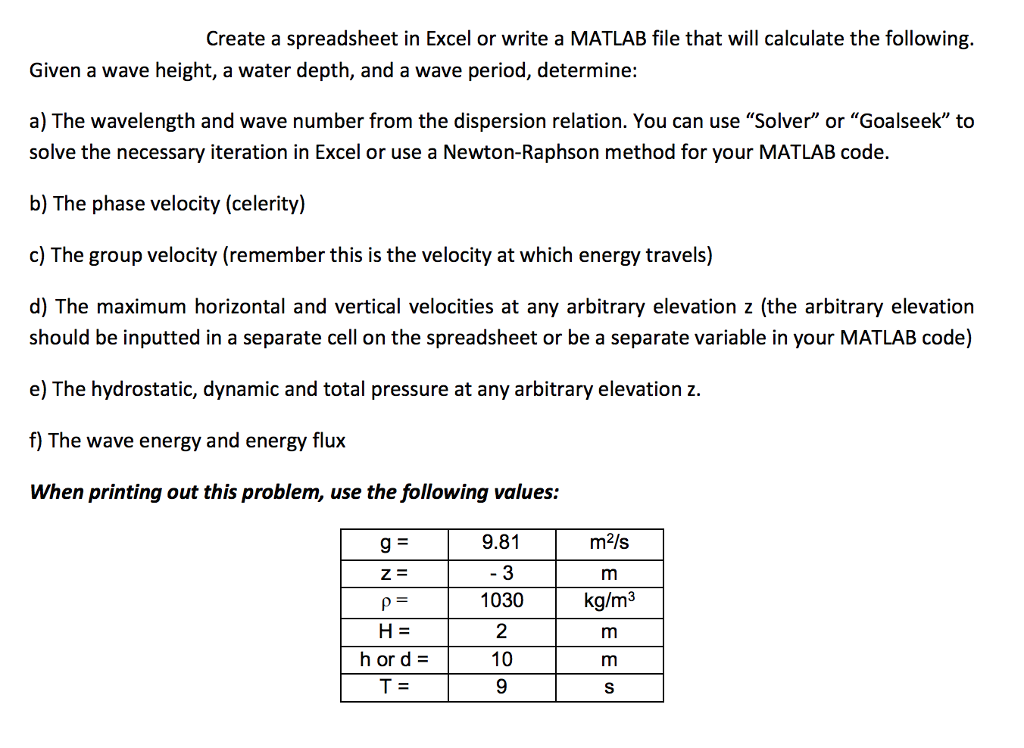
Create a spreadsheet in Excel or write a MATLAB file that will calculate the following. Given a wave height, a water depth, and a wave period, determine: a) The wavelength and wave number from the dispersion relation. You can use "Solver" or "Goalseek" to solve the necessary iteration in Excel or use a Newton-Raphson method for your MATLAB code. b) The phase velocity (celerity) c) The group velocity (remember this is the velocity at which energy travels) d) The maximum horizontal and vertical velocities at any arbitrary elevation z (the arbitrary elevation should be inputted in a separate cell on the spreadsheet or be a separate variable in your MATLAB code) e) The hydrostatic, dynamic and total pressure at any arbitrary elevation z. f) The wave energy and energy flux When printing out this problem, use the following values: 9.81 3 m2/s Z= 2 10 hord= Create a spreadsheet in Excel or write a MATLAB file that will calculate the following. Given a wave height, a water depth, and a wave period, determine: a) The wavelength and wave number from the dispersion relation. You can use "Solver" or "Goalseek" to solve the necessary iteration in Excel or use a Newton-Raphson method for your MATLAB code. b) The phase velocity (celerity) c) The group velocity (remember this is the velocity at which energy travels) d) The maximum horizontal and vertical velocities at any arbitrary elevation z (the arbitrary elevation should be inputted in a separate cell on the spreadsheet or be a separate variable in your MATLAB code) e) The hydrostatic, dynamic and total pressure at any arbitrary elevation z. f) The wave energy and energy flux When printing out this problem, use the following values: 9.81 3 m2/s Z= 2 10 hord=
Step by Step Solution
There are 3 Steps involved in it

Get step-by-step solutions from verified subject matter experts
 Study Help