







Question: Create a stored procedure in the RAD schema that meets the following requirements. a. The procedure should be named spNewLease. b. The user will provide
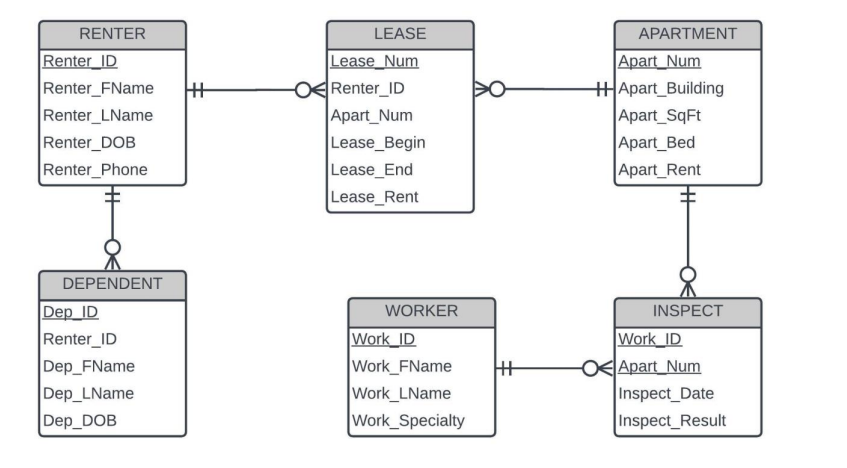 Create a stored procedure in the RAD schema that meets the following requirements. a. The procedure should be named spNewLease. b. The user will provide values for Renter_ID, Apart_Num, and Lease_Begin as parameters. The parameters must be in that order. Be certain that your code accepts the first two as numbers, and the third as a date. c. Determine if the apartment number is valid (i.e., the apart_num already exists in the APARTMENT table). If the apart_num is not valid, output a message stating the apartment cannot be found. d. If the apartment number is valid, determine if the renter ID is valid (i.e., the renter_ID already exists in the RENTER table). If the renter_ID is not valid, output a message stating the renter cannot be found. (Note that your code should not be checking if the renter is valid if it already determined that the apartment is not valid.) e. If both the apartment number and renter ID are valid, check to ensure that there is not already a row in the LEASE table for this apartment on the date provided in the parameter. If there is a lease that begins before the provided date that ends after the provided date, then the apartment is already leased. If there is, then display a message that there is a scheduling conflict. For example, Scheduling conflict for Apartment 1001 on 2022-09-15. f. If the apartment number is valid, the renter ID is valid, and there is no scheduling conflict, then insert a new row in the LEASE table. The lease number should be 1 larger than the largest lease number currently in the table. Use the apartment number and renter ID provided as parameters by the user. The date provided by the user should be the lease begin date. The lease end date should be 90 days after the lease begin date. The lease rent should be whatever value is in the apart_rent attribute for the specified apartment number.
\begin{tabular}{l} \hline \multicolumn{1}{|c|}{ RENTER } \\ \hline \begin{tabular}{l} Renter_ID \\ Renter_FName \\ Renter_LName \\ Renter_DOB \\ Renter_Phone \\ \hline \\ \hline DEPENDENT \\ \hline Dep_ID \\ Renter_ID \\ Dep_FName \\ Dep_LName \\ Dep_DOB \\ \hline \end{tabular} \end{tabular}
Step by Step Solution
There are 3 Steps involved in it

Get step-by-step solutions from verified subject matter experts
 Study Help