







Question: Create a UML diagram for a Person class by using any number of UML drawing tools that include, but are not limited to: Microsoft Word,
Create a UML diagram for a Person class by using any number of UML drawing tools that include, but are not limited to: Microsoft Word, Microsoft Visio, and Draw.io. Create a variety of properties and methods that describe what you want the person to be able to be and do. Students who are taking this course on campus should do an in-class activity with the whiteboard to model a Person class.
2.Create a new Java Project using the File New Java Project menu items and name your project topic1-2. Also validate that your project is configured to use the JavaSE-11 JRE. Click the Finish button.
3.Right click on the project folder within the Project and select the New Class menu options. Name your class Person and put in a package named app. Click the public static void main() method creation option. Click Finish.
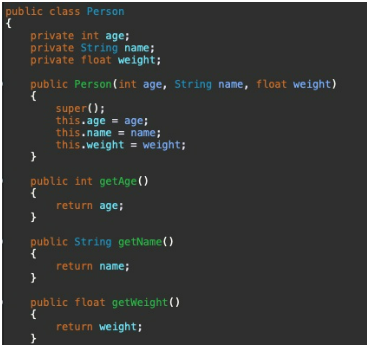
a.Add the state variables that were modeled as class private member variables.
b.Create a non-default constructor that initializes your Person state variables.
c.Create a getter and setter method for all of the state variables using Eclipse Refactoring (use the Source Generate Getter and Setters. menu options)
Utilizing and building upon this UML:
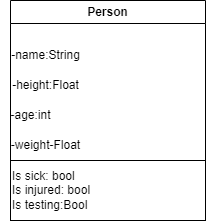
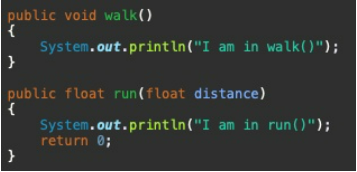
d.Add the behavior methods that were modeled as public class methods.
e.Add console print statements to each method that displays appropriate testing messages
In the main() method, create an instance of the Person class and call each of the public methods.
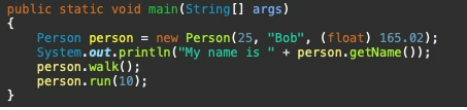
6.Provide a brief (3- to 4-sentence) description of how and why the output was displayed.
7.Using JavaDoc conventions using Eclipse (enter /** [return] above each class method), document your class and all methods. Generate the JavaDoc using Eclipse with following steps:
a.Select the Project Generate Javadoc menu options.
b.Select your project.
c.Use the standard doclet.
d.Set the location where you want the JavaDoc generated. The default location is the doc folder inside of the project.
e.Click the Generate button.
f.Validate the documentation by opening the index.html generated by JavaDoc
ALL OF THE CODING IMAGES ARE EXAMPLES, I NEED THE EXAMPLES AS TO HOW TO RUN THIS WITH MY EXAMPLE UML
(ic class Person private int age; private String name; private float weight; public Person(int age, String name, float weight) \{ super(); this.age = age; this.name = name; this.weight = weight; public int getAge() \{ \} return age; public string getName() \{ return name; \} return weight; Person -name:String -height:Float -age-int -weight-Float Is sick: bool Is injured: bool Is testing: Bool public static void main(String[] args) Person person = new Person(25," "Bob", (float) 165.02); System.out.println("My name is " + person.getName()); person.walk(); person. run
Step by Step Solution
There are 3 Steps involved in it

Get step-by-step solutions from verified subject matter experts
 Study Help